Media.io Image to Video logo

Media.io Image to Video

Media.io Image to Video is an online generator that animates a still photo into a short AI video.

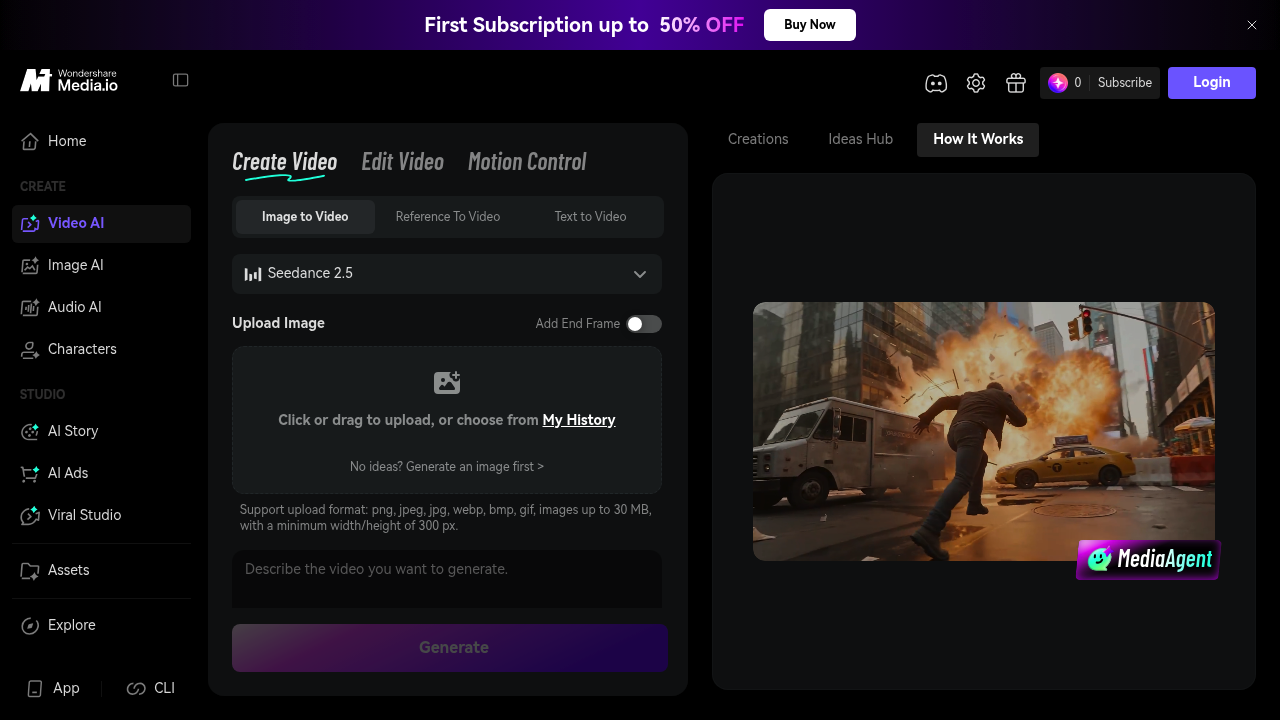
You upload an image, type a prompt describing the motion, scene, or camera move, preview the result, and download it. The interface offers options such as 5 second clips and 480P output, accepts PNG, JPEG, JPG, WebP,…

Media.io Image to Video screenshot

Media.io Image to Video is an online generator that animates a still photo into a short AI video. You upload an image, type a prompt describing the motion, scene, or camera move, preview the result, and download it. The interface offers options such as 5 second clips and 480P output, accepts PNG, JPEG, JPG, WebP, BMP, and GIF files up to 30 MB with a minimum size of 300 pixels, and brings several video models together, including Sora 2, Veo 3, PixVerse, Vidu, Hailuo, and Runway.

It suits creators, marketers, and small businesses that want share-ready motion without a video editor. Social media managers can turn campaign images into clips, online sellers can animate product photos, and storytellers can build short sequences from a single frame. Beginners benefit from the three-step flow of upload, prompt, and generate, while more experienced users can pick between models and continue shots from keyframes to build longer, connected sequences. A mobile app and a command-line interface are listed alongside the web version.

Common uses include animating portraits and character art, creating product videos for ads, making viral-style clips from trending effects such as dance trends or AI story videos, and producing cinematic scenes with prompts that describe tracking shots or slow motion. Because the product sits inside the wider Media.io toolset, users can refine results with background and object removal, quality enhancement, background music, compression, and format conversion in one place. Generated creations are kept for 7 days, and assets made after upgrading to a membership plan are stored permanently.

Media.io Image to Video alternatives

See all →

Frequently asked

6 questions
How does the image to video generator work?
Upload an image, enter a prompt describing the motion or scene, then generate and download the video. Camera movement, transitions, and effects can be described in the prompt.
Who is it intended for?
Creators, marketers, and online sellers who want share-ready video from photos without editing software. The three-step flow suits beginners.
What can I make with it?
Examples include product videos, animated portraits, story clips, and cinematic scenes with tracking shots or slow motion. Trending effects such as dance trends and AI story videos are also featured.
Which image files can I upload?
PNG, JPEG, JPG, WebP, BMP, and GIF files are accepted, up to 30 MB with a minimum width or height of 300 px. A built-in editor can resize, rotate, or crop first.
How long are generated videos kept?
Creations are stored for only 7 days on the standard account. Assets created after upgrading to a membership plan are stored permanently.

Which video models are available?
Media.io lists models including Sora 2, Veo 3, PixVerse, Vidu, Hailuo, and Runway in one platform. Keyframes can be used to continue shots into longer sequences.

Reviews (0)

Write review

No reviews yet. Be the first to share your experience.