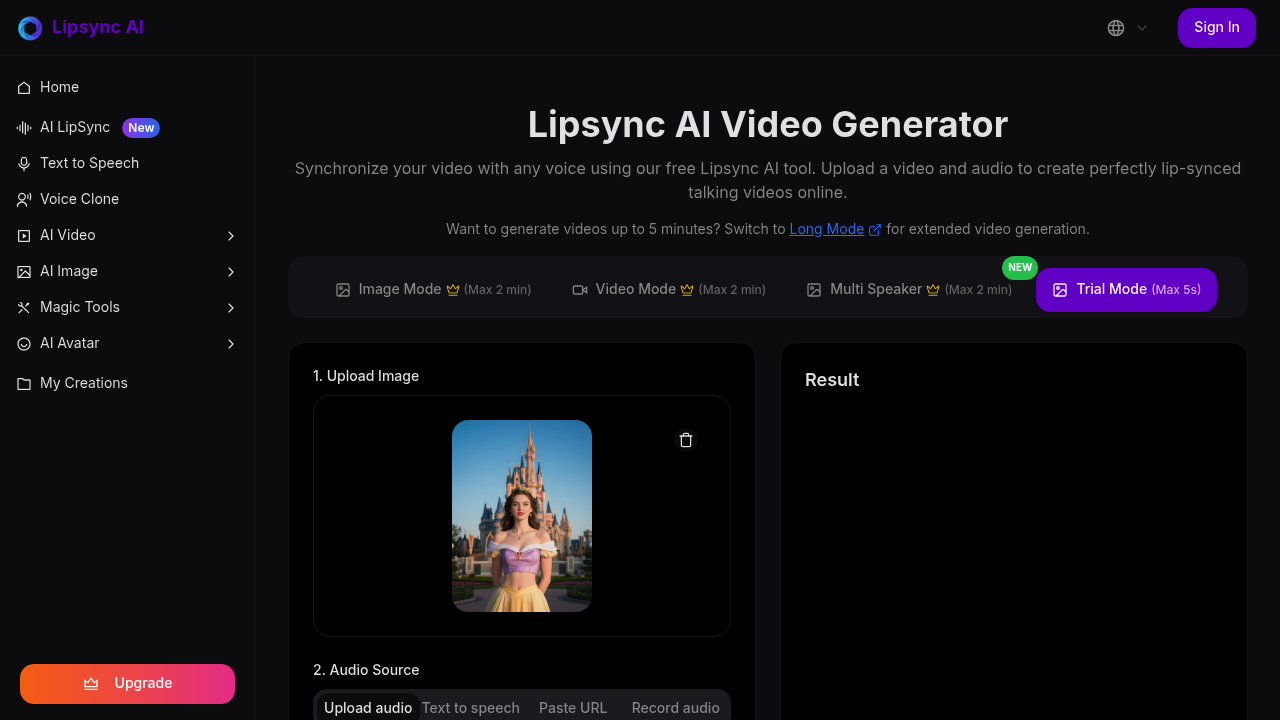
You start by uploading a video or image. The interface accepts JPEG, PNG, or JPG files up to 10MB. Then you add audio either by uploading an MP3, WAV, OGG, AAC, or M4A file up to 20MB, pasting a URL, recording directly, or generating speech from text using the built-in text to speech feature. There's also voice cloning if you want to match a specific voice.
This software offers several processing modes depending on what you're working with. Image Mode takes a still photo and animates the mouth movements. Video Mode syncs existing video footage with new audio. Multi Speaker Mode handles conversations between multiple people. Each of these caps at two minutes. Trial Mode lets you test with just five seconds of output. Long Mode extends processing to five minutes for lengthier content.
Before generating, you choose between Basic and Advanced modes. Basic works fine when faces point straight at the camera. Advanced handles trickier angles and situations where parts of the face get blocked by hair, hands, or other objects. There's a Portrait Focus toggle that crops output to emphasize the speaker's face.
What makes this different is how it handles non-human subjects. Cartoon characters work. Animals work. The phoneme mapping system tracks facial movements across different types of faces, not just realistic human ones. This opens it up for mascot videos, animated explainer content, and stylized characters that other solutions can't process.
The interface shows 50 credits needed to generate a video. You can't do anything without credits. This becomes the main friction point since you need to figure out the credit system before seeing any results.
Processing time varies based on mode and length. Shorter clips in Basic mode finish faster than multi-minute videos with occlusion handling. The output quality depends heavily on source material quality and how well the face aligns with what the system expects.
Where it struggles is with extreme angles or heavy occlusion. Even Advanced mode has limits when most of the face disappears from view. Audio sync accuracy drops when background noise interferes with the source file. The two-minute cap on standard modes feels restrictive for longer interview clips or extended dialogue scenes.
This platform works for production teams needing quick dubbing, content creators localizing videos into different languages, or anyone building talking head content from scratch. It handles the technical work of matching mouth shapes to audio phonemes without manual keyframing.