
LipSync Video logo
AI Lip Sync Generator FREEMIUM from $8/mo

LipSync Video

A YouTube creator records a voiceover in English, then realizes her international audience needs Spanish and French versions

She's got the translated audio tracks but re-filming each version isn't happening. She uploads her original video to LipSync Video, drops in the Spanish audio, and the AI automatically adjusts her lip movements to match…

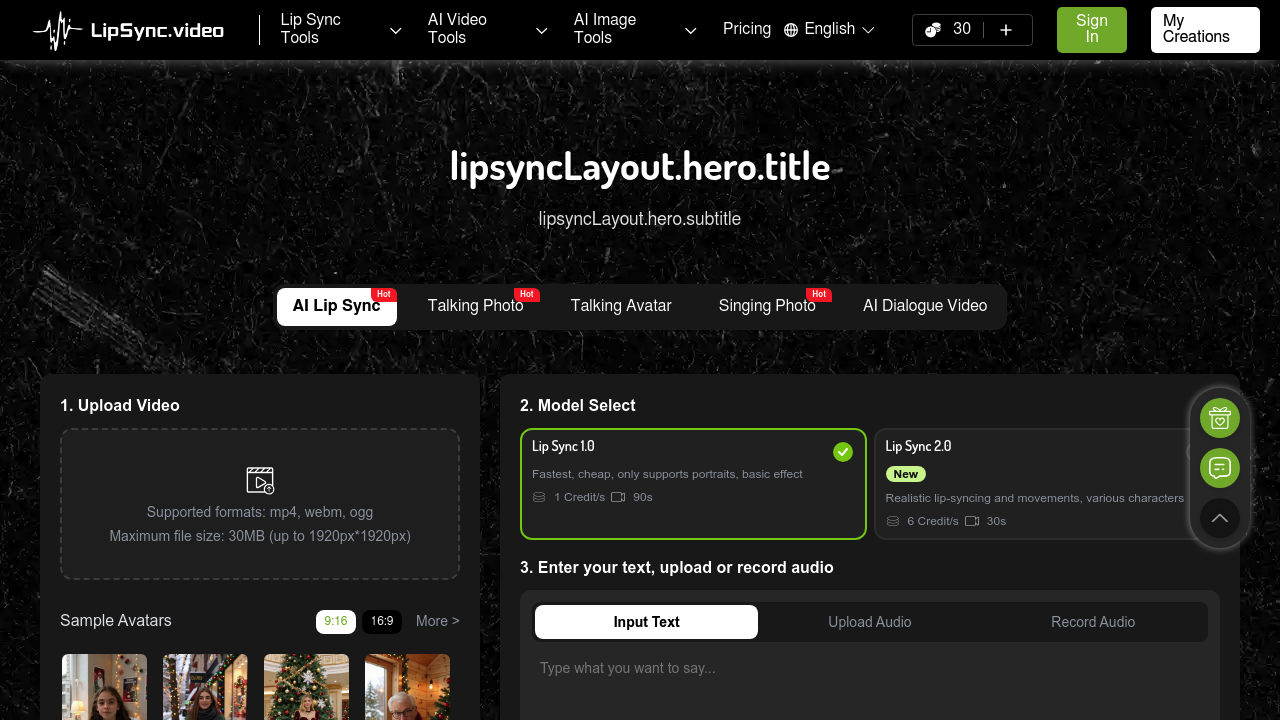
LipSync Video screenshot

A YouTube creator records a voiceover in English, then realizes her international audience needs Spanish and French versions. She's got the translated audio tracks but re-filming each version isn't happening. She uploads her original video to LipSync Video, drops in the Spanish audio, and the AI automatically adjusts her lip movements to match the new words. The French version takes another five minutes (three language versions done without touching a camera).

This service handles several specific video types beyond basic dubbing. A pet Instagram account with 200K followers uses the AI Pet Lip Sync feature to make their golden retriever appear to narrate stories. An educator turns historical photos into talking lessons with Talking Photo. A baby products brand creates podcast-style content where infant footage syncs with explanatory audio through the AI Baby Podcast feature. Cartoon animators skip frame-by-frame mouth animation by uploading character videos and letting the AI Cartoon Lip Sync match mouths to voice tracks.

Two model options handle different needs. Lip Sync 1.0 runs at 1 credit per second, handles up to 90 seconds of footage, but only works with portrait shots and delivers basic results. Lip Sync 2.0 costs 6 credits per second, maxes out at 30 seconds, but produces realistic movements and handles various character types beyond portraits. The credit-based system means users pay per second of processing rather than monthly subscriptions. A free tier provides credits to test the service before committing.

Text-to-speech integration lets creators type scripts up to 1000 characters instead of recording audio. The subtitle generator adds captions automatically. Background customization and template libraries speed up production for social content in 9:16 or 16:9 formats. Multiple voice styles and expressions give options beyond straightforward narration.

The 30MB file size limit and 1920x1920px maximum resolution block high-resolution professional video work. Videos must be mp4, webm, or ogg formats. That 30-second cap on the better model restricts longer content to the basic version. Lip Sync 1.0's portrait-only limitation means full-body shots or wide angles will not process correctly.

This works for social media managers cranking out quick vertical videos, TikTok creators localizing content, and marketers testing messages across languages. It fits pet influencers adding personality to animal footage and educators breathing life into static images. It does not work for filmmakers needing cinema-quality lip sync, professional translators requiring perfect accuracy, or anyone working with 4K footage exceeding the resolution limits. Long-form content creators will hit duration walls fast.


LipSync Video alternatives

See all →

Frequently asked

7 questions
Can I use LipSync Video for free?
LipSync Video runs on a credit system with a free tier that gives you credits to start. The generate button shows approximately 1 credit needed, and you'll pay 1 credit per second for the basic Lip Sync 1.0 model or 6 credits per second for the advanced Lip Sync 2.0 model. A social media manager testing three 15-second videos would burn through 15 credits on the basic model or 90 credits on the advanced one. The free credits let you experiment with both models before deciding if the service fits your workflow.
What video formats does LipSync Video support?
The service accepts mp4, webm, and ogg files only, with a 30MB maximum file size and 1920x1920px resolution cap. A YouTube creator uploading 4K footage from a mirrorless camera will hit the resolution limit immediately and need to downscale. That 30MB limit means a five-minute 1080p video won't upload without compression. Filmmakers shooting in ProRes or other high-quality formats will need to convert and compress before the platform accepts their files.
How long can my video be in LipSync Video?
Lip Sync 1.0 handles up to 90 seconds but only works with portrait shots and delivers basic results. Lip Sync 2.0 maxes out at 30 seconds but produces realistic movements and works with various character types. A TikTok creator making 60-second product reviews would need the basic model since the advanced version cuts off halfway through. An advertiser creating a 15-second commercial could use either model, trading six times the credits for significantly better quality with version 2.0.
Can LipSync Video make my pet look like it's talking?
The AI Pet Lip Sync feature adds mouth movements to animal videos synced with uploaded audio or text-to-speech narration. A dog trainer with a YouTube channel can upload training footage of their German shepherd and have the dog appear to explain commands in the trainer's voice. A cat Instagram account with 150K followers uses it to create storytelling content where their tabby narrates daily adventures. The 1000-character text limit for typed scripts means longer pet monologues need audio file uploads instead.
Can I translate videos into different languages with LipSync Video?
A cooking channel host records one video in English, then uploads the same footage three times with Spanish, French, and German audio tracks. The AI adjusts lip movements to match each language's mouth shapes, creating localized versions without re-filming. An e-learning company turns one instructor video into five language variants for international markets in under an hour. The service handles the lip sync automatically when you upload translated audio, though you'll need separate audio files for each language rather than machine translation built in.
What's the difference between Lip Sync 1.0 and 2.0?
Lip Sync 1.0 costs 1 credit per second, handles portrait-only videos up to 90 seconds, and produces basic lip matching. Lip Sync 2.0 costs 6 credits per second, maxes at 30 seconds, but delivers realistic facial movements and works with cartoons, pets, and varied character angles. A budget-conscious podcaster creating simple talking-head clips for Instagram Stories would stick with version 1.0 to stretch credits further. A brand launching a 20-second mascot character ad would choose version 2.0 for professional-looking mouth animation despite the higher cost.
Does LipSync Video work with full-body shots or only close-ups?
Lip Sync 1.0 only processes portrait shots, meaning wide angles or full-body footage will not work with the basic model. Lip Sync 2.0 handles various character types and angles beyond tight head shots. A fitness instructor filming workout explanations from waist-up would need the advanced model since version 1.0 will not recognize or process the wider framing. An interview-style content creator shooting standard portrait framing can save credits by using the basic model, but anyone filming from mid-distance or wider needs version 2.0.

Traffic

Estimated monthly website visits · last 9 months

332.9K visits/mo
Monthly visits
332.9K
↓ 13.2% MoM
Global rank
#138,386
US #178,954
Category rank
#11
AI Lip Sync Generator
752.2K 647.3K 542.5K 437.7K 332.9K Dec 2025: 595.5K visits Dec 2025 Jan 2026: 738.5K visits Jan 2026 Feb 2026: 713.9K visits Feb 2026 Mar 2026: 752.2K visits Mar 2026 Apr 2026: 698.6K visits Apr 2026 May 2026: 637.1K visits May 2026 Jun 2026: 508.6K visits Jun 2026 Jul 2026: 383.4K visits Jul 2026 Aug 2026: 332.9K visits Aug 2026

Reviews (0)

Write review

No reviews yet. Be the first to share your experience.