FluxProWeb | AI Talking Baby Generator logo

FluxProWeb | AI Talking Baby Generator

This tool turns baby photos into talking videos

Upload a still image and either record audio or let AI generate it, then watch the baby's mouth move in sync with the speech. The service also supports podcast-style baby videos, which sounds weird but that's the pitch.…

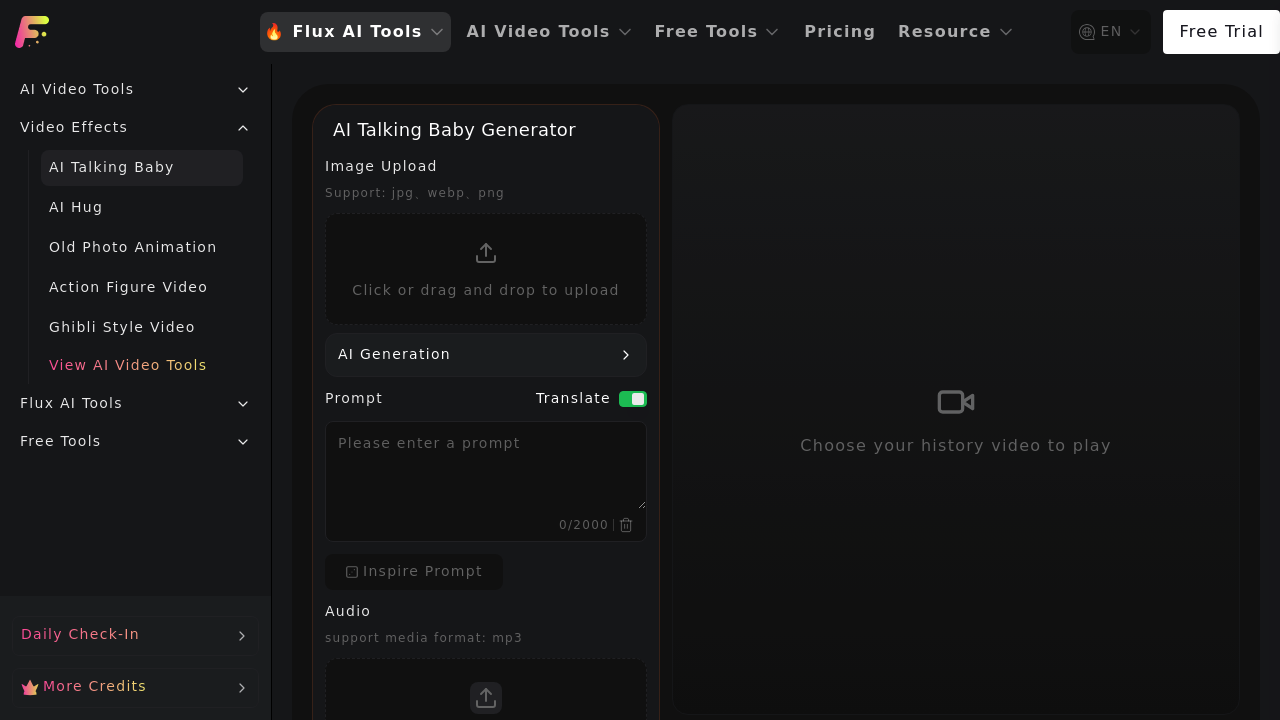
FluxProWeb | AI Talking Baby Generator screenshot

This tool turns baby photos into talking videos. Upload a still image and either record audio or let AI generate it, then watch the baby's mouth move in sync with the speech. The service also supports podcast-style baby videos, which sounds weird but that's the pitch.

You get standard control over output settings — pick from 540p or 720p resolution. Choose between 16:9 widescreen, 9:16 vertical, or 1:1 square aspect ratios. Write prompts up to 2000 characters to guide what the baby says. Upload images in jpg, webp, or png formats. Audio needs to be mp3.

The credit system determines costs. Each talking baby video runs 100-200 credits depending on the type you generate. Free users can check in daily to earn credits, but there's a catch worth noting. Videos only stick around for 15 days on the free plan. That's not long if you want to keep baby videos for memories. Paid users get 365-day storage, which makes more sense for archival purposes.

Video history tracking lets you see what you've made. You can set videos to public or private. The service sits inside a larger FluxProWeb ecosystem that includes AI Hug videos, old photo animation, action figure videos, and Ghibli-style conversions. Whether that variety matters depends on if you want those other effects.

Real limitations show up fast. The 15-day storage window kills the free tier for anyone wanting permanent keepsakes. Credit costs add up if you're making multiple videos. No mention of how many credits daily check-ins provide, so you can't calculate how often you'd actually generate videos for free. File format restrictions aren't dealbreakers but they're there. No wav or other audio formats. No webm or gif image uploads.

Parents wanting quick novelty videos might get some laughs out of this. The podcast angle could work for baby announcements or birthday messages with a twist. But the storage limit makes it feel disposable rather than something you'd use for meaningful content you want to keep.

A free plan exists with daily credit check-ins. Fifteen days of storage for free users. That's the pricing reality. Whether the credit costs and storage limits work for you depends entirely on how many videos you plan to make and whether you need them long-term. Test it on the free tier before committing to paid plans.


FluxProWeb | AI Talking Baby Generator alternatives

See all →

Frequently asked

6 questions
How much does it cost to make a talking baby video?
Each talking baby video costs 100-200 credits depending on the type you generate. Free users can earn credits through daily check-ins, though the tool doesn't specify how many credits each check-in provides. That makes it tough to calculate how many videos you can actually make for free. Paid users get credits through their subscription, but specific pricing tiers aren't disclosed. The credit system means costs vary based on how many videos you want to create.
How long do my talking baby videos stay saved?
Videos disappear after 15 days on the free plan, which isn't great if you're making baby memories you want to keep. Paid users get 365-day storage, giving you a full year to download or share videos before they vanish. Neither tier offers permanent storage, so you'll need to download anything you want long-term. The 15-day window on free accounts basically forces you to pay if you care about keeping the content. Download immediately after generation if you're on the free tier.
What file formats can I upload for talking baby videos?
Images need to be jpg, webp, or png formats. Audio files must be mp3 — no wav, aac, or other formats accepted. That's pretty standard for web tools but could require conversion if your files don't match. Most phones save photos as jpg by default, so that part shouldn't cause issues. Audio might require a converter app if you're recording in other formats.
Can I use AI-generated voices instead of recording my own?
The tool offers AI-generated audio as an option alongside mp3 uploads. You can write prompts up to 2000 characters to guide what the baby says, and the AI handles both the voice and lip-sync. That's useful if you don't want to record yourself or need specific wording. The quality of AI voices isn't specified, so expect typical text-to-speech results. Recording your own audio gives you more control over tone and emotion.
What video quality and formats does the talking baby generator support?
Resolution options include 540p and 720p — nothing higher, which means no full HD output. Aspect ratios cover 16:9 widescreen, 9:16 vertical for phones, and 1:1 square for social posts. That covers most sharing scenarios but won't impress anyone expecting 1080p or 4K. The lower resolution keeps processing faster and file sizes smaller. Good enough for social media, not ideal for large screens.
What's the best use case for AI talking baby videos?
Baby announcements and birthday messages get the most mileage from this tool. Parents can create novelty videos where their baby appears to deliver jokes, songs, or family updates. The podcast-style option works for longer content, though that format feels niche. It's entertainment rather than practical — think social media posts that get reactions, not professional video projects. The 15-day storage limit on free accounts suggests even the creators see this as throwaway content rather than lasting memories.

Traffic

Estimated monthly website visits · last 9 months

8.4K visits/mo
Monthly visits
8.4K
↓ 89.8% MoM
Global rank
#491,705
IN #286,120
Category rank
#24
AI Lip Sync Generator
486.7K 367.1K 247.6K 128K 8.4K Dec 2025: 394K visits Dec 2025 Jan 2026: 433.1K visits Jan 2026 Feb 2026: 457.4K visits Feb 2026 Mar 2026: 486.7K visits Mar 2026 Apr 2026: 340.8K visits Apr 2026 May 2026: 191K visits May 2026 Jun 2026: 205.1K visits Jun 2026 Jul 2026: 82.5K visits Jul 2026 Aug 2026: 8.4K visits Aug 2026

Reviews (0)

Write review

No reviews yet. Be the first to share your experience.