
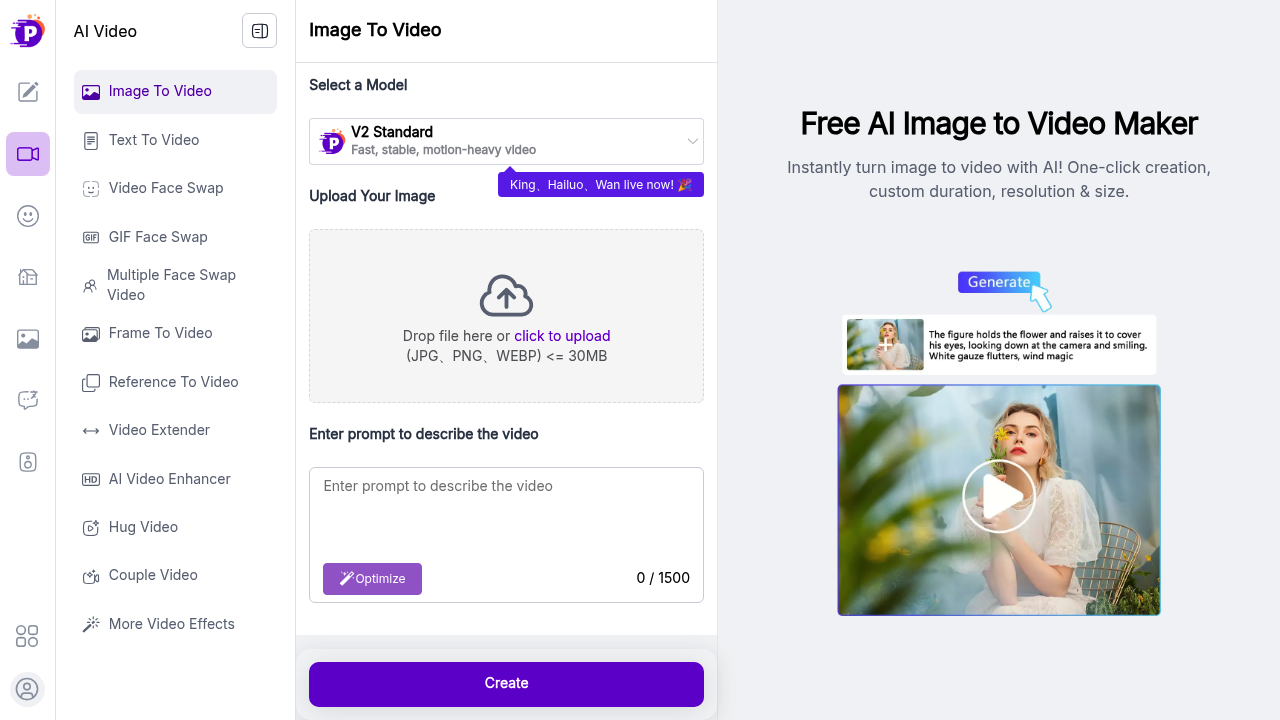
PixNova transforms static images into motion videos through AI-driven conversion technology that prioritizes speed and customization. This system handles uploads in JPG, PNG, and WEBP formats up to 30MB, processing them into videos that run either four or eight seconds. Users pick from three resolution settings and four size configurations, with output quality reaching 1080p.
The core image-to-video function works alongside several specialized conversion tools. Text-to-video generation creates footage from written descriptions. Frame-to-video assembles sequences from individual stills. Reference-to-video uses existing footage as a template for new creations. The video extender lengthens existing clips beyond their original duration.
Face manipulation features cover multiple scenarios. Video face swap replaces faces in moving footage. GIF face swap targets animated files specifically. Multiple face swap video handles scenes with several people simultaneously. Hug video and couple video create specific relationship-focused content, likely animating romantic or affectionate scenarios between subjects.
Four AI models power the conversions. V2 Standard prioritizes speed and stability while generating motion-heavy results. King, Hailuo, and Wan models offer alternative processing approaches, though their specific characteristics aren't detailed. The prompt system accepts up to 1500 characters of description, with built-in optimization that refines user input for better results.
Stock image integration sets PixNova apart from basic conversion tools. This service connects to 16 million images from iStock, Shutterstock, and Adobe Stock. This means users can pull professional photography directly into their video projects rather than relying solely on personal uploads. Character animation functionality works with movie stills, animation frames, or original sketches, converting static artwork into moving sequences.
The AI video enhancer upgrades existing footage quality. Social media sharing pushes completed videos directly to Facebook, Instagram, and TikTok without requiring downloads and manual uploads. Free trial access removes payment barriers for initial testing. Users get immediate access to creation tools without fees or registration complications.
The 30MB file size cap restricts high-resolution source material. Large professional photos often exceed this limit. Format support excludes TIFF, BMP, and RAW files that photographers commonly use. Video duration locks at four or eight seconds. No custom length option exists. The 1500-character prompt limit constrains complex scene descriptions, though most scenarios fit comfortably within this boundary.
Content creators building social media presence benefit from the quick turnaround and platform-ready output. Businesses producing commercial advertisements can prototype concepts using stock imagery before committing to full production. Animators testing character movements gain a rapid iteration tool. Anyone wanting dynamic content from static sources finds practical application here.
The V2 Standard model's emphasis on motion-heavy output suggests aggressive movement rather than subtle transitions. This works for dramatic effect but might overwhelm scenes requiring gentle pacing. The specialized hug and couple video features target relationship content creators specifically, narrowing use cases for those features compared to general conversion tools.
Resolution and size options provide output flexibility without specifying exact pixel dimensions for each tier. The three-by-four grid of choices gives twelve total combinations. 1080p represents maximum quality, but whether lower resolutions offer faster processing or smaller file sizes remains unstated. The stock image library's value depends entirely on whether users need generic professional photography versus specific custom imagery.