TurboScribe logo
AI Transcription FREEMIUM from $10/mo

TurboScribe

TurboScribe converts audio and video recordings to text using Whisper-based speech recognition.

Files upload by drag and drop in common formats such as MP3, MP4, M4A, MOV and WAV, and transcripts come back in seconds with optional speaker labels. It supports more than 98 languages and can translate transcripts or…

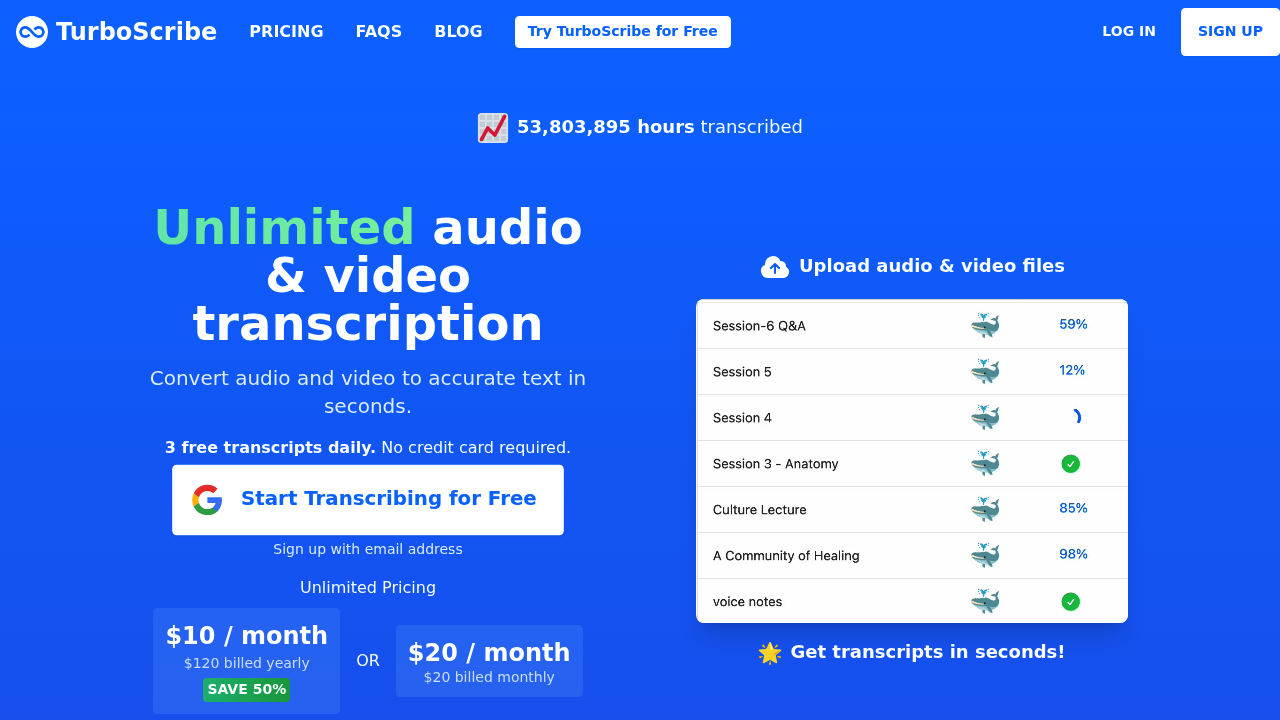
TurboScribe screenshot

TurboScribe converts audio and video recordings to text using Whisper-based speech recognition. Files upload by drag and drop in common formats such as MP3, MP4, M4A, MOV and WAV, and transcripts come back in seconds with optional speaker labels. It supports more than 98 languages and can translate transcripts or subtitles into over 134 languages. Free accounts get three transcripts a day, and the Unlimited plan costs $10 a month billed yearly or $20 billed monthly.

Podcasters, journalists, researchers, students, consultants and small teams that regularly turn recorded speech into text are the intended users. Speaker recognition, which can label up to eight speakers, helps with interviews, meetings and group discussions, and the 10-hour upload limit covers long lectures and workshop recordings. People transcribing in a language other than English can have the audio transcribed directly to English. Heavy users with hundreds of hours of material can rely on unlimited minutes rather than counting usage.

Typical jobs include turning a podcast episode into show notes, converting a recorded interview into a quotable document, and producing captions for video. Transcripts export as DOCX, PDF or TXT, and subtitles export as SRT or VTT for editors and video platforms. Three transcription modes trade speed for accuracy: Cheetah is the fastest, Dolphin balances speed and accuracy, and Whale uses the large Whisper model for the most accurate output. A restore audio option can reduce background noise on poor recordings, and batch uploads of up to 50 files help when processing a backlog.


TurboScribe alternatives

See all →

Frequently asked

6 questions
What file types can TurboScribe transcribe?
Audio and video in MP3, MP4, M4A, MOV, AAC, WAV, OGG, OPUS, MPEG, WMA and WMV, plus YouTube links. Each file can be up to 10 hours or 5 GB. Up to 50 files can be uploaded at once.
Who uses TurboScribe?
People who turn speech into text, including podcasters, journalists, students and professionals. Speaker recognition suits meetings, interviews and podcasts. Trying a file does not require an account.
Can it produce subtitles for a video?
Subtitles export in SRT and VTT formats. Transcripts can also be downloaded as DOCX, PDF or TXT. Built-in translation can convert transcripts or subtitles into over 134 languages.
How much does TurboScribe cost?
A free tier allows 3 transcripts per day without a credit card. Unlimited is $10 per month billed yearly at $120, or $20 per month billed monthly. All billing is in US dollars.
How accurate is the transcription?
Accuracy depends on the mode chosen. Whale, the most accurate mode, runs the Whisper large-v2 model, while Cheetah and Dolphin use smaller models for speed. A 99.8 percent accuracy figure is advertised.
How many languages does it support?
Transcription covers 98+ languages, from English variants to Swahili and Welsh. Audio in any of them can be transcribed directly to English. An option to restore audio helps with noisy recordings.

Reviews (0)

Write review

No reviews yet. Be the first to share your experience.