
Speaktor logo
AI Text-to-Speech PAID from $5/mo

Speaktor

This text-to-speech converter processes written content through neural network models trained on human speech patterns to generate audio output in more than 50 languages

The system accepts input through document uploads or direct text pasting, then analyzes the content to apply appropriate pronunciation, pacing, and intonation based on the selected voice profile and emotional setting.…

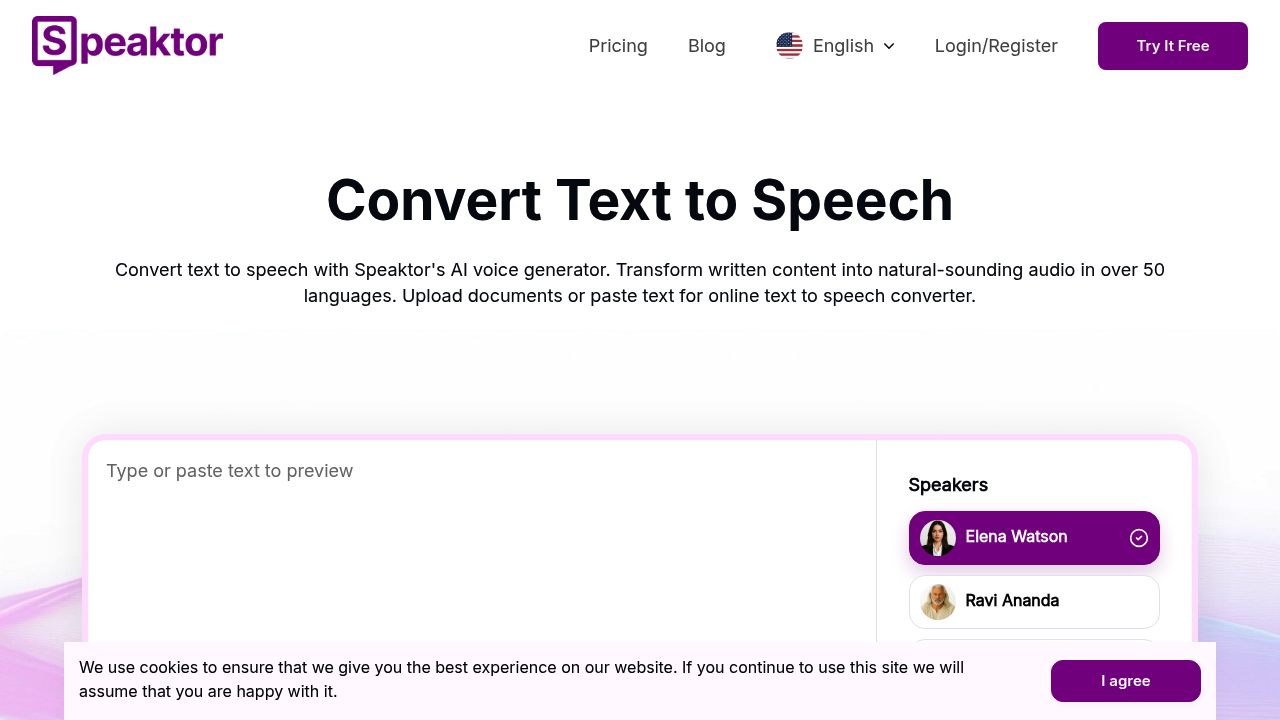
Speaktor screenshot

This text-to-speech converter processes written content through neural network models trained on human speech patterns to generate audio output in more than 50 languages. The system accepts input through document uploads or direct text pasting, then analyzes the content to apply appropriate pronunciation, pacing, and intonation based on the selected voice profile and emotional setting.

The audio generation pipeline operates through a multi-stage process. First, the text undergoes linguistic analysis to identify sentence structure, punctuation cues, and contextual meaning. The engine then maps this analyzed text to phonetic representations, which get processed through the voice synthesis model. What sets this apart is the emotional voice system. Users can select from 14 specific emotional states including angry, calm, cheerful, conversational, dramatic, formal, instructional, narrative, newscast, promo, robotic, sorrowful, and terrified. The models apply distinct prosodic patterns for each emotion, adjusting pitch variation, speech rate, and stress patterns accordingly.

The service includes four named speaker voices: Elena Watson, Ravi Ananda, Julian Hale, and Mark Ellis. These aren't simple voice variations but distinct voice profiles with different timbral characteristics and speech patterns. The multi-speaker feature lets you assign different voices to different sections of text within a single project, useful for dialogue-heavy content like audiobooks or educational materials.

Video dubbing works through voice cloning technology. The system analyzes a source voice sample, extracts its acoustic characteristics, then generates new speech that matches those characteristics while speaking different content. This process is computationally expensive, consuming 10 times the standard credit allocation per minute of output. Pro voices, which deliver higher fidelity through more complex neural networks, use 5 times the standard credits.

Output flexibility covers multiple formats. Audio exports as MP3 or WAV files, while subtitle generation produces SRT files synchronized to the audio timeline. The system runs on desktop browsers, mobile apps for both iOS and Android, and through a Chrome extension that integrates directly into web browsing workflows.

Technical distribution happens across platforms. The Chrome extension rated 4.8 out of 5, while mobile apps scored 4.6 on Google Play and 4.8 on the App Store. The core service holds a 4.6 rating on Trustpilot and 4.5 on G2.

Credit allocation varies considerably by tier. The Lite plan provides 90 minutes of standard text-to-audio conversion monthly at $4.99, discounted from $9.99. Pro offers 600 minutes at $12.49, down from $24.99. Team accounts get 3000 minutes per seat at $15 monthly, halved from $30. Enterprise pricing is custom with API access included only at that level.

The credit multiplier system creates real usage constraints. If you're using Pro voices exclusively on the standard plan, your effective allocation drops from 600 minutes to 120 minutes. Video dubbing reduces it further to just 60 minutes. This is not clearly advertised upfront.

The Lite tier restricts access to Pro voices entirely, limiting you to basic voice models regardless of your content needs. API access requires jumping to Enterprise, blocking programmatic integration for smaller teams. No direct integrations with content management systems, video editing platforms, or publishing tools exist, requiring manual export and import workflows for most production pipelines.

The service operates entirely cloud-based with no offline processing capability. All text gets transmitted to remote servers for conversion, which creates latency and raises privacy considerations for sensitive content.


Speaktor alternatives

See all →

Frequently asked

6 questions
Does Speaktor have a free plan or free trial?
Speaktor doesn't offer a free plan or free trial. The entry point is the Lite plan at $4.99 monthly, which provides 90 minutes of text-to-audio conversion with basic voice models. This differs from many text-to-speech tools that include limited free tiers for testing. You'll need to commit to at least the discounted annual billing to access the service.
How does Speaktor's credit system work with Pro voices and video dubbing?
Speaktor uses a credit multiplier where premium features consume significantly more of your monthly allocation. Pro voices use 5 times the standard credits, so 600 minutes on the Pro plan becomes effectively 120 minutes if you're using only Pro voices. Video dubbing with voice cloning uses 10 times the credits, dropping that same 600-minute allocation to just 60 minutes of dubbed video. The Lite plan blocks Pro voice access entirely regardless of credits. This multiplier system isn't prominently displayed in the pricing tiers and can lead to much faster credit depletion than expected.
Can Speaktor work offline or through API integration?
Speaktor operates entirely cloud-based with no offline processing capability, meaning all text gets transmitted to remote servers for conversion. API access is restricted to Enterprise plan customers only, blocking programmatic integration for individuals and smaller teams on Lite, Pro, or Team plans. The service also lacks direct integrations with content management systems, video editors, or publishing platforms, requiring manual file export and import for most production workflows.
What languages and voice options does Speaktor support?
Speaktor processes text in over 50 languages and outputs audio in 55+ languages through neural network models trained on human speech patterns. The system includes four named speaker voices with distinct timbral characteristics: Elena Watson, Ravi Ananda, Julian Hale, and Mark Ellis. Beyond basic voices, it offers 14 emotional states including angry, calm, cheerful, conversational, dramatic, formal, instructional, narrative, newscast, promo, robotic, sorrowful, and terrified. Each emotional setting applies distinct prosodic patterns by adjusting pitch variation, speech rate, and stress patterns. The multi-speaker feature lets you assign different voices to different text sections within a single project.
Can Speaktor create audiobooks from documents?
Speaktor converts documents, ebooks, and scripts into audiobook-style narration by processing uploaded files or pasted text through its voice synthesis pipeline. The system analyzes sentence structure and contextual meaning to apply appropriate pronunciation, pacing, and intonation based on your selected voice profile. The multi-speaker feature works particularly well for dialogue-heavy content, letting you assign different character voices to different sections. Audio exports as MP3 or WAV files, while synchronized subtitles generate as SRT files. The main workflow constraint is that all processing happens cloud-based with no offline option.
How much does Speaktor cost for teams?
Team accounts cost $15 per seat monthly, discounted from $30, with each seat receiving 3000 minutes of standard text-to-audio conversion. This tier includes workspaces for collaborative projects, centralized billing, access to Pro voices at 5x credit usage, and video dubbing at 10x credit usage. Billed annually, teams pay $360 per seat. Enterprise plans offer custom pricing with flexible credits, full API access, custom workflows, and dedicated support, but there's no published pricing structure for that tier.

Traffic

Estimated monthly website visits · last 7 months

256.7K visits/mo
Monthly visits
256.7K
↓ 12.6% MoM
Global rank
#169,083
BR #68,687
Category rank
#21
AI Text-to-Speech
382.3K 344.6K 306.8K 269K 231.2K Jan 2026: 373.4K visits Jan 2026 Feb 2026: 231.2K visits Feb 2026 Mar 2026: 262.2K visits Mar 2026 Apr 2026: 347.8K visits Apr 2026 May 2026: 382.3K visits May 2026 Jun 2026: 293.8K visits Jun 2026 Jul 2026: 256.7K visits Jul 2026

Reviews (0)

Write review

No reviews yet. Be the first to share your experience.