RoomBoost AI logo

RoomBoost AI

Uploading a photo of your living room and getting back a photorealistic visualization of that same space redesigned in a completely different style happens in seconds with this service

39 views
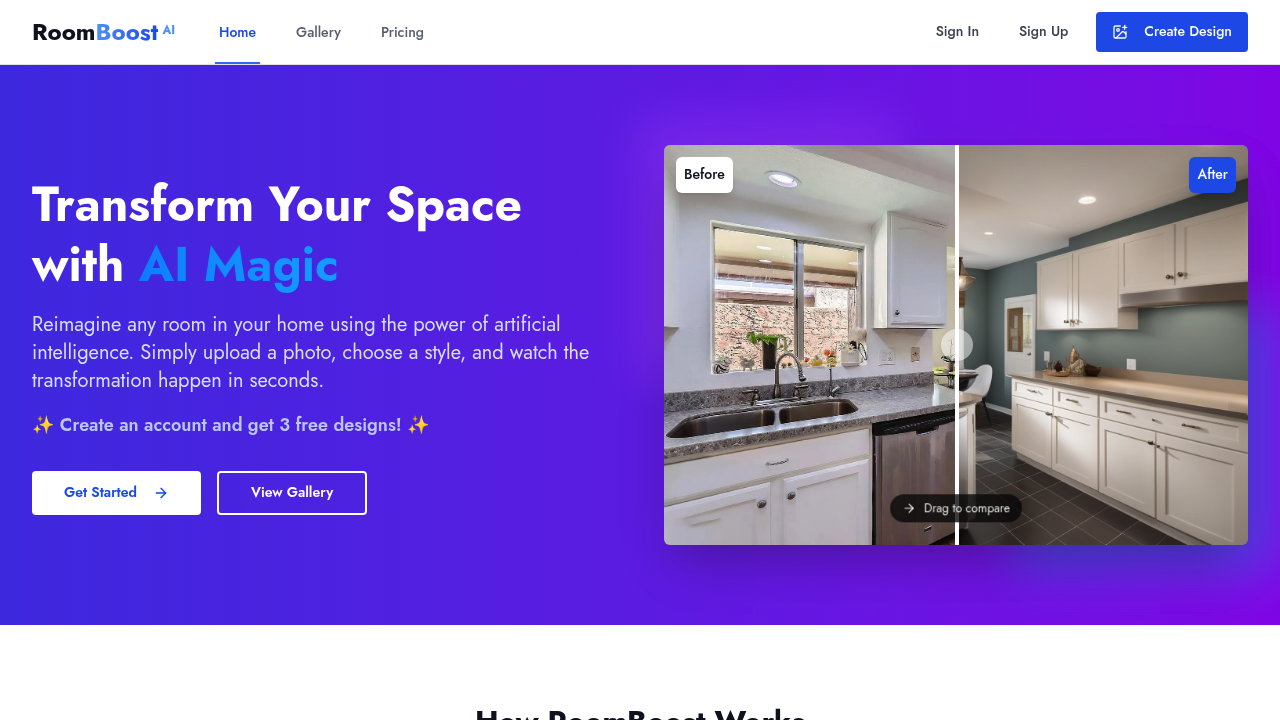
RoomBoost AI screenshot

Uploading a photo of your living room and getting back a photorealistic visualization of that same space redesigned in a completely different style happens in seconds with this service. The AI analyzes room photos and generates new versions showing different furniture arrangements, color schemes, and decor choices without requiring any design expertise from the user.

Eight distinct design styles come built into the system. Modern/Contemporary, Traditional/Classic, Scandinavian, Mid-Century Modern, Industrial, Bohemian, Minimalist, and Farmhouse/Rustic each transform spaces according to their aesthetic principles. Beyond selecting from these curated options, users can describe custom visions in text and the AI interprets those descriptions into visual designs. Color palette selection includes earth tones and other schemes that coordinate with chosen styles. Budget range options let users indicate spending constraints, which influences the furniture and materials the AI suggests.

This service handles multiple room types including living rooms, bedrooms, and kitchens. Each design generation consumes one credit from the user's monthly allocation. Three quality levels affect the final rendering resolution. Standard quality comes with the free tier, higher resolution becomes available at paid levels, and maximum quality appears only in the Team plan. Advanced design controls give paying users more granular influence over specific design elements, though the free tier sticks to basic options.

A design gallery showcases community creations, letting users browse what others have generated for inspiration. Pro plan subscribers get their designs featured in this gallery, potentially drawing attention to their work. All paid tiers include the ability to download renderings for use in presentations, client meetings, or personal planning.

The free plan provides three credits monthly. That's three room redesigns per month at standard quality with community forum support. Starter tier runs nine dollars monthly for 25 credits, working out to 36 cents per design generation. This tier adds higher resolution renders, advanced design options, email support, and full download capabilities. Pro tier runs 24 dollars monthly for 100 credits, dropping the per-credit cost to 24 cents. It brings priority support, advanced design controls, and those featured gallery listings. Team tier delivers 250 credits for 49 dollars monthly at 20 cents per credit, including maximum render quality, priority support, and complete design control. Annual billing cuts costs by 20 percent across all paid tiers.

Credits roll over for up to three months before expiring. A user on the Starter plan who uses only 15 credits one month keeps those remaining 10 credits for three additional months. After that window closes, unused credits disappear. New accounts get three free designs to test this service before committing to any plan.

The credit system creates a hard constraint on experimentation volume. Free users generating three designs monthly can't explore many variations before hitting their limit. Even Starter subscribers burning through 25 credits might find themselves rationing attempts when working on multiple rooms or trying numerous style combinations. Free tier users also can't access higher resolution outputs, making it difficult to evaluate fine details or use renders professionally.

House flippers can visualize renovation options before purchasing materials. Homeowners planning redecorations see what different furniture styles look like in their actual spaces rather than imagining. Professional designers show clients multiple directions quickly instead of sketching concepts manually. This service positions itself for everyone from casual enthusiasts experimenting with their apartment to professionals billing clients for design consultations. The cost transparency with per-credit pricing helps users calculate exactly what their design exploration will cost before subscribing.

Frequently asked

7 questions
How many room designs can you generate with RoomBoost AI for free?
The free plan provides three credits per month, with each room design consuming one credit. New accounts also receive three bonus credits upfront to test the service before the monthly allocation begins. These free credits come with standard render quality and basic design options, though they're limited to community forum support rather than email or priority assistance. Credits unused within a given month roll over for up to three months before expiring, so a free user who generates only one design in January could accumulate up to six credits by March if they continue not using them all.
What design styles does RoomBoost AI offer?
Eight curated design styles come built into the platform: Modern/Contemporary, Traditional/Classic, Scandinavian, Mid-Century Modern, Industrial, Bohemian, Minimalist, and Farmhouse/Rustic. Each style transforms uploaded room photos according to its specific aesthetic principles, changing furniture selections, color schemes, and decor elements to match. Beyond these preset options, users can describe custom visions in text and the AI interprets those descriptions into visual designs. Color palette selection includes options like earth tones that coordinate with chosen styles, and budget range settings let users indicate spending constraints that influence the furniture and materials the AI suggests.
How much does RoomBoost AI cost per design?
Cost per design ranges from 20 to 36 cents depending on which plan you choose. The Starter plan at nine dollars monthly provides 25 credits at 36 cents each, while Pro subscribers pay 24 dollars for 100 credits at 24 cents per design. Team tier delivers the lowest per-credit cost at 20 cents, providing 250 monthly credits for 49 dollars. Annual billing cuts all these prices by 20 percent, bringing the Team plan's effective cost down to 16 cents per credit. The free tier technically costs zero for its three monthly credits, though it restricts users to standard quality renders and basic design options.
Can interior designers use RoomBoost AI for client projects?
Professional designers can show clients multiple design directions quickly by uploading room photos and generating visualizations in different styles within seconds. The Pro and Team plans include advanced design controls that give granular influence over specific design elements, making the output more aligned with professional requirements. Pro subscribers also get their designs featured in the platform's design gallery, potentially attracting new clients who browse community creations. All paid tiers allow downloading renderings for use in client presentations, and the priority support on Pro and Team plans means faster responses when working under client deadlines.
What happens to unused credits in RoomBoost AI?
Credits roll over for up to three months before expiring completely. A Starter subscriber who uses only 15 of their 25 monthly credits keeps those remaining 10 credits available for three additional months. This rollover system lets users accumulate credits during months when they're not actively redesigning spaces, then spend heavily when tackling multiple rooms. After the three-month window closes, any still-unused credits disappear rather than continuing to accumulate indefinitely. The rollover applies across all plan tiers including the free plan's three monthly credits.
Does RoomBoost AI work for kitchens and bedrooms or just living rooms?
The platform handles multiple room types including living rooms, bedrooms, and kitchens explicitly mentioned in its capabilities. Each room type gets the same treatment where users upload a photo and the AI generates redesigned versions showing different furniture arrangements, color schemes, and decor choices. The eight design styles and custom text descriptions work across all supported room types, though the AI adjusts suggestions based on room-specific requirements like kitchen appliances versus bedroom furniture. Budget range options and color palette selections apply regardless of which room you're redesigning.
What are the limitations of RoomBoost AI's free plan?
Free users hit a hard limit of three designs per month, making it difficult to explore many style variations or work on multiple rooms simultaneously. The free tier restricts output to standard render quality, preventing users from evaluating fine details or using renders in professional contexts where higher resolution matters. Community forum support replaces email or priority assistance, meaning slower response times when questions arise. Basic design options replace the advanced controls available on paid tiers, limiting how much influence users have over specific design elements the AI generates.

Traffic

Estimated monthly website visits · last 0 months

Not enough historical data for a chart yet.

Data from SimilarWeb · Updated monthly.

Reviews (0)

Write review

No reviews yet. Be the first to share your experience.

Similar tools

See all →