RapidMap - AI Process Mapping for Management Consultants logo
AI Diagram Generator FREEMIUM from $53/mo

RapidMap - AI Process Mapping for Management Consultants

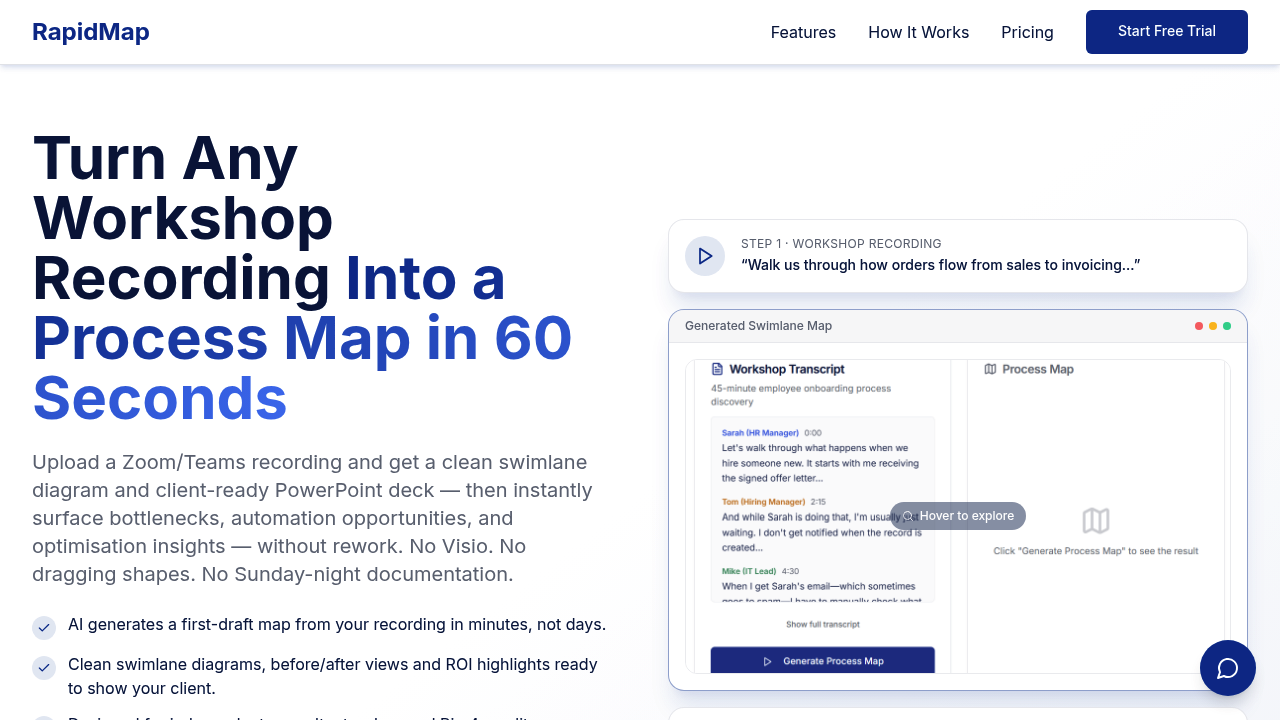
RapidMap converts workshop recordings into process diagrams through a voice-to-diagram pipeline that handles the full transformation from audio to client deliverable

You record a process discussion via Zoom or Teams, and this system transcribes the conversation while simultaneously parsing it for process steps, decision points, and role assignments. The AI identifies who does what,…

RapidMap - AI Process Mapping for Management Consultants screenshot

RapidMap converts workshop recordings into process diagrams through a voice-to-diagram pipeline that handles the full transformation from audio to client deliverable. You record a process discussion via Zoom or Teams, and this system transcribes the conversation while simultaneously parsing it for process steps, decision points, and role assignments. The AI identifies who does what, where handoffs occur, and which steps create bottlenecks.

The system generates swimlane diagrams automatically, organizing activities by department or role without manual dragging of shapes. It creates three hierarchy levels: executive summaries for C-suite audiences, mid-level process flows for managers, and detailed operational maps for implementation teams. Each level pulls from the same source recording but adjusts granularity based on the intended viewer.

The methodology component runs in parallel with diagram generation. As it builds the visual map, it flags pain points, calculates time spent on each step, and estimates potential savings from automation or process redesign. This happens during the initial 60-second processing window, not as a separate analysis phase. The output includes before-and-after comparisons showing current state versus proposed future state, with ROI metrics embedded directly into the deliverable.

Export goes straight to PowerPoint with branding controls for logos and color schemes. The format matches Big 4 consulting standards, which matters since RapidMap's designed for independent consultants who need enterprise-quality outputs. Instead of spending 8 to 10 hours turning workshop notes into Visio diagrams, you spend 10 to 15 minutes reviewing the auto-generated maps and tweaking as needed. That's 5 to 8 billable hours recovered per project.

RapidMap works through web interface or mobile recorder. Over 200 independent consultants use it currently. Setup takes under 10 minutes.

Technical constraints aren't specified in available documentation, but the reliance on Zoom and Teams means you're limited to those platforms for input. The AI needs clear audio with distinguishable speakers for accurate role detection. If workshop participants talk over each other frequently or use vague language about responsibilities, the swimlane assignments may require manual correction during the review phase.

RapidMap offers a free trial period. There's a 30-day money-back guarantee. Specific pricing tiers aren't publicly detailed beyond those trial terms.

Implementation roadmaps generate automatically based on the identified process gaps and optimization opportunities. This gives consultants a ready-made action plan to present alongside the process maps.

RapidMap - AI Process Mapping for Management Consultants alternatives

See all →

Frequently asked

7 questions
How long does it take to create a process map with AI?
RapidMap processes a workshop recording into a complete process map in 60 seconds after upload. The initial generation happens automatically during that minute, creating swimlane diagrams, identifying bottlenecks, and calculating time savings. You'll spend 10 to 15 minutes reviewing and adjusting the output rather than the 8 to 10 hours required for traditional manual diagram creation in Visio. This compression recovers 5 to 8 billable hours per consulting project that you can redirect to client work or business development.
Does RapidMap work with Google Meet or just Zoom and Teams?
RapidMap integrates only with Zoom and Microsoft Teams for recording input. The system doesn't currently support Google Meet, Webex, or other conferencing platforms. You can work around this limitation by using RapidMap's mobile recorder during any meeting type, though you'll need to capture audio separately rather than pulling it directly from the platform. The transcription and role-detection pipeline relies on clear audio with distinguishable speakers, so overlapping conversations or vague responsibility language will require manual corrections during the 10 to 15 minute review phase.
Is there a free version of RapidMap for consultants?
RapidMap offers a free trial period but doesn't maintain a permanent free tier. After the trial, you'll need a paid subscription to continue using the voice-to-diagram features and PowerPoint export capabilities. There's a 30-day money-back guarantee if the tool doesn't fit your workflow. Specific pricing details aren't publicly listed, but given the target audience of independent consultants recovering 5 to 8 billable hours per project, the cost structure likely assumes you'll recoup the investment within one or two client engagements.
Can RapidMap create process maps for internal teams or just consulting projects?
RapidMap works for both independent consultants and internal teams analyzing workflows, though it's designed primarily for solo consultants who need Big 4-quality deliverables. Internal operations teams can use the same voice-to-diagram pipeline to document existing processes, identify automation opportunities, and generate implementation roadmaps. The system creates three hierarchy levels from a single recording, so you can share executive summaries with leadership while giving operational teams the detailed step-by-step maps. Over 200 independent consultants currently use it, but the methodology applies equally to internal process improvement initiatives.
How does AI detect roles and swimlanes from a recording?
RapidMap's transcription engine parses conversation audio to identify who performs each process step, then assigns those activities to role-based swimlanes automatically. The AI listens for phrases indicating responsibility like department names, job titles, or explicit handoffs between participants. This detection runs simultaneously with the diagram generation during the 60-second processing window, not as a separate analysis pass. If speakers use vague language about who does what or talk over each other frequently, the swimlane assignments may need manual correction during your 10 to 15 minute review, since the system relies on clear audio with distinguishable voices for accurate role mapping.
What does RapidMap export for client presentations?
RapidMap exports directly to PowerPoint with branded formatting that includes your logo and custom color schemes. The output contains multi-level process views ranging from executive summaries to detailed operational maps, before-and-after comparisons showing current versus future state, and embedded ROI metrics with time-savings estimates. The methodology component auto-generates implementation roadmaps based on identified bottlenecks and automation opportunities, giving you a complete deliverable package. The format matches Big 4 consulting standards, which matters since the tool's built for independent consultants competing against enterprise firms on deliverable quality.
How quickly can you set up RapidMap for a consulting project?
Setup takes under 10 minutes from account creation to first recording. You'll connect your Zoom or Teams account, configure branding preferences for PowerPoint exports, and you're ready to capture your first workshop. The web interface and mobile recorder both work immediately after setup without additional configuration. This fast onboarding matters for independent consultants who can't spend days learning complex diagramming software or setting up integrations, especially when you're recovering 5 to 8 billable hours per project that would otherwise go to manual Visio work.

Traffic

Estimated monthly website visits · last 0 months

Not enough historical data for a chart yet.

Reviews (0)

Write review

No reviews yet. Be the first to share your experience.