Leanify logo
AI Diagram Generator FREEMIUM from £39/mo

Leanify

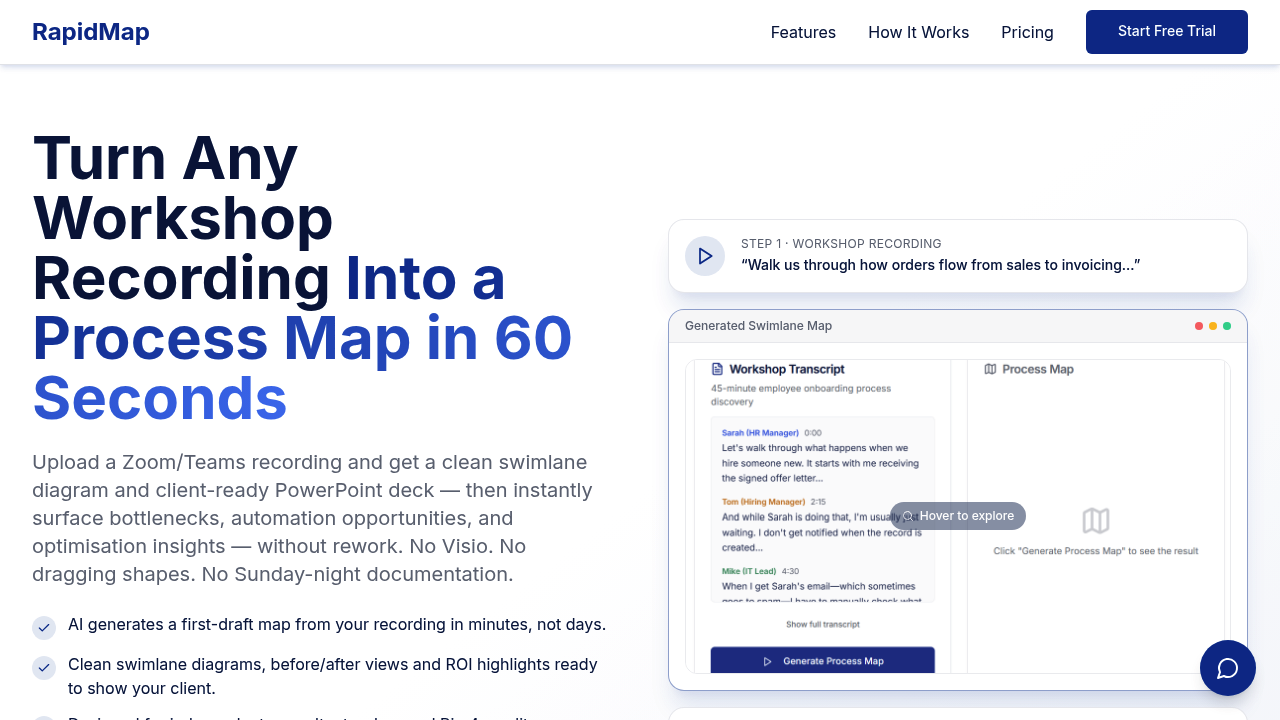
RapidMap turns workshop recordings into process diagrams and PowerPoint decks

You record a Zoom or Teams session where someone walks through how work gets done. The AI transcribes it, maps out the workflow, and generates swimlane diagrams with roles, handoffs, and decision points already placed.…

Leanify screenshot

RapidMap turns workshop recordings into process diagrams and PowerPoint decks. You record a Zoom or Teams session where someone walks through how work gets done. The AI transcribes it, maps out the workflow, and generates swimlane diagrams with roles, handoffs, and decision points already placed. Takes about 60 seconds to produce the first draft.

RapidMap targets independent consultants who need polished deliverables but don't have a team to build them. Most consultants spend 8-10 hours converting interview notes into diagrams. RapidMap compresses that into a 10-15 minute review cycle. You start with an AI-generated draft instead of a blank canvas. That's the pitch, anyway.

What actually works: The multi-level views are practical. Level 1 gives executives the summary. Level 3 shows operational detail. The auto-detection catches roles and departments without manual tagging. The branded PowerPoint export lets you drop in logos and color schemes. Before and after comparison views help visualize current-state versus future-state workflows. The AI flags pain points and suggests where automation might fit. ROI summaries and time-savings estimates are baked in, so you're not starting from scratch on the business case.

The mobile recorder is handy. You can capture workshops on the go without lugging a laptop.

What's missing: The cost structure isn't publicly disclosed. You get a 30-day money-back guarantee and can set up in under 10 minutes, but the actual price isn't available upfront. That's a problem if you're comparing tools or working within a budget. No API access mentioned. Team features aren't detailed, so it's unclear how collaboration works if you're not solo. RapidMap claims 200+ independent consultants use it, which is a modest user base. That number doesn't tell you much about satisfaction or retention.

The 5-8 billable hours recovered per project sounds good. But that assumes your current workflow is inefficient enough to save that much time. If you're already fast at diagramming, the benefit shrinks. The AI-generated draft still needs review. It's not hands-off. You'll catch mistakes, reorder steps, and adjust labels. The 10-15 minute review is optimistic if the workshop was messy or covered multiple processes.

RapidMap works best for straightforward workflows. Complex processes with lots of exceptions or unclear handoffs will need more cleanup. The AI can't guess what wasn't said in the recording. If participants skip steps or assume context, the map will have gaps.


Leanify alternatives

See all →

Frequently asked

6 questions
How long does RapidMap take to generate a process map?
RapidMap produces a first-draft process map in about 60 seconds after you upload a workshop recording. The catch is you'll still need 10-15 minutes to review and clean up what the AI generated. That's way faster than the 8-10 hours most consultants spend manually diagramming workflows, but it's not instant-and-done. The AI misses context that wasn't explicitly stated in the recording, so you'll fix gaps, reorder steps, and adjust labels.
Does RapidMap have a free trial or free plan?
RapidMap offers a free trial but doesn't publish pricing details upfront. You get a 30-day money-back guarantee, which functions like an extended trial period. The company doesn't disclose whether a free plan exists or what paid tiers cost. That makes budget planning difficult before you commit. Setup takes under 10 minutes once you're in, but you won't know the monthly cost until you contact them.
Can RapidMap handle complex workflows with lots of exceptions?
RapidMap works best for straightforward workflows with clear handoffs and roles. Complex processes with multiple exceptions, unclear decision points, or lots of assumed context will need more manual cleanup. The AI only maps what participants actually say in the recording. If people skip steps, use shorthand, or reference things without explaining them, the generated diagram will have gaps you'll need to fill in yourself.
What integrations does RapidMap support?
RapidMap integrates with Zoom and Microsoft Teams to capture workshop recordings directly. That's it for integrations. No API access is mentioned, so connecting to other tools or automating workflows isn't an option. The mobile app lets you record sessions on the go without needing a laptop. You export finished diagrams as branded PowerPoint decks with your logo and color scheme, but there's no mention of pushing data to other platforms.
Who should use RapidMap?
Independent consultants who need polished process maps without a team to build them get the most value. Internal teams documenting workflows or surfacing inefficiencies also fit the target. The tool is built for people who currently spend hours turning interview notes into diagrams. If you're already fast at diagramming or work with highly complex processes that need lots of manual adjustment, the time savings shrink. Over 200 independent consultants reportedly use it, which is a small but specific user base.
How much time does RapidMap actually save per project?
RapidMap claims you'll recover 5-8 billable hours per project by starting with an AI-generated draft instead of a blank canvas. That assumes your current workflow involves 8-10 hours of manual diagramming. If you're already efficient or the workshop recording was messy, the savings drop. You still spend 10-15 minutes reviewing and correcting the AI output. The time savings are real for consultants who hate diagramming, but the numbers depend heavily on how organized your source material is.

Traffic

Estimated monthly website visits · last 0 months

Not enough historical data for a chart yet.

Reviews (0)

Write review

No reviews yet. Be the first to share your experience.