
#10 in AI Diagram Generator DG Diagram-Generator logo
AI Diagram Generator FREEMIUM from $9/mo

DG Diagram-Generator

Transforming text descriptions into professional diagrams usually requires either specialized software skills or settling for basic auto-generated output

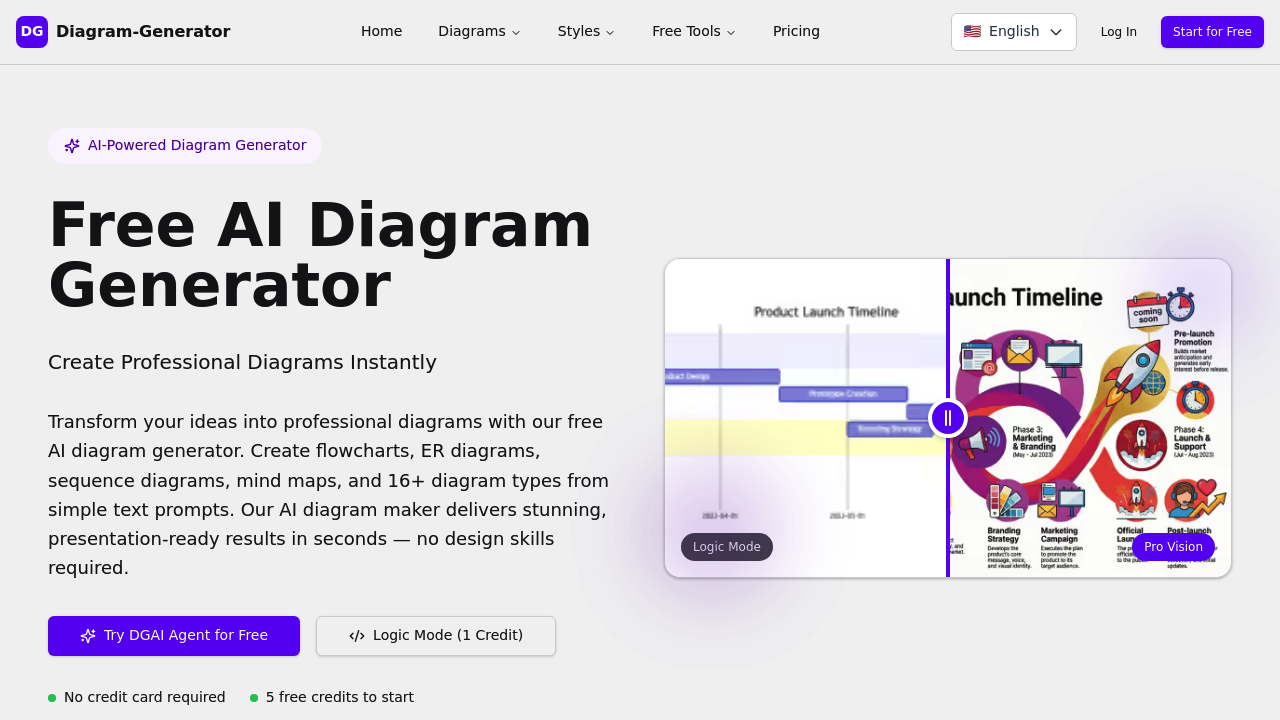
DG Diagram-Generator tackles this through a two-stage workflow that separates logical structure from visual polish. Users first create diagrams in Logic Mode, which costs one credit and produces editable Mermaid code.…

DG Diagram-Generator screenshot

Transforming text descriptions into professional diagrams usually requires either specialized software skills or settling for basic auto-generated output. DG Diagram-Generator tackles this through a two-stage workflow that separates logical structure from visual polish. Users first create diagrams in Logic Mode, which costs one credit and produces editable Mermaid code. This text-based format lets them refine structure through natural language commands before committing to a high-resolution render. Once the logic feels right, Pro Vision mode transforms that foundation into professional graphics at 2K resolution for three credits or 4K for six credits.

This system supports 16 different diagram types spanning technical and business needs. Flowcharts, sequence diagrams, class diagrams, and state diagrams handle software architecture. ER diagrams and UML diagrams serve database design. Gantt charts, timelines, and organizational charts manage project planning. Mind maps, Venn diagrams, and quadrant charts organize concepts. Network diagrams, AWS architecture diagrams, Sankey diagrams, funnel charts, and even Lewis diagrams for chemistry round out the options.

Visual presentation gets controlled through the Style Picker, which offers 10 distinct aesthetic approaches. Content-Based adapts to diagram type automatically. Corporate Clean and Modern Tech suit business presentations. Editorial and News styles work for publications. 3D Isometric and Blueprint provide technical visualization. Hand-Drawn adds approachability. Cyberpunk, Paper Cutout, Retro Pixel, and Academic styles serve specialized contexts.

The DGAI Agent handles document conversion, turning product requirement documents and technical specifications directly into diagrams without manual prompt writing. Search Grounding pulls in real-world data to populate diagrams with actual information rather than placeholder content. Complex reasoning capability means the system can visualize abstract concepts that don't map to simple node-and-edge relationships.

Credits work differently. They're spent.

The Developer plan provides five one-time credits at signup. Every Logic Mode generation costs one credit regardless of complexity. Pro Mode rendering to 2K resolution costs three credits. Diagrams created on this tier carry watermarks, get stored in a public-only gallery, and remain owned by Diagram-Generator rather than the user. No commercial use allowed. Resolution caps at 2K.

Starter tier costs nine dollars monthly and includes 100 credits. Watermarks disappear. Users get commercial licensing and private gallery storage. Resolution still maxes out at 2K, meaning 4K rendering stays unavailable even if credits remain.

Professional tier runs 35 dollars monthly with 400 credits. This enables 4K generation capability alongside priority support. All Starter features carry over.

The credit math matters for budget planning. Creating a diagram in Logic Mode and rendering it at 2K costs four credits total. The same workflow ending in 4K costs seven credits. A user on the Starter plan could produce 25 diagrams monthly at 2K quality or 14 at 4K quality if that tier supported 4K, which it doesn't. Professional tier users get roughly 57 complete workflows at 2K or 57 at 4K.

This tool targets technical professionals who need diagram quality beyond what basic auto-generators produce but don't want to master specialized software. Software architects documenting systems, product managers visualizing workflows, designers creating information architecture, and anyone converting dense documentation into visual formats fit the use case. The document-to-diagram feature specifically serves teams working from written specifications who need visual representations for stakeholder communication.


DG Diagram-Generator alternatives

See all →

Frequently asked

7 questions
How many diagrams can you create with DG Diagram-Generator for free?
The Developer plan gives you five one-time credits at signup, which translates to five Logic Mode diagram generations if you never render them to high resolution. Creating a complete diagram with a 2K Pro Mode render costs four credits total (one for Logic Mode, three for rendering), meaning you get one fully rendered diagram plus one Logic Mode diagram with your free allocation. If you only work in Logic Mode to generate editable Mermaid code without rendering, you stretch those credits to five separate diagrams. Once these five credits run out, you'll need to upgrade to continue creating diagrams since the free tier doesn't replenish monthly.
What's the difference between Logic Mode and Pro Mode in DG Diagram-Generator?
Logic Mode generates diagrams as editable Mermaid code for one credit, letting you refine the structure and relationships through natural language commands before committing to a visual render. Pro Mode takes that finalized logic and transforms it into high-resolution professional graphics, costing three credits for 2K resolution or six credits for 4K. This separation means you can iterate on diagram structure cheaply in text format, then only pay the higher rendering cost once you're satisfied with the layout. Free tier users get watermarked Pro Mode outputs while paid tiers render without watermarks, and only Professional plan subscribers can access 4K rendering regardless of available credits.
Can DG Diagram-Generator create diagrams from uploaded documents?
The DGAI Agent feature converts product requirement documents and technical specifications directly into diagrams without writing prompts manually. You upload written documentation and the system extracts structure to generate appropriate diagram types based on content. Search Grounding capability pulls real-world data into diagrams rather than using placeholder information, which matters when visualizing actual architectures or workflows described in your documents. This document-to-diagram conversion works across all 16 supported diagram types, from flowcharts and sequence diagrams to Gantt charts and network diagrams, depending on what your documentation describes.
Does DG Diagram-Generator work for creating software architecture diagrams?
Software architecture gets covered through multiple diagram types including flowcharts, sequence diagrams, class diagrams, state diagrams, UML diagrams, and AWS architecture diagrams. The system handles technical visualization styles like Blueprint and Modern Tech alongside 3D Isometric rendering for infrastructure layouts. You can upload technical specifications and have the DGAI Agent extract architecture into visual format, or describe systems through text prompts that get refined in Logic Mode before rendering. The complex reasoning capability means it can visualize abstract architectural concepts beyond simple boxes-and-arrows relationships, though you'll need Professional tier for 4K resolution output suitable for detailed technical presentations.
What happens when you run out of credits on DG Diagram-Generator?
Credits don't roll over or replenish on the free Developer plan, so after spending your five one-time credits you'll need to upgrade to continue generating diagrams. Starter plan provides 100 credits monthly and Professional gives 400 credits per month, but there's no information about what happens if you exhaust your monthly allocation before the billing cycle resets. The credit costs mean Starter users can produce about 25 complete diagrams at 2K resolution monthly (four credits each including Logic Mode generation and Pro Mode rendering), while Professional users get roughly 57 complete workflows at either 2K or 4K. Running purely in Logic Mode without rendering stretches credits further since each generation only costs one credit.
Can you edit diagrams after generating them in DG Diagram-Generator?
Logic Mode outputs editable Mermaid code, which you can refine through natural language commands to adjust structure, relationships, and content before rendering to Pro Mode. Once you've spent credits rendering to 2K or 4K in Pro Mode, the output becomes a static high-resolution image rather than an editable file. This workflow means all structural editing happens in the text-based Logic Mode phase, and you'd need to regenerate from Logic Mode and re-render if changes are needed after producing the final visual. The separation between logic and graphics stages exists specifically to let you iterate cheaply on structure before committing the higher credit cost for professional rendering.
Why can't Starter plan users generate 4K diagrams even with enough credits?
The 4K generation capability gets locked to Professional tier as a feature restriction rather than just a credit cost difference. Starter plan explicitly caps maximum resolution at 2K regardless of how many credits you've accumulated, meaning you couldn't render 4K even if you had 100 unused credits sitting in your account. This creates a situation where credit math alone doesn't determine what you can produce, since tier-level features override credit availability. Professional plan costs 26 dollars more monthly than Starter but provides both the 400 credits needed for regular 4K rendering and the actual capability to generate at that resolution, making the price gap reflect both credit volume and feature access rather than just quantity differences.

Traffic

Estimated monthly website visits · last 8 months

10.8K visits/mo
Monthly visits
10.8K
↓ 45.5% MoM
Global rank
#2,199,388
US #2,983,580
Category rank
#10
AI Diagram Generator
26.5K 21.2K 15.9K 10.7K 5.4K Dec 2025: 5.4K visits Dec 2025 Jan 2026: 10.7K visits Jan 2026 Feb 2026: 15.6K visits Feb 2026 Mar 2026: 26.5K visits Mar 2026 Apr 2026: 24.5K visits Apr 2026 May 2026: 16.9K visits May 2026 Jun 2026: 19.9K visits Jun 2026 Jul 2026: 10.8K visits Jul 2026

Reviews (0)

Write review

No reviews yet. Be the first to share your experience.