Liminary logo
AI Knowledge Management FREEMIUM from $29/mo

Liminary

Ever open a browser tab to find something you saved three months ago, only to spend ten minutes hunting through bookmarks

? Liminary sidesteps that entire problem by surfacing what you need before you even search for it. It captures content with one click. Webpages, PDFs, YouTube videos, AI chat transcripts, emails. All saved…

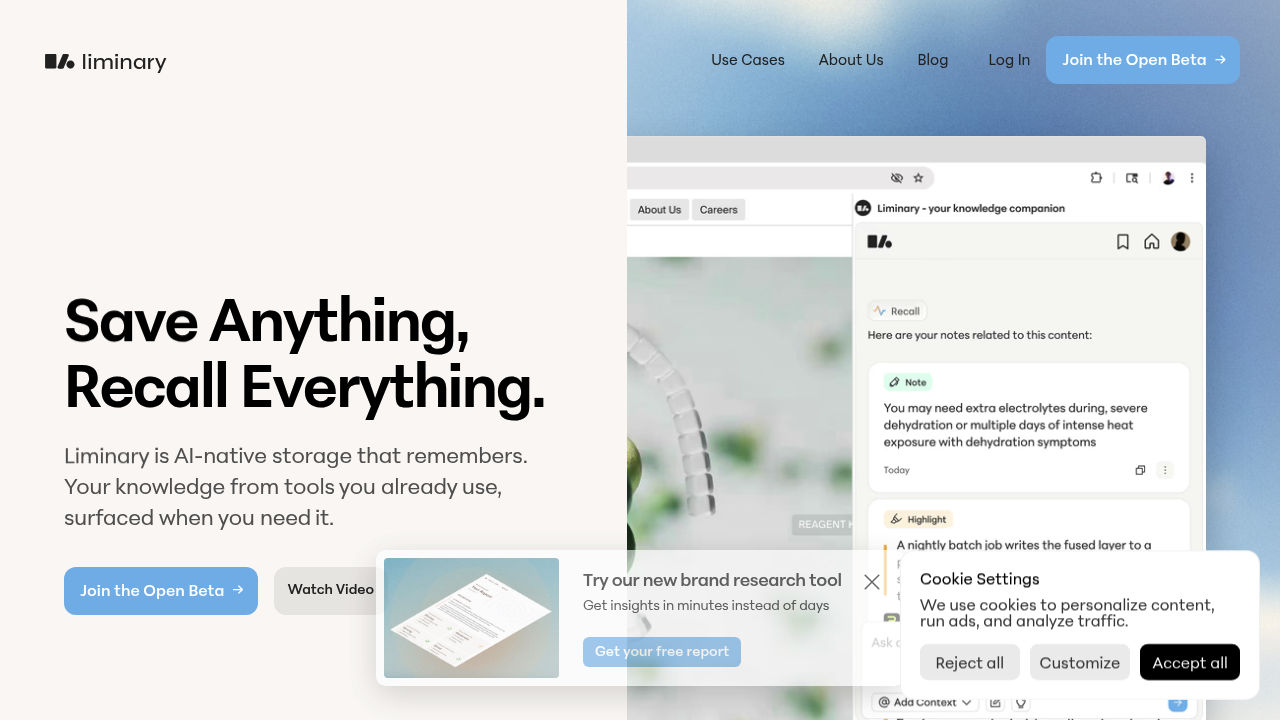
Liminary screenshot

Ever open a browser tab to find something you saved three months ago, only to spend ten minutes hunting through bookmarks? Liminary sidesteps that entire problem by surfacing what you need before you even search for it.

It captures content with one click. Webpages, PDFs, YouTube videos, AI chat transcripts, emails. All saved automatically. But the compelling part: instead of dumping everything into a digital filing cabinet, Liminary watches what you're working on and pulls up relevant material from your past captures. Reading an article about market trends? It might surface notes from a video you watched last month on the same topic.

This proactive recall works across everything you've saved. The system connects old ideas to new ones automatically, finding patterns across different content types. You're not switching tabs or typing queries. It just appears when contextually relevant. You can also summarize saved content and add your own notes to anything you've collected.

The Chrome Web Store rating sits at five stars, which suggests people actually find it useful. It's currently in open beta, so you can test it without commitment.

Does it actually deliver? The approach makes sense for anyone who consumes a lot of information professionally. Venture capital partners, consultants, researchers, analysts. People who bill for their perspective and need to synthesize inputs from multiple sources. Graduate students writing literature reviews. Content strategists tracking trends across platforms. The common thread is knowledge work that requires connecting dots across scattered information.

What's missing from the picture? No clarity on what happens after the open beta ends. Will there be a permanent free tier? Paid plans? The facts don't say. There's also no mention of team features, API access, or a mobile app. If you need to collaborate with others or work primarily from your phone, that could be limiting.

Liminary combines storage with intelligence. Unlike basic note-taking apps that just save what you feed them, it actively processes and surfaces connections. It's less about building a second brain and more about having one that actually remembers things for you.

If your workflow involves constantly referencing past research while creating new work, this could eliminate a genuine friction point. Whether it remains accessible long-term is the open question.

Liminary alternatives

See all →

Frequently asked

6 questions
Is Liminary actually free to use?
Right now you can use it for free during the open beta. The catch is there's no information about what happens when the beta ends. Will there be a permanent free tier or paid plans? That part isn't clear yet. If you're considering building it into your workflow, just know the pricing structure might change down the line.
How does Liminary surface information without you searching for it?
It watches what you're currently reading or working on and automatically pulls up related content from everything you've previously saved. Say you're reading an article about AI regulation — Liminary might surface a PDF you saved two months ago or notes from a YouTube video on the same topic. The system connects patterns across webpages, videos, PDFs, and chat transcripts without you needing to remember you saved something relevant.
What kind of content can you save to Liminary?
You can capture webpages, PDFs, YouTube videos, AI chat transcripts, and emails with one click. Everything gets saved automatically, and you can add your own notes or summaries to any piece of content. The system then watches for connections across all these different formats while you work.
Does Liminary work on mobile or just desktop?
There's no mention of a mobile app in the available information. It has a Chrome browser extension, which points to desktop use. If you do most of your research and writing on your phone or tablet, that could be a problem. The tool seems built for people working primarily from a computer.
Can you use Liminary for team collaboration?
The current details don't mention any team features or sharing capabilities. It appears designed for individual knowledge workers rather than collaborative workflows. If you need to share research with colleagues or work in shared knowledge bases, you might need something else alongside it.
Who actually benefits from using Liminary?
Knowledge workers who consume information from multiple sources and need to connect ideas across them. Researchers writing literature reviews, consultants synthesizing client data, venture capital partners tracking market patterns, content strategists monitoring trends. The common thread is professionals who bill for their perspective and constantly reference past research while creating new work. If your job involves reading widely and connecting dots, this addresses a real friction point.

Traffic

Estimated monthly website visits · last 8 months

23.3K visits/mo
Monthly visits
23.3K
↓ 18.4% MoM
Global rank
#1,028,276
US #762,740
Category rank
#12
AI Knowledge Management
37.2K 31.9K 26.6K 21.3K 16K Jan 2026: 37.2K visits Jan 2026 Feb 2026: 16K visits Feb 2026 Mar 2026: 26K visits Mar 2026 Apr 2026: 18.1K visits Apr 2026 May 2026: 28.2K visits May 2026 Jun 2026: 21.2K visits Jun 2026 Jul 2026: 28.5K visits Jul 2026 Aug 2026: 23.3K visits Aug 2026

Reviews (0)

Write review

No reviews yet. Be the first to share your experience.