
#5 in AI UX Design Flowstep logo
AI UX Design FREEMIUM from $15/mo

Flowstep

Flowstep turns text descriptions into fully editable, production-ready UI designs through an AI-powered chat interface

This platform generates complete user interfaces in seconds, handling everything from single screens to multi-screen flows like login pages, dashboards, and profile pages simultaneously. The generation happens through…

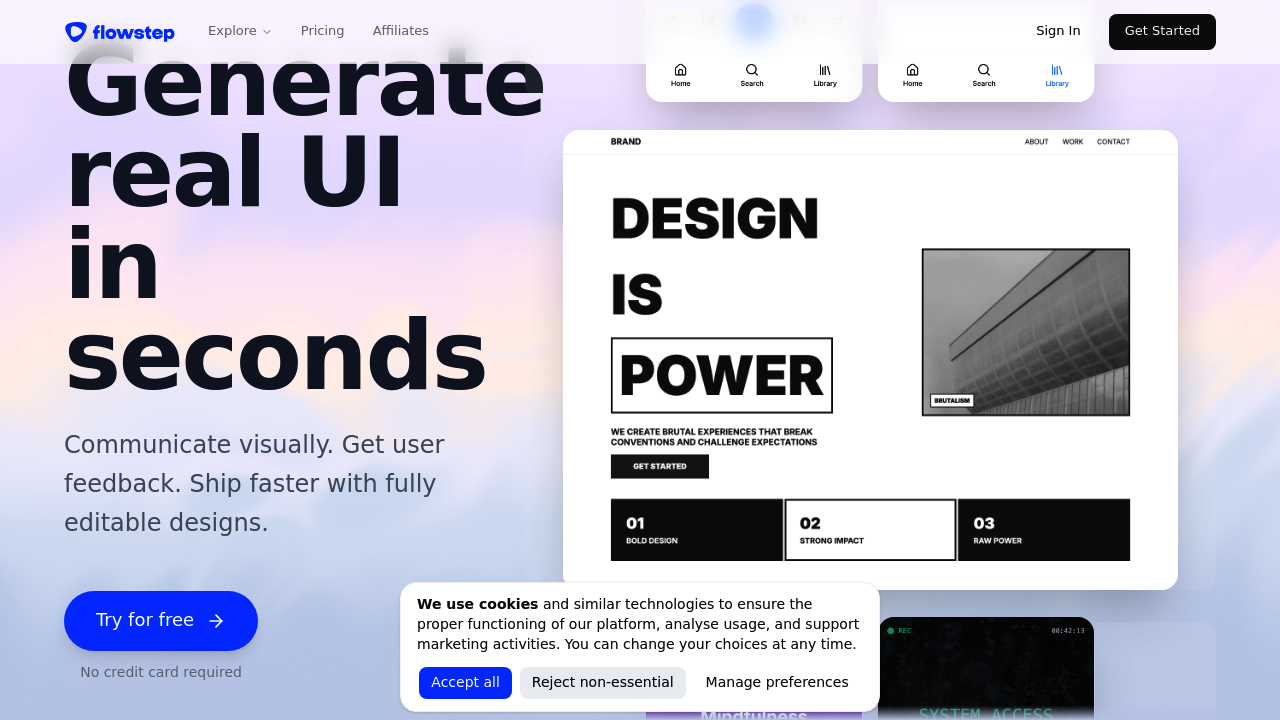
Flowstep screenshot

Flowstep turns text descriptions into fully editable, production-ready UI designs through an AI-powered chat interface. This platform generates complete user interfaces in seconds, handling everything from single screens to multi-screen flows like login pages, dashboards, and profile pages simultaneously. The generation happens through what the company calls its Imagination Algorithm, which processes natural language requests and outputs designs ready for immediate use.

The editing workflow combines AI assistance with manual control. Users can refine generated designs by chatting with the AI or making direct adjustments themselves. The design process accepts multiple input types as references — product requirement documents, uploaded images, or pasted links all help guide the AI toward specific visual directions. The infinite canvas workspace lets teams arrange and organize multiple screens without spatial constraints.

Collaboration happens in real time with visible cursors showing where team members are working. Edits sync across participants instantly, and feedback can be shared directly within the workspace. Flowstep positions itself as an eventual Figma replacement, though it currently integrates with Figma through a direct copy-paste mechanism. Users hit Command-C in Flowstep and Command-V in Figma without needing any plugin installation. Designs transfer immediately between the two platforms.

The code export capability produces React, TypeScript, and Tailwind CSS that matches the visual design one-to-one. Flowstep emphasizes that this code is production-ready and clean enough for engineers to actually use rather than just reference. This addresses a common gap where design-to-code tools generate output that developers discard in favor of building from scratch.

The free plan provides access to core functionality but caps messages, multi-screen generation capacity, and project counts. Starter plan costs fifteen dollars monthly and includes eighty messages per month with unlimited multi-screen generation, unlimited projects, unlimited exports, and unlimited Figma transfers. Enterprise pricing follows custom arrangements for larger teams needing advanced security, compliance features, dedicated support, or volume discounts. Monthly quotas reset on the first of each month while daily limits reset at midnight UTC.

Message limits affect how much users can interact with the AI generation system. Free users hit walls faster when iterating on designs or generating multiple variations. The eighty-message cap on Starter plan means heavy users might exhaust their quota before the month ends if they are running extensive design explorations or working on multiple projects simultaneously. Multi-screen generation restrictions on the free tier limit the ability to create complete user flows in single operations.

Product managers benefit from rapid prototyping without design skills. They can describe features in plain language and get visual representations that communicate concepts to stakeholders or development teams. Product designers gain speed on initial explorations and variations, though they'll likely want the unlimited multi-screen generation that comes with paid plans. Software engineers can generate UI scaffolding and receive code that integrates into existing React projects without translation work. Teams working across these roles get shared workspace benefits where everyone sees changes as they happen and can contribute feedback without switching tools or waiting for file exports.


Flowstep alternatives

See all →

Frequently asked

7 questions
Can you export Flowstep designs to Figma?
Flowstep transfers designs directly to Figma through native copy-paste without requiring any plugin installation. You select elements in Flowstep, hit Command-C, switch to Figma, and hit Command-V to paste fully editable designs. This works with individual components or entire multi-screen flows. The Starter plan includes unlimited Figma transfers, while the free plan restricts this capability alongside other features.
Does Flowstep generate actual production code or just design mockups?
Flowstep exports one-to-one UI-to-code that matches the visual design exactly, outputting React components with TypeScript and Tailwind CSS. The company specifically emphasizes this code is clean and production-ready rather than reference material engineers need to rebuild from scratch. Engineers can take exported components and integrate them directly into existing React projects. This addresses the common problem where design-to-code tools generate output that development teams immediately discard because it's too messy or impractical to maintain.
How many AI messages do you get with Flowstep's free plan?
The free plan provides limited messages without specifying an exact count, while the fifteen-dollar Starter plan includes eighty messages per month. Messages represent interactions with the AI generation system, so this quota affects how much you can iterate on designs, request variations, or generate new screens. Heavy users exploring multiple design directions or working on several projects simultaneously could exhaust the eighty-message Starter limit before the month ends. Monthly quotas reset on the first of each month, with daily limits resetting at midnight UTC.
What's the difference between Flowstep's single-screen and multi-screen generation?
Multi-screen generation creates complete user flows in one operation, like login screens, dashboards, and profile pages simultaneously rather than building each screen separately. The free plan restricts how much multi-screen generation you can perform, while Starter plan provides unlimited multi-screen capacity. This matters when designing complete features or user journeys where you need to see how multiple interfaces connect and maintain visual consistency across the flow. Generating screens together also ensures the AI maintains context and design patterns across related interfaces instead of treating each screen as an isolated request.
Can product managers use Flowstep without design experience?
Product managers can describe features in plain language through the chat interface and receive visual UI designs without needing design skills. The tool accepts product requirement documents, images, or links as references to guide the AI toward specific directions. This lets product managers create visual representations that communicate concepts to stakeholders or development teams during planning phases. The AI handles layout decisions, component selection, and visual styling based on text descriptions, though managers working on multiple projects or extensive iterations might hit message limits on lower-tier plans.
Does Flowstep work for real-time team collaboration like Figma?
Flowstep includes real-time collaboration where team members see each other's cursors, watch edits sync instantly, and share feedback directly in the workspace. This works across the infinite canvas where multiple screens can be arranged and organized without spatial restrictions. The collaboration features let product managers, designers, and engineers work simultaneously on the same designs rather than passing files back and forth. Flowstep positions itself as an eventual Figma replacement, though right now it integrates with Figma through direct copy-paste rather than fully replacing it.
What happens when you hit Flowstep's message limit mid-project?
Running out of messages stops your ability to interact with the AI generation system until your quota resets, which happens on the first of each month for monthly limits. You can still manually edit existing designs and use collaboration features, but you can't generate new screens or request AI-driven modifications. The eighty-message cap on Starter plan affects users running extensive design explorations, generating many variations, or working across multiple active projects. Teams anticipating heavy AI usage might need to pace requests throughout the month or consider Enterprise pricing for higher limits, though specific Enterprise message allocations aren't publicly detailed.

Traffic

Estimated monthly website visits · last 9 months

115.8K visits/mo
Monthly visits
115.8K
↑ 8.1% MoM
Global rank
#358,352
IN #143,521
Category rank
#5
AI UX Design
120.8K 92K 63.1K 34.3K 5.4K Dec 2025: 5.4K visits Dec 2025 Jan 2026: 9.9K visits Jan 2026 Feb 2026: 9.5K visits Feb 2026 Mar 2026: 33.1K visits Mar 2026 Apr 2026: 60.9K visits Apr 2026 May 2026: 86.5K visits May 2026 Jun 2026: 120.8K visits Jun 2026 Jul 2026: 107.1K visits Jul 2026 Aug 2026: 115.8K visits Aug 2026

Reviews (0)

Write review

No reviews yet. Be the first to share your experience.