
EasyPic.app logo

EasyPic.app

EasyPic

App consolidates photo management tasks into a single browser-based platform. This application handles format conversion between JPG, PNG, and WebP with compression options, batch resizing, watermarking with text or…

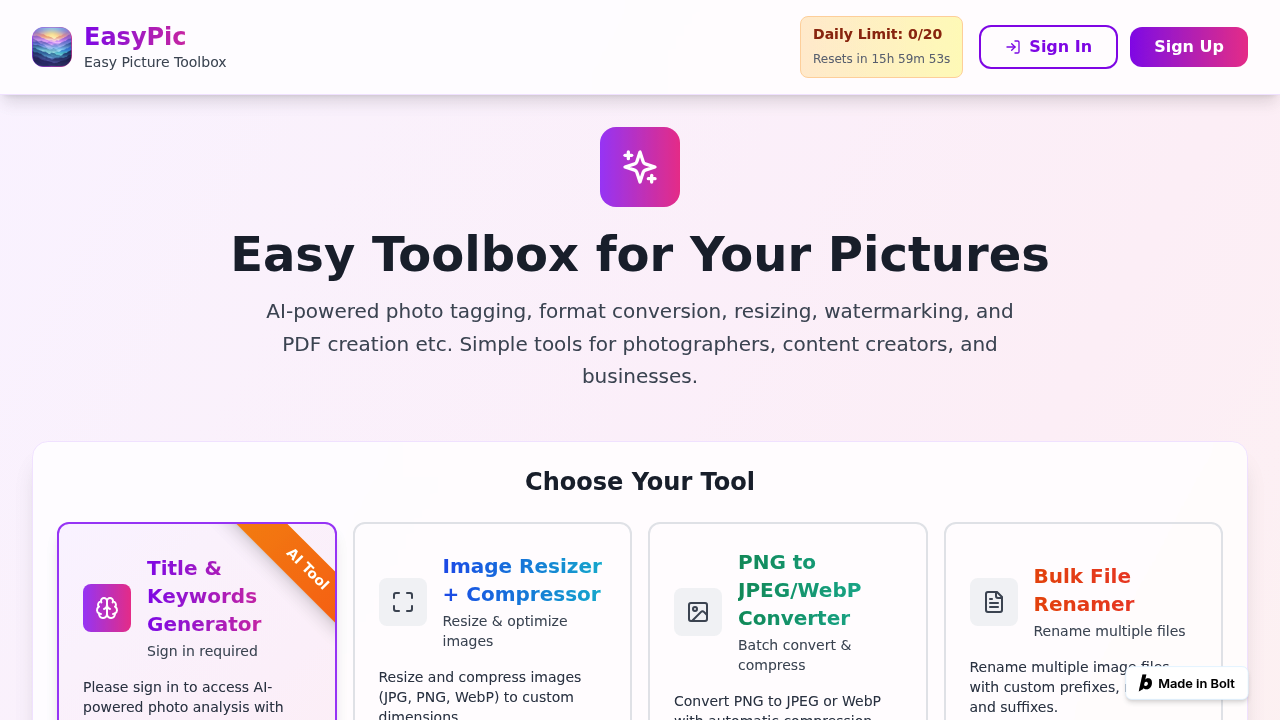
EasyPic.app screenshot

EasyPic.app consolidates photo management tasks into a single browser-based platform. This application handles format conversion between JPG, PNG, and WebP with compression options, batch resizing, watermarking with text or image overlays, and PDF creation from image sets. AI-powered analysis generates titles and keywords for uploaded photos, while additional functions include collage creation, file renaming with custom patterns, and cropping with preset aspect ratios. Files upload via drag-and-drop, and processed images download as batch ZIP files. The free tier allows 20 uses daily with a reset every 24 hours, though AI tagging features require signing in.

Photographers managing large shoots benefit from batch renaming and format conversion when preparing deliverables for clients or stock platforms. Content creators producing social media assets use the resizing and watermarking tools to adapt images across different platform requirements without switching between applications. Small business owners and marketing teams apply the collage generator and PDF converter when assembling product catalogs or visual reports. This service suits users who need quick image processing without installing desktop software, particularly those handling repetitive tasks like watermarking batches of photos or converting file formats for web optimization.

E-commerce teams resize product images to meet marketplace specifications while compressing files to improve page load speeds. Real estate photographers add branded watermarks to property listings before uploading to multiple listing services. Bloggers and newsletter writers convert images to WebP format for faster website performance, then batch-rename files according to SEO-friendly naming conventions. The PDF converter helps educators compile visual teaching materials or allow designers to share mockup presentations. Freelancers working across client projects use the AI keyword generation to organize photo libraries by subject matter, while the daily use limit makes EasyPic.app practical for occasional users who don't need subscription-level volume. The browser-based approach eliminates software installation, making it accessible from any device with internet access.


EasyPic.app alternatives

See all →

Frequently asked

6 questions
What image processing features does EasyPic.app offer?
EasyPic.app handles format conversion between JPG, PNG, and WebP with compression, batch resizing, and watermarking using text or image overlays. The platform includes AI-powered photo analysis that generates titles and keywords, plus tools for creating collages, renaming files in bulk, cropping with preset aspect ratios, and converting images to PDF. All files upload via drag-and-drop and download as batch ZIP files.
Who should use EasyPic.app?
Photographers managing large shoots benefit from batch processing and format conversion when preparing client deliverables or stock submissions. Content creators and social media managers use the resizing and watermarking tools to adapt images across platform requirements, while small business owners and marketing teams apply the collage generator and PDF converter for product catalogs or visual reports.
How do e-commerce teams use EasyPic.app for product images?
E-commerce teams resize product photos to meet marketplace specifications while compressing files to improve page load speeds. The batch watermarking feature adds branded overlays before uploading to multiple listing services, and WebP conversion reduces file sizes for faster website performance. The bulk renaming tool helps organize product image libraries with SEO-friendly naming conventions.
Is EasyPic.app free to use?
EasyPic.app offers a free tier with 20 daily uses that resets every 24 hours. Users must sign in to access AI-powered photo analysis features like title and keyword generation.
Does EasyPic.app have API access or team collaboration features?
EasyPic.app operates as a browser-based tool without API access or team collaboration features. The platform focuses on individual image processing tasks rather than workflow automation or multi-user project management.
What platforms does EasyPic.app work on?
EasyPic.app runs entirely in web browsers, eliminating the need for desktop software installation. This browser-based approach makes the tool accessible from any device with internet access, including computers, tablets, and smartphones.

Traffic

Estimated monthly website visits · last 0 months

Not enough historical data for a chart yet.

Reviews (0)

Write review

No reviews yet. Be the first to share your experience.