
#8 in AI Background Remover EzRemove logo
AI Background Remover FREEMIUM from $5/mo

EzRemove

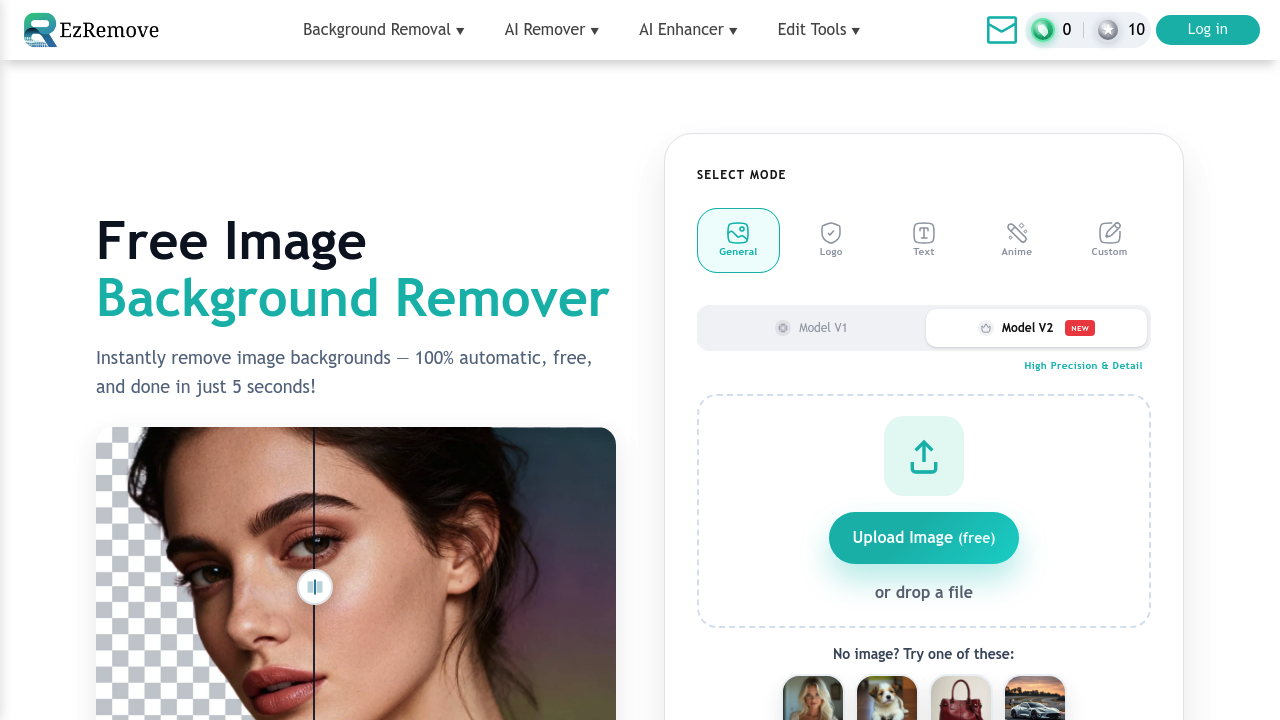
EzRemove processes images through AI models that detect foreground subjects and separate them from backgrounds in under three seconds

This service has processed over 50 million images using two model versions that handle different complexity levels. Model V1 and Model V2 each approach edge detection and transparency mapping differently, giving users…

EzRemove screenshot

EzRemove processes images through AI models that detect foreground subjects and separate them from backgrounds in under three seconds. This service has processed over 50 million images using two model versions that handle different complexity levels. Model V1 and Model V2 each approach edge detection and transparency mapping differently, giving users options based on their image characteristics.

The system offers five specialized removal modes. General mode handles standard photography. Logo mode preserves sharp edges and brand elements. Text mode maintains character clarity. Anime mode accounts for illustrated art styles with distinct color boundaries. Custom mode lets users define specific parameters for unusual image types.

Processing happens entirely through web upload. Users drop an image, select a mode, and the AI segments the subject from background pixels. The output's a transparent PNG where the background's been replaced with alpha channel data. Processing time stays around five seconds regardless of image complexity, suggesting the models prioritize speed over exhaustive detail analysis.

Beyond basic removal, this service includes color replacement and an AI Background Generator. The generator creates new scenes behind subjects rather than leaving transparency. This uses separate generative models, Nano Banana AI and Seedream 4.0, which synthesize backgrounds based on the subject's lighting and perspective. The technical challenge here's matching generated lighting direction and shadow angles to the original subject, though the facts don't specify how well this alignment works in practice.

EzRemove bundles numerous other features. Magic Eraser removes unwanted objects from photos. Text Remover strips text overlays. Object Remover, People Remover, and Cleanup Pictures all target specific element types. There's also batch and video watermark removal, plus enhancement tools like AI Image Upscaler, Photo Enhancer, HD Photo Converter, and Photo Restoration. An AI Image Generator and Image To Image converter round out the suite. Each feature consumes credits from the same pool.

Free users get 20 credits daily but must log in each day to claim them. that is the main limitation. The credit system applies across all premium features, so heavy users of multiple functions will burn through allocations quickly.

Paid tiers work differently than most AI services. They're one-time purchases, not subscriptions. $4.99 gets 70 credits. $9.99 gets 300 credits. $17.90 gets 700 credits. $69.90 gets 3000 credits. $89.90 gets 5000 credits. Credits never expire. The per-credit cost drops as you buy larger packages, ranging from $0.071 per credit down to $0.018 per credit at the highest tier. Enterprise plans offer custom pricing with API access, team collaboration features, priority support, and dedicated account management.

This service targets eCommerce sellers who need clean product shots and social media users creating graphics. It's positioned as simpler than Photoshop for background work, which makes sense given the single-function interface versus learning layer masks and selection tools.

API access exists for enterprise customers, enabling automated batch processing or integration into existing workflows. No browser extension or mobile app's mentioned in the available information. The facts don't list any third-party integrations with design tools, eCommerce platforms, or social media schedulers.

The credit-per-use model means costs scale directly with volume. Each background removal, enhancement, or watermark strip costs credits. Heavy users need to calculate their monthly usage against the one-time package sizes to determine real cost-effectiveness versus subscription competitors.


EzRemove alternatives

See all →

Frequently asked

7 questions
How much does EzRemove cost?
EzRemove operates on a one-time payment model rather than subscriptions. The free plan provides 20 credits daily if you log in each day, with access to all premium tools including background removal and watermark erasers. Paid packages start at $4.99 for 70 credits and scale up to $89.90 for 5000 credits, with per-credit costs dropping from $0.071 to $0.018 as you buy larger bundles. Credits never expire once purchased, so you're paying for lifetime access to a fixed allocation rather than monthly fees.
Can EzRemove handle batch background removal?
The service includes batch watermark removal as a listed feature, but the facts don't specify whether standard background removal supports batch processing for free users. Enterprise plans offer API access, which enables automated batch workflows by integrating EzRemove's processing into your own systems. Each image processed consumes credits from your allocation regardless of whether you're handling files individually or in batches. Processing time runs around three to five seconds per image, so manual batch work through repeated uploads would accumulate that delay across your entire set.
What's the difference between EzRemove's Model V1 and Model V2?
EzRemove offers two model versions that approach edge detection and transparency mapping differently, giving users options based on their specific image characteristics. The technical details of how these models differ aren't specified in available information, but having multiple models suggests they're optimized for different complexity levels or image types. Users select between them alongside the five specialized modes like General, Logo, Text, Anime, and Custom. Both models maintain the same processing speed of under three seconds regardless of image complexity, indicating they prioritize throughput over exhaustive detail analysis.
Does EzRemove work for product photography?
The service specifically targets eCommerce sellers who need clean product shots with transparent or replaced backgrounds. Processing delivers transparent PNGs where background pixels are replaced with alpha channel data, which works well for catalog listings and marketplace photos that require white or custom backgrounds. Logo mode preserves sharp edges and brand elements, which helps maintain product detail during removal. The AI Background Generator can synthesize new scenes behind products using Nano Banana AI and Seedream 4.0 models, though matching generated lighting direction and shadow angles to original subjects presents technical challenges the facts don't detail.
How many images can I process with EzRemove for free?
Free users receive 20 credits per day, but you must log in daily to claim them, they don't accumulate if you skip days. Each use of premium tools including background removal, Magic Eraser, Text Remover, Object Remover, People Remover, and watermark removers consumes credits from this same pool. The facts don't specify how many credits each operation costs, so the actual number of images you can process depends on which features you're using. Heavy users of multiple functions will exhaust the 20-credit daily allocation quickly, making the free tier better suited for occasional use rather than production workflows.
Can EzRemove replace backgrounds with AI-generated scenes?
The AI Background Generator creates new scenes behind subjects using two separate generative models, Nano Banana AI and Seedream 4.0, rather than just leaving transparency. These models synthesize backgrounds based on the subject's lighting and perspective, attempting to match generated lighting direction and shadow angles to the original foreground element. This feature consumes credits from the same pool as background removal and other tools. The technical challenge involves aligning generated environmental lighting with existing subject lighting, though the available information doesn't specify how accurately this alignment performs across different image types or lighting conditions.
Why doesn't EzRemove offer monthly subscriptions?
The service uses one-time purchases with credits that never expire instead of recurring subscription billing. This model means you're buying a fixed allocation upfront rather than paying monthly for unlimited or tiered usage. Per-credit costs decrease significantly with larger packages, from $0.071 per credit at the smallest tier down to $0.018 at the highest, incentivizing bulk purchases. The limitation of this approach is that you need to calculate your actual monthly usage against package sizes to determine cost-effectiveness versus subscription competitors, since heavy users might exhaust even large credit bundles and need repeated purchases.

Traffic

Estimated monthly website visits · last 9 months

2.6M visits/mo
Monthly visits
2.6M
↓ 16.0% MoM
Global rank
#18,976
IN #5,559
Category rank
#8
AI Background Remover
6M 5.1M 4.3M 3.5M 2.6M Dec 2025: 4.1M visits Dec 2025 Jan 2026: 4.6M visits Jan 2026 Feb 2026: 4.2M visits Feb 2026 Mar 2026: 5.4M visits Mar 2026 Apr 2026: 6M visits Apr 2026 May 2026: 4.3M visits May 2026 Jun 2026: 4M visits Jun 2026 Jul 2026: 3.1M visits Jul 2026 Aug 2026: 2.6M visits Aug 2026

Reviews (0)

Write review

No reviews yet. Be the first to share your experience.