
Cap logo
AI Video Recording FREEMIUM from $2/mo

Cap

Cap Pro is the paid cloud tier of Cap, an open source screen recorder, and its main draw is automatic AI processing of every recording.

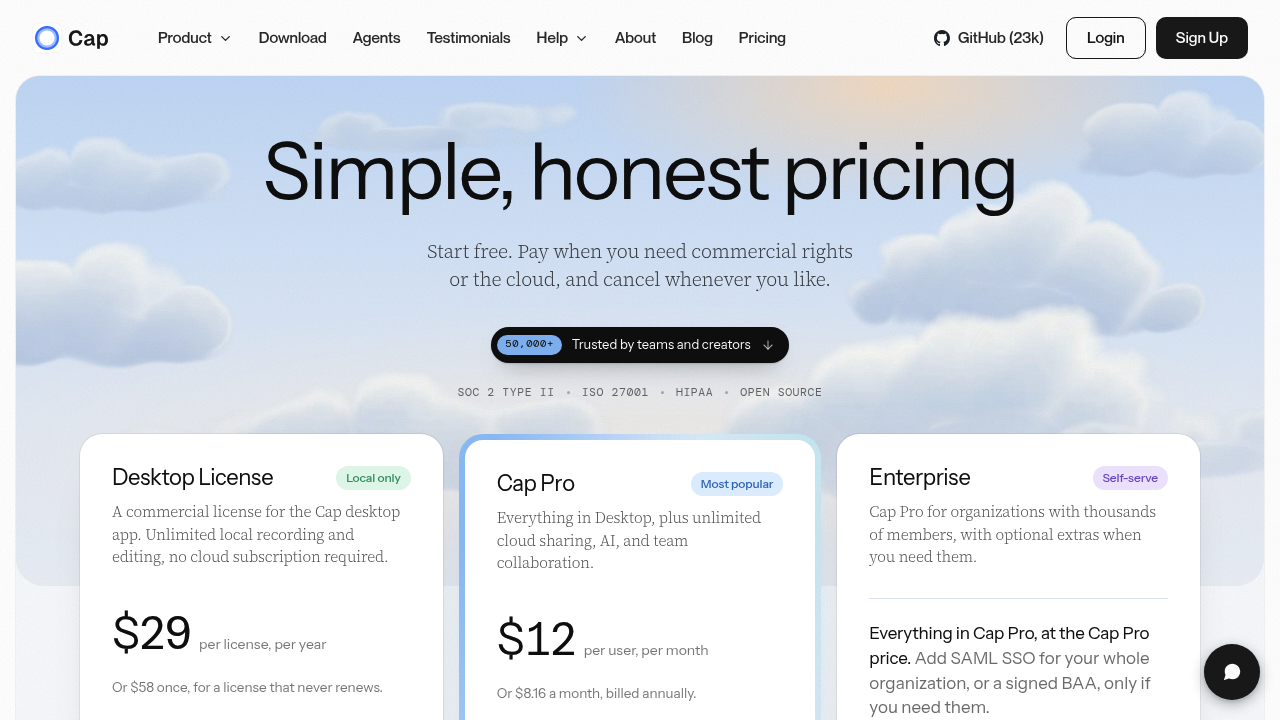
Each upload gets a generated title, a written summary, clickable chapters and a full transcription, so a viewer can jump straight to the part they need. The tier costs $12 per user per month, or $8.16 a month billed…

Cap screenshot

Cap Pro is the paid cloud tier of Cap, an open source screen recorder, and its main draw is automatic AI processing of every recording. Each upload gets a generated title, a written summary, clickable chapters and a full transcription, so a viewer can jump straight to the part they need. The tier costs $12 per user per month, or $8.16 a month billed annually, and adds unlimited cloud storage and bandwidth, custom domains, password protected shares and viewer analytics. A free version covers local recording, and a Desktop License at $29 per year adds commercial rights.

People who record their screen to explain work are the natural audience: product managers walking through a spec, support agents answering a customer, engineers reviewing a pull request, founders sending a demo to investors. Small teams that want a self-hostable Loom replacement fit well, as do larger organizations that need SOC 2 Type II, ISO 27001 or HIPAA compliance. Students can claim a 30 percent discount. Anyone comfortable with a one-click recorder can start without training, and the editor handles polish afterward.

Typical use is async communication. A designer records a walkthrough, shares a link, and teammates read the generated summary or search the transcript instead of watching the full video. Onboarding libraries benefit from chapters, because new hires can skip to the relevant section. Teams moving off Loom can bring old videos in with the importer, point storage at their own S3 bucket or Google Drive, and serve videos from a branded subdomain. Studio Mode offers a full editor with export up to 4K at 60fps, and the open source code on GitHub lets technical teams audit or self-host the product.


Cap alternatives

See all →

Frequently asked

6 questions
What does Cap Pro generate automatically for each recording?
Every recording gets an AI-written title, a summary, clickable chapters and a transcription. Viewers can use the chapters to jump to a section or search the transcript instead of watching the whole video.
Who gets the most out of Cap Pro?
Teams that share screen recordings regularly, such as product, support, engineering and sales groups. Organizations with compliance needs also qualify, since Cap Pro lists SOC 2 Type II, ISO 27001 and HIPAA.
Can Cap Pro replace Loom for async video updates?
As an open source alternative to Loom, Cap offers a path in. A Loom video importer brings existing videos over, and shares can run on a custom domain with password protection and viewer analytics.
How much does Cap Pro cost and is there a free plan?
Cap Pro is $12 per user per month, or $8.16 a month when billed annually. A free version covers local recording with no time limit, and a $29 per year Desktop License adds commercial rights without the AI features.
Are the AI titles and transcripts available on the free plan?
Auto titles, summaries, chapters and transcriptions are only included in Cap Pro. The free plan and the Desktop License do not have them, and free shareable links stop at 5 minutes.
Where can recordings be stored?
Unlimited cloud storage and bandwidth come with Cap Pro. Teams can instead connect their own S3 bucket or Google Drive, and the open source code allows self-hosting.

Reviews (0)

Write review

No reviews yet. Be the first to share your experience.