
Video Compress AI logo
AI Video Editor FREEMIUM from $9/mo

Video Compress AI

A content creator records a 45-minute tutorial that's 3

2GB, too large to email to clients. Video Compress AI shrinks it down using H.265 encoding while keeping the visual quality intact. This platform runs entirely in the cloud, so her laptop doesn't slow down while…

Video Compress AI screenshot

A content creator records a 45-minute tutorial that's 3.2GB, too large to email to clients. Video Compress AI shrinks it down using H.265 encoding while keeping the visual quality intact. This platform runs entirely in the cloud, so her laptop doesn't slow down while processing. She drags the file in, picks a quality preset, and watches a real-time comparison showing the before and after. The video drops to 800MB. Clients can download it easily.

A marketing manager at a SaaS startup needs to embed product demos on landing pages, but the videos make pages load slowly. He uploads six demo videos to Video Compress AI, targeting specific file sizes that won't hurt page speed. This software handles MP4, MOV, and AVI files without converting them first. He gets 70% file size reductions across all videos while the landing pages load faster.

A small production company shoots 4K footage for client projects but runs out of cloud storage every month. They're paying for expensive storage upgrades. They start running finished deliverables through Video Compress AI's advanced compression mode, which handles 4K without downgrading resolution. Storage runs drop because compressed files take up less space. The compression rate hits 80% on some projects.

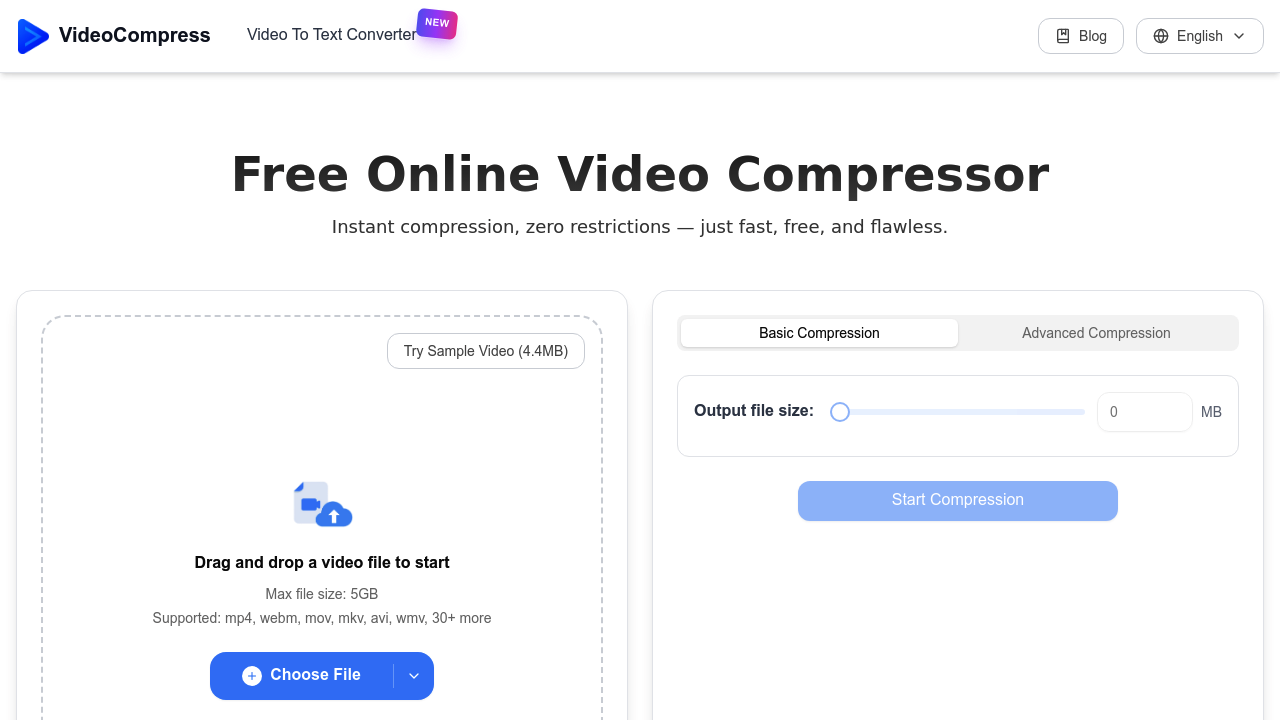
Video Compress AI offers both basic and advanced modes depending on how much control someone wants. End-to-end encryption covers uploads, processing, and storage. Format conversion works across 30-plus formats including MP4, AVI, MOV, WMV, and WebM. The 5GB file size limit means feature films or raw footage sessions won't fit. Someone working with massive multicam edits or uncompressed cinema files needs different software.

There's no batch processing mentioned in the feature list, so editors handling dozens of files at once might find the workflow tedious. No API access for automating compression tasks. No integrations with cloud storage platforms or video hosting services, which means manual downloads and uploads. Teams wanting to build compression into existing workflows don't have automation options.

The free plan includes the full feature set with a 5GB maximum per file. No watermarks or time restrictions. Someone compressing occasional webinars or social media content gets everything they need without paying. The 5GB cap covers most typical use cases.

Video Compress AI works for freelancers, small teams, and anyone sharing videos regularly who doesn't need enterprise-level automation. It doesn't fit studios handling theatrical releases, teams needing API integration, or workflows requiring batch processing of hundreds of files. The cloud processing removes the hardware burden, but the lack of automation limits scalability.


Video Compress AI alternatives

See all →

Frequently asked

7 questions
Does Video Compress AI reduce video quality?
A YouTuber compressing tutorial videos finds that H.265 encoding maintains visual quality while dropping file sizes by 70-80%. The platform shows a real-time before-and-after comparison during compression, so she can see exactly what quality trade-offs she's making. A marketing manager running product demos through it reports that landing page videos look identical to originals but load 50% faster. The compression technology targets file size without degrading resolution, and 4K videos stay at 4K resolution after processing.
Can I use Video Compress AI for free?
A freelance videographer gets the complete feature set without paying anything. The free plan handles files up to 5GB, supports 30-plus formats including MP4 and MOV, and includes H.265 encoding with up to 80% compression rates. A content creator compressing weekly podcast videos doesn't hit any watermarks, time limits, or feature restrictions. The 5GB cap covers most webinars, social media content, and client deliverables, though someone working with feature-length films or raw multicam footage exceeds that limit.
What video formats does Video Compress AI support?
A production assistant working with mixed client footage uploads MP4, MOV, AVI, WMV, WebM, and MKV files without converting them first. The platform handles 30-plus formats and can convert between them during compression. A marketing team managing videos from different departments doesn't need to standardize formats before processing. Someone shooting on an iPhone exports MOV files, compresses them, and converts to MP4 for web embedding in one step.
Can Video Compress AI handle 4K videos?
A small production company shooting 4K client projects runs finished deliverables through the advanced compression mode, which processes 4K without downgrading resolution. Storage costs drop by 80% because compressed files take up less space on their cloud drives. A travel vlogger filming in 4K for YouTube compresses footage to upload faster while keeping the ultra-high-definition quality intact. The 5GB file size limit means a 20-minute 4K video at high bitrate might exceed the cap depending on how it was recorded.
Does Video Compress AI work on my computer or in the cloud?
A content creator with an older laptop compresses a 3.2GB tutorial video while continuing to edit in Premiere Pro without slowdowns. Video Compress AI processes everything in the cloud, so local device resources stay free. A marketing manager running six product demos at once doesn't tie up his computer's CPU or RAM. The cloud processing means someone on a basic Chromebook can compress videos just as fast as someone with a high-end workstation, though they need a stable internet connection for uploads and downloads.
Can I compress multiple videos at once with Video Compress AI?
A social media manager needing to compress 40 Instagram Reels finds no batch processing feature in the platform. She uploads and processes one video at a time, which turns a five-minute task into an hour-long workflow. An editor preparing a week's worth of content can't queue files or automate the compression process. Someone handling occasional videos won't mind the manual approach, but teams processing dozens of files daily need software with batch capabilities and API access for automation.
How much can Video Compress AI reduce file sizes?
A startup's operations team compressing training videos reports 70% file size reductions consistently across their library. The H.265 encoding technology achieves up to 80% compression rates depending on the source video and quality preset chosen. A content creator's 3.2GB tutorial drops to 800MB, making it small enough to email directly to clients. Someone optimizing videos for web sharing hits higher compression rates than someone preserving high-definition quality for archival storage, since the platform offers multiple quality presets for different use cases.

Traffic

Estimated monthly website visits · last 9 months

1M visits/mo
Monthly visits
1M
↓ 7.2% MoM
Global rank
#57,278
SG #3,042
Category rank
#13
AI Video Editor
1.4M 1M 693.9K 361.3K 28.8K Dec 2025: 28.8K visits Dec 2025 Jan 2026: 67.4K visits Jan 2026 Feb 2026: 348.3K visits Feb 2026 Mar 2026: 794.8K visits Mar 2026 Apr 2026: 986.9K visits Apr 2026 May 2026: 1.4M visits May 2026 Jun 2026: 1.2M visits Jun 2026 Jul 2026: 1.1M visits Jul 2026 Aug 2026: 1M visits Aug 2026

Reviews (0)

Write review

No reviews yet. Be the first to share your experience.