TalkToText logo

TalkToText

Voice transcription software that runs system-wide across any application with a single hotkey

33 views
TalkToText screenshot

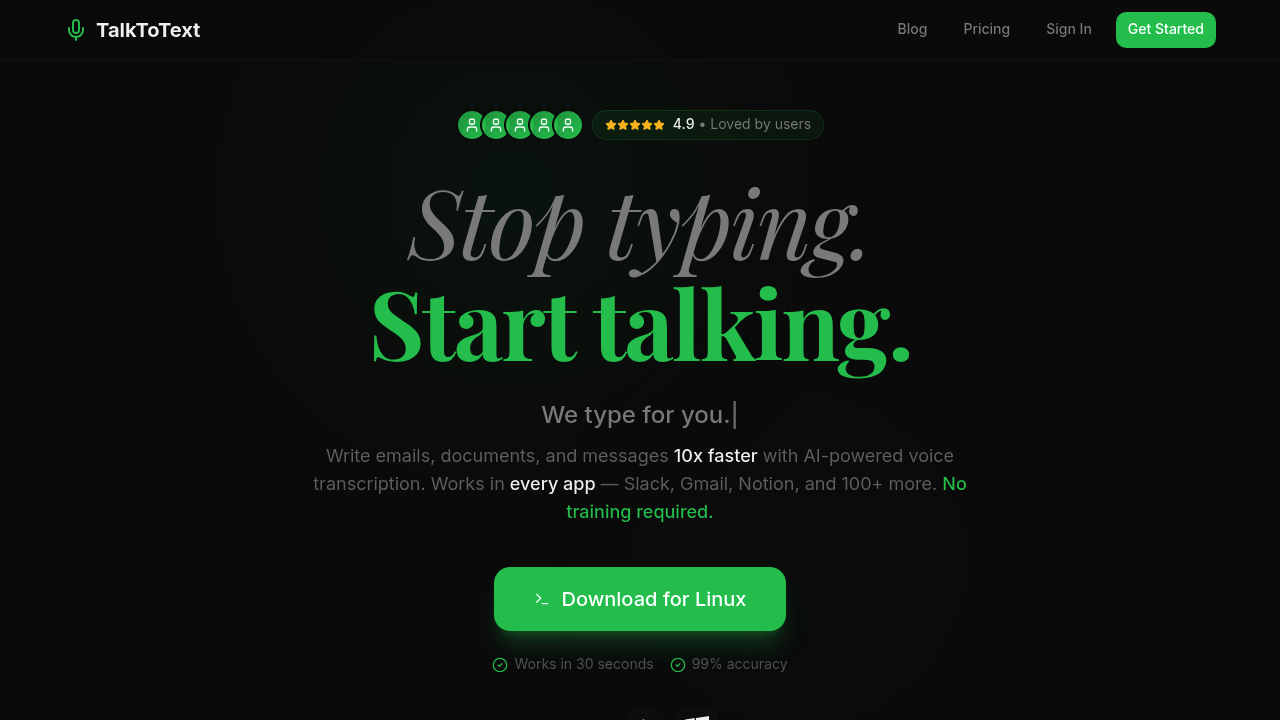
Voice transcription software that runs system-wide across any application with a single hotkey. TalkToText converts speech to text in real-time, processing audio locally on your device rather than sending it to cloud servers. The software installs as a 50MB lightweight application that activates with one keyboard shortcut, letting you dictate into any text field regardless of which program's active.

The system operates in two distinct modes. Type for Me handles pure dictation, transcribing your speech directly without modification. Write for Me adds an AI layer that enhances the transcription by adjusting tone, fixing grammar, and formatting paragraphs automatically. Both modes claim 99% accuracy and process speech at 360 words per minute, compared to the typical 40 words per minute for keyboard typing.

The technical architecture keeps all voice data on your local machine. No audio gets transmitted to external servers, which means the software works completely offline once installed. This approach differs from cloud-based transcription services that require constant internet connectivity and process audio remotely. The on-device processing also eliminates latency issues common with cloud transcription, though it means the software's performance depends entirely on your local hardware capabilities.

Auto punctuation happens during transcription. The system inserts periods, commas, and paragraph breaks based on speech patterns and pauses. Command mode lets you issue voice instructions for editing, like deleting words or moving sentences, without switching to keyboard input.

The software doesn't require training on your voice or accent. It works immediately after installation. No calibration phase. This suggests the underlying speech recognition model was pre-trained on diverse voice data, though the specific model architecture isn't disclosed in the provided information.

Integration happens at the operating system level rather than through individual app connections. Since it injects text into any active text field, it works across Slack, Gmail, Notion, VS Code, Discord, Figma, Linear, Microsoft Teams, GitHub, WhatsApp, Google Docs, Zoom, Trello, Asana, Jira, Dropbox, Airtable, Monday, Canva, HubSpot, Salesforce, and over 100 other applications without requiring app-specific setup or permissions. The system functions by mimicking keyboard input, which means any application that accepts typed text will accept dictated text.

Language support extends to 100+ languages, though the documentation specifically mentions 28 languages for certain plans. This discrepancy in the numbers isn't explained. Whether all features work equally across all supported languages also isn't specified.

Monthly plans cost $19. The yearly option runs $15 per month when billed annually at $180, saving $48 compared to monthly billing. Team plans drop to $12 per user monthly and include admin dashboards and shared billing. A three-day free trial's available for yearly plans, and there's a seven-day money-back guarantee. All paid tiers include unlimited transcriptions, offline mode, and command mode for editing.

The system shows a 4.9 rating, though the source and sample size of this rating aren't provided. Marketing materials claim users save two hours daily and that the software works within 30 seconds of installation, though these figures represent estimated time savings rather than measured performance metrics. The actual time savings would vary considerably based on how much writing someone does and how comfortable they are with voice dictation versus typing.


Frequently asked

7 questions
Is there a free version of TalkToText?
TalkToText doesn't offer a free plan. The service starts at $12 per user monthly for team plans, $15 monthly when billed annually, or $19 for month-to-month billing. You can test it through a three-day free trial on yearly plans, and all purchases include a seven-day money-back guarantee. The lowest entry point is the yearly plan at $180 upfront, which breaks down to $15 monthly.
How does TalkToText work offline without internet?
TalkToText processes all voice data locally on your device rather than sending audio to cloud servers. The speech recognition model runs entirely on your machine after the initial 50MB installation, which means transcription happens without any network calls. This architecture eliminates the latency you'd get from uploading audio and waiting for server responses. The tradeoff is that performance depends completely on your local hardware specs rather than scalable cloud infrastructure.
Does TalkToText work with Google Docs and Slack?
TalkToText operates at the system level rather than integrating with specific apps individually. It activates with a single hotkey and injects text into whatever field's currently active, whether that's Google Docs, Slack, Gmail, Notion, VS Code, Discord, Microsoft Teams, or any of the 100+ supported applications. The software mimics keyboard input, so any application that accepts typed text will accept dictated text. This means you don't need to configure permissions or install plugins for each app separately.
Can TalkToText transcribe meeting recordings or audio files?
The provided documentation only describes real-time dictation into active text fields through a hotkey activation. There's no mention of uploading pre-recorded audio files or transcribing existing recordings. TalkToText appears designed specifically for live speech-to-text conversion while you're actively working in applications. If you need to transcribe recorded audio, the current feature set doesn't explicitly support that workflow.
What's the difference between Type for Me and Write for Me modes?
Type for Me transcribes your speech verbatim without modification, converting audio directly to text. Write for Me adds an AI processing layer that enhances the transcription by adjusting tone, fixing grammar, formatting paragraphs automatically, and improving overall readability. Both modes operate at 99% accuracy and 360 words per minute. The choice depends on whether you want raw dictation or AI-polished output, and you can switch between modes using the same hotkey system.
How accurate is TalkToText compared to typing?
TalkToText claims 99% transcription accuracy and processes speech at 360 words per minute, compared to the average typing speed of 40 words per minute. This represents roughly 10 times faster input than keyboard typing. The system doesn't require training on your voice or accent and works immediately after installation. Auto punctuation happens during transcription based on speech patterns and pauses, so you don't need to verbally say punctuation marks.
Does TalkToText support languages other than English?
TalkToText supports 100+ languages, though the pricing documentation specifically mentions 28 languages for certain plan tiers. This discrepancy isn't explained in the available information. The software doesn't specify whether all features like AI enhancement, command mode, or auto punctuation work equally across all supported languages. Language processing happens on-device like all other transcription, so offline functionality applies regardless of which language you're using.

Reviews (0)

No reviews yet. Be the first to share your experience.

Similar tools

See all →