Pixwith AI logo
AI Video Generator FREEMIUM from $10/mo

Pixwith AI

Pixwith AI consolidates multiple video and image generation models into a single interface, routing user prompts through seven different AI systems depending on the selected model

Instead of maintaining separate subscriptions to OpenAI's Sora, Google's Veo, Kling, Wan, or the Flux variants, users access all these models through one interface. This system operates through a straightforward…

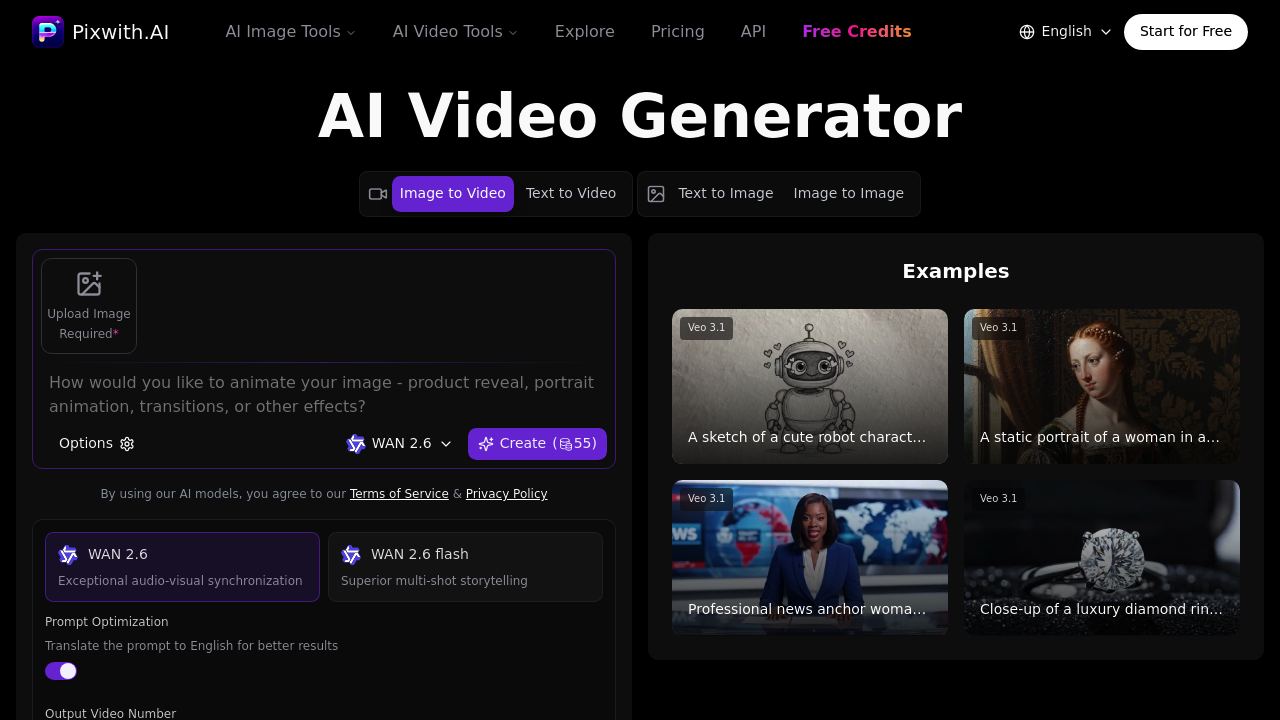
Pixwith AI screenshot

Pixwith AI consolidates multiple video and image generation models into a single interface, routing user prompts through seven different AI systems depending on the selected model. Instead of maintaining separate subscriptions to OpenAI's Sora, Google's Veo, Kling, Wan, or the Flux variants, users access all these models through one interface.

This system operates through a straightforward input-output pipeline. Users submit either text prompts or images, select their preferred AI model, and specify technical parameters like aspect ratio and output count. For image generation, the system supports text-to-image creation and image-to-image transformations, producing between one and four images per generation across seven aspect ratios ranging from square 1:1 to widescreen 16:9. The image extender function expands existing images beyond their original boundaries, useful for adapting content to different formats.

Video generation works through two primary pathways. Text-to-video converts written descriptions directly into video clips, while image-to-video animates static images. Duration flexibility ranges from five seconds to a full minute, with the exact capabilities varying by model. The Sora 2, Veo, and Wan 2.5 models include audio synthesis, generating sound and voice to match the visual content without requiring separate audio tools.

Each model in the pipeline operates differently under the hood. Sora, Veo, Kling, and Wan represent distinct approaches to video generation, trained on different datasets with varying strengths in motion quality, prompt adherence, and scene composition. The Flux variants, Dev, Pro, and Pro Ultra, offer escalating quality tiers for image generation. This model diversity means users can test the same prompt across different systems to compare results.

This service includes a prompt optimization feature with English translation, automatically refining user inputs for better model performance. This preprocessing step can improve output quality, particularly when the original prompt lacks specificity or uses non-English language. Digital human creation adds another layer, generating speaking avatars from text or image inputs.

All outputs come watermark-free from the first render. No paid tier required. Every model produces clean files immediately, which matters for commercial use where watermarks create additional editing work.

API access opens the system's functionality to developers building automated content pipelines or integrating generation capabilities into existing applications. This technical integration path means the model consolidation benefits extend beyond the web interface to programmatic workflows.

New users receive trial credits upon registration, allowing exploration of all models and features without immediate payment commitment. This lets creators test different models against their specific use cases before deciding whether this service fits their workflow.

The technical challenge with multi-model systems involves maintaining consistent interfaces across systems with different input requirements and output characteristics. Each underlying model has unique parameter sets and optimal prompt structures. This interface abstracts these differences but can't eliminate them entirely, meaning results still vary considerably between models for identical inputs.

Model availability depends on the upstream providers. If Sora or Veo experience downtime or API changes, those specific generation paths become unavailable. This service doesn't control the underlying model infrastructure, only the access layer. Output quality limitations inherit directly from whichever model you're using. Resolution caps, motion artifacts, and prompt interpretation quirks all trace back to the base models themselves rather than this implementation.


Pixwith AI alternatives

See all →

Frequently asked

7 questions
Can you generate AI videos for free with Pixwith AI?
New users get trial credits upon registration that work across all seven integrated AI models, including OpenAI Sora, Google Veo, Kling, Wan, and the Flux variants. These credits let you test text-to-video, image-to-video, and all image generation features without paying upfront. Video outputs range from 5 to 60 seconds depending on the model you select, and everything renders without watermarks even during the trial period. Once trial credits run out, you'll need to add funds to continue generating content.
What AI models does Pixwith AI use for video generation?
The platform routes requests through four primary video generation systems: OpenAI's Sora, Google's Veo, Kling, and Wan. Each model processes prompts differently based on its training data and architecture, which means identical text inputs produce noticeably different results across models. Sora 2, Veo, and Wan 2.5 include built-in audio synthesis that generates sound and voice alongside visuals, while other models produce silent video that requires separate audio work. This multi-model approach lets you run the same prompt through different systems to compare motion quality, prompt adherence, and scene composition before selecting your preferred output.
How long can AI-generated videos be on Pixwith AI?
Video duration spans from a minimum of 5 seconds to a maximum of 60 seconds, though exact limits vary depending on which AI model you're using. The system doesn't specify which models support the full 60-second range versus shorter caps, so you'll discover these constraints when selecting duration parameters for specific models. This limitation exists at the base model level rather than being imposed by the platform itself. Longer videos require more computational resources and increase generation time, which affects both processing speed and credit consumption.
What happens if one of the AI models goes down or stops working?
Since Pixwith AI functions as an access layer to seven different upstream AI systems, it doesn't control the underlying infrastructure for Sora, Veo, Kling, Wan, or the Flux models. When an upstream provider experiences API changes, downtime, or service interruptions, that specific generation path becomes unavailable until the provider resolves the issue. The other models continue functioning independently, so you can switch to an alternative system if your preferred model is temporarily inaccessible. This dependency structure means availability and output quality trace directly back to whichever base model you're using rather than being managed by this platform.
Can Pixwith AI turn images into videos?
The image-to-video function takes static images and animates them through the same AI models used for text-to-video generation. You upload an image, select your preferred model from the available options, and the system processes it into a video clip lasting between 5 and 60 seconds. This works differently from text-to-video because the model uses your image as a starting frame and generates motion from there, rather than synthesizing everything from scratch. Results vary considerably between models since each system handles motion extrapolation and scene understanding differently, so testing the same image across multiple models often reveals which one best suits your specific animation needs.
Does Pixwith AI add watermarks to generated content?
All outputs render completely watermark-free from the first generation, regardless of which AI model you're using or whether you're on trial credits. This applies to both images and videos across Sora, Veo, Kling, Wan, and all Flux variants without requiring a paid subscription tier. The clean output matters for commercial use cases where watermarks create additional editing work to remove or cover. Most platforms reserve watermark-free rendering for paid tiers, so this represents a notable difference in how the service structures its output delivery.
What aspect ratios and image formats does Pixwith AI support?
Image generation offers seven aspect ratio options: square 1:1, portrait formats 3:4, 2:3, and 9:16, plus landscape formats 4:3, 3:2, and 16:9. Each generation produces between one and four images depending on your selected output count, letting you create multiple variations from a single prompt. The image extender function expands existing images beyond their original boundaries, which helps adapt content to different platform requirements without cropping or distortion. These format options work across all integrated image models including Flux Dev, Flux Pro, and Flux Pro Ultra, though the quality and interpretation of aspect ratio constraints varies between models.

Traffic

Estimated monthly website visits · last 0 months

Global rank
#6,340,763

Not enough historical data for a chart yet.

Reviews (0)

Write review

No reviews yet. Be the first to share your experience.