MyHeritage Photo Enhancer logo
AI Photo Restoration FREEMIUM from €8/mo

MyHeritage Photo Enhancer

MyHeritage Photo Enhancer sharpens blurry, low-resolution family photos by upscaling the faces in them.

The face enhancement technology was licensed from the creators of the Remini mobile app, and it works on old black and white prints as well as newer color shots. Users can click through a group photo face by face to…

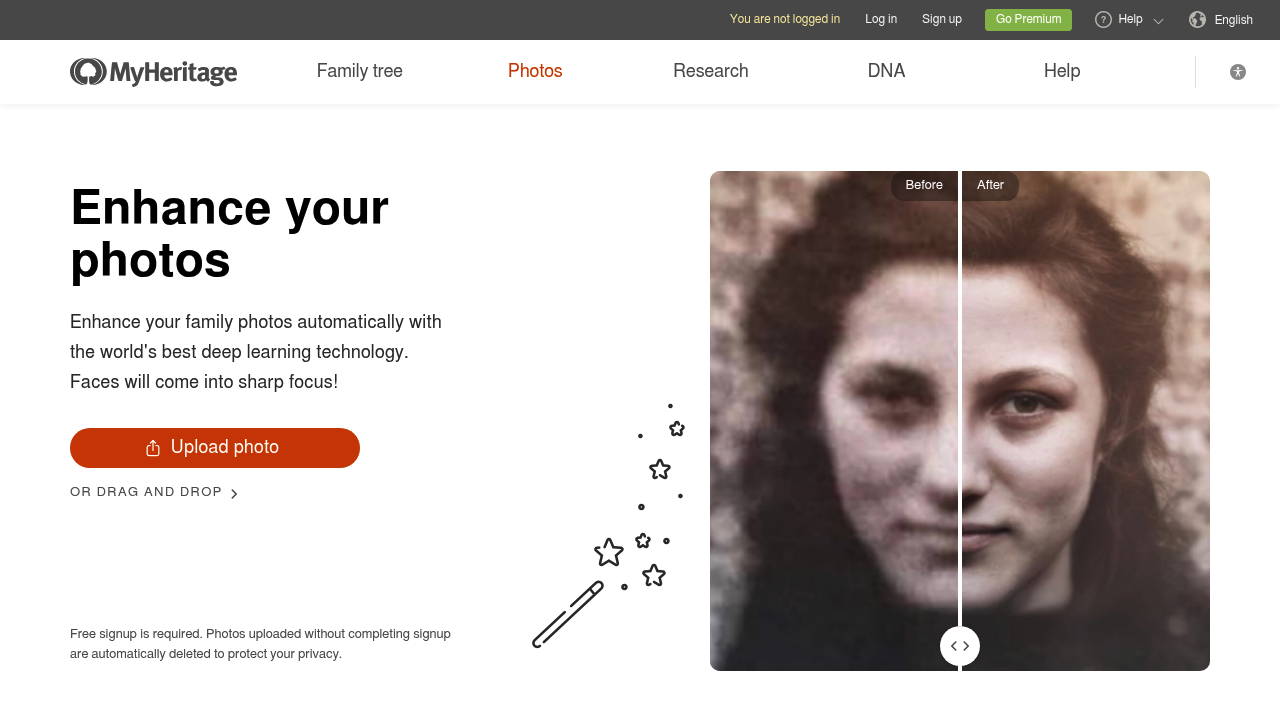
MyHeritage Photo Enhancer screenshot

MyHeritage Photo Enhancer sharpens blurry, low-resolution family photos by upscaling the faces in them. The face enhancement technology was licensed from the creators of the Remini mobile app, and it works on old black and white prints as well as newer color shots. Users can click through a group photo face by face to compare the before and after versions. The same account also gives access to Deep Nostalgia, which animates still portraits into short videos of a person smiling, blinking and turning their head, and to MyHeritage In Color for colorizing black and white images. A free MyHeritage account is required to run an enhancement, and photos uploaded without finishing signup are deleted automatically. It sits inside a family-history service, but the photo features work on any picture.

Hobbyist genealogists who inherited shoeboxes of faded portraits are the obvious audience, since historical photos often have tiny, soft faces that benefit most from upscaling. Relatives preparing a memorial slideshow, a wedding anniversary display or a family reunion poster will find it useful for lifting old group shots to a presentable quality. No editing skills are needed: you upload a file, wait a moment and review the result. People who want fine manual retouching control, layers or batch pipelines should look at a full photo editor instead.

A typical workflow starts with scanning a physical album page, uploading the scan, and enhancing the faces of grandparents or great-grandparents in a wedding portrait. The enhanced copy can then be saved to a family photo collection, shared with relatives by link, or printed for framing. Photos that were already colorized with MyHeritage In Color can be enhanced afterwards for a cleaner final image. Deep Nostalgia adds a second step for people who want movement: the enhanced still is animated with preset gestures, producing a short clip for social media or a family chat. Enhanced images carry a small magic wand icon in the corner, which marks them as processed copies and keeps the originals untouched.


MyHeritage Photo Enhancer alternatives

See all →

Frequently asked

6 questions
How does MyHeritage improve a blurry photo?
It upscales the faces that appear in the picture, increasing their resolution so features come into focus. The technology was licensed from the creators of the Remini app. Multi-person photos can be reviewed face by face.
Who gets the most out of the Photo Enhancer?
People working with historical family pictures benefit most, because faces in old prints are often small and soft. Genealogy hobbyists, relatives preparing memorials and small archives are typical users. It also works on newer color photos.
Can I animate an old portrait as well as enhance it?
Deep Nostalgia, available from the same account, animates faces in still photos using prepared driver videos with fixed gestures. Your relatives can be shown smiling, blinking and turning their heads. The result is a short video you can share.
Do I need an account to enhance a photo?
A free MyHeritage signup is required to complete an enhancement. Photos uploaded without finishing signup are deleted automatically for privacy. Enhanced copies do not replace your original uploads.
What kinds of photos does it handle less well?
Enhancement works best on pictures that contain faces, and it is strongest on photos with several people. Scenery, text and objects are not the focus of the face upscaling. Heavy manual retouching is outside its scope.
Can I enhance photos that are already colorized?
Pictures colorized with MyHeritage In Color can be enhanced afterwards. Photos already stored in your MyHeritage account can be processed too. Paper albums need to be scanned first and then uploaded.

Reviews (0)

Write review

No reviews yet. Be the first to share your experience.