#4 in AI Tattoo Generator My Tattoo Ideas logo

My Tattoo Ideas

This tool generates custom tattoo designs from text prompts and shows how they'll look on actual body parts

Type what you want, pick from 12 professional styles (Neo-Traditional, Realism, Irezumi, Watercolor, Blackwork, Geometric, Biomechanical, Dark Art Sketch, Fine Line, American Traditional, Engraving, Surrealism), and it…

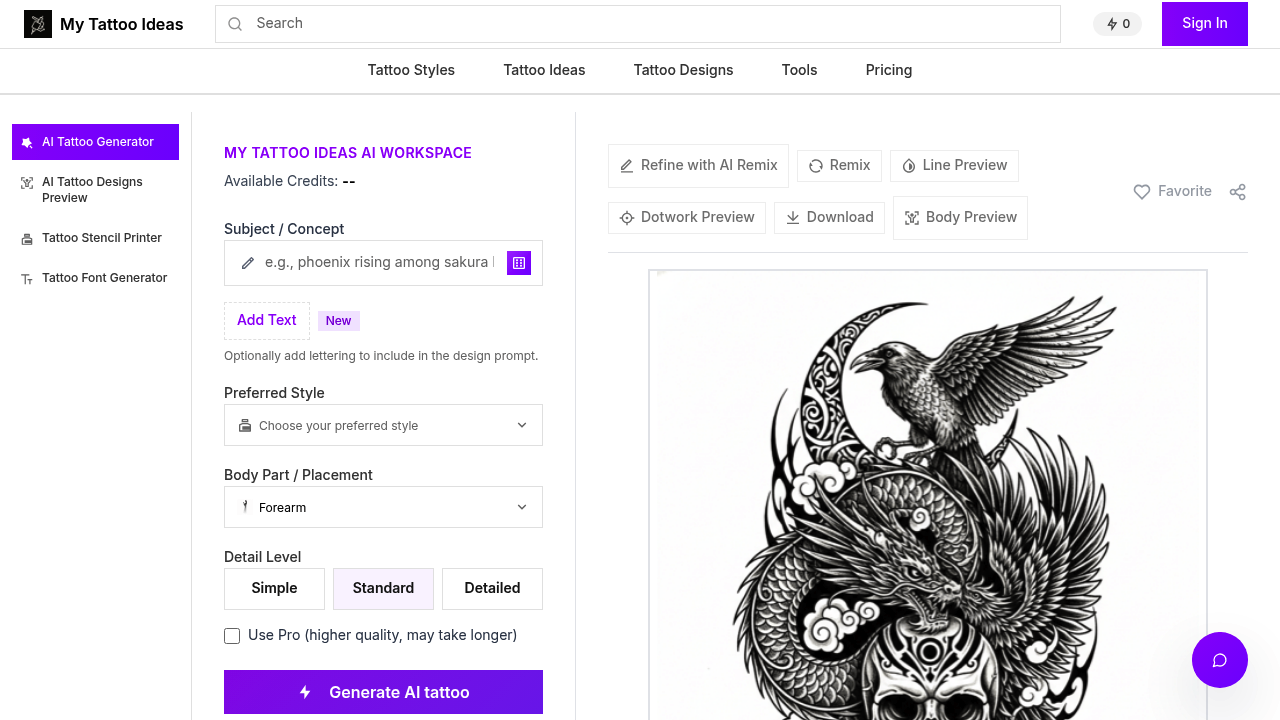
My Tattoo Ideas screenshot

This tool generates custom tattoo designs from text prompts and shows how they'll look on actual body parts. Type what you want, pick from 12 professional styles (Neo-Traditional, Realism, Irezumi, Watercolor, Blackwork, Geometric, Biomechanical, Dark Art Sketch, Fine Line, American Traditional, Engraving, Surrealism), and it creates a design. The real trick is the body placement preview that adapts designs to real anatomy across 13 different spots like Full Sleeve, Half Sleeve, Forearm, Upper Arm, Chest, Back, Shoulder, Thigh, Calf, Ribs, and Spine.

Each body part gets smart aspect ratio templates. Full Sleeve uses 2:5, Forearm uses 3:4, Hand uses 1:1. The system adjusts designs to fit the natural curves and proportions of where you want the ink. You can preview how a design looks on different body parts without creating multiple versions.

Three detail levels let you control complexity. Simple for minimalist designs, Standard for everyday work, Detailed for complex pieces. The AI Remix feature refines existing designs when the first attempt needs tweaking. Line Preview and Dotwork Preview modes show different rendering styles. The Tattoo Stencil Printer converts designs into printable stencils and prep sheets. There's also a Tattoo Font Generator for text-based designs.

Here's the catch. Credits run out fast. You get 6 free credits with no signup required, but every action costs 2 credits. That's 3 complete workflows total. Design costs 2 credits. Edit costs 2 more. Body placement preview costs another 2. If you want to see your design on three different body parts, you're burning through credits quickly. Pro mode generates higher quality but takes longer.

This tool combines what's usually separate tools. Most AI tattoo generators stop at image creation. This one adds body visualization and stencil printing in one workspace. That matters if you're bouncing between tattoo artists and clients trying to nail down a final design.

Works best for early-stage exploration. Not for fine-tuning tiny details. The 12 styles cover major tattoo categories, but if your artist specializes in a hybrid style, the generator might not capture it. The body preview helps avoid the "looked good on paper, terrible on skin" problem, but it's still a preview. Real skin, real ink, real artist skill changes everything.

Six free credits won't get you far if you're indecisive. You'll need to know roughly what you want before starting. But for visualizing an idea and seeing it on your actual arm or back before committing to a tattoo appointment, it cuts out guesswork.

My Tattoo Ideas alternatives

See all →

Frequently asked

7 questions
How many free tattoo designs can you generate on My Tattoo Ideas?
Claim: 'Free unlimited designs.' Reality: 6 free credits with no signup required. Each action (design creation, edit, or body placement preview) costs 2 credits. That means 3 complete workflows total if you're generating, editing, and placing one design. Want to see one design on three different body parts? You'll use all 6 credits just on placement previews. Generate three different designs without editing or placement? Also 6 credits. The free tier runs out fast if you're exploring multiple options or indecisive about style.
Can AI tattoo generators really show how a design looks on your body?
My Tattoo Ideas does this through 13 body placement templates with smart anatomy adaptation. You pick where you want the tattoo (Full Sleeve, Forearm, Chest, Back, Thigh, Calf, Ribs, Spine, etc.) and it adjusts the design to fit that body part's natural proportions. Full Sleeve uses 2:5 aspect ratio, Forearm uses 3:4, Hand uses 1:1. The system adapts designs to curves and dimensions of each spot. But it's still a digital preview, not actual skin. Real ink on real body with real artist technique will differ from what you see on screen.
What tattoo styles can the AI generator create?
The tool offers 12 professional styles: Neo-Traditional, Realism, Irezumi, Watercolor, Blackwork, Geometric, Biomechanical, Dark Art Sketch, Fine Line, American Traditional, Engraving, and Surrealism. Each style has distinct characteristics the AI attempts to replicate. You also get 3 detail levels (Simple, Standard, Detailed) to control complexity. If your artist works in a hybrid style or something outside these 12 categories, the generator might miss the mark. The styles cover major tattoo categories but won't capture every niche approach.
Does My Tattoo Ideas work without creating an account?
The 6 free credits load instantly with no signup required. You can start generating designs, editing them, and previewing body placements immediately. Each action costs 2 credits whether you have an account or not. Once those 6 credits run out, the free tier is exhausted. There's no mention of paid plans or credit refills in the available information, so the limitation appears hard. For quick exploration of 2-3 design concepts, no account needed works fine.
Can you print tattoo stencils from AI-generated designs?
The Tattoo Stencil Printer feature converts AI designs into downloadable stencils and prep sheets. After generating a design you like, you can turn it into a printable format that tattoo artists use for transfer. This bridges the gap between digital concept and actual tattooing process. You also get Line Preview and Dotwork Preview modes to see different rendering styles before printing. The stencil quality depends on the AI design quality, and Pro mode generates higher quality output but takes longer to process.
What happens when the AI tattoo design isn't quite right?
The AI Remix feature lets you refine designs that need tweaking, but it costs another 2 credits per edit. If your first design misses the mark, you can adjust and regenerate. With only 6 free credits total, you get maybe one design with two rounds of editing, or three designs with no edits. The limitation hits hard if you're experimenting with multiple concepts or refining details. Pro mode offers higher quality generation but doesn't solve the credit constraint. You'll need to nail your text prompt and style selection early to avoid burning credits on iterations.
Who should use an AI tattoo generator instead of going straight to an artist?
This tool targets people who need to visualize concepts before booking a tattoo session. If you've got a vague idea but can't articulate it to an artist, generate a few designs to clarify what you want. Tattoo artists can use it for client consultations to show quick mockups. The body placement preview helps avoid committing to a design that looks great on paper but terrible on your actual shoulder or calf. It cuts out early-stage guesswork, but it doesn't replace artist consultation. Real tattoo artists adjust for skin tone, body movement, aging, and technical execution that AI previews can't capture.

Traffic

Estimated monthly website visits · last 6 months

810 visits/mo
Monthly visits
810
↑ 102.5% MoM
Category rank
#4
AI Tattoo Generator
3K 2.3K 1.5K 759 0 Dec 2025: 3K visits Dec 2025 Jan 2026: 1.6K visits Jan 2026 Feb 2026: 0 visits Feb 2026 Mar 2026: 238 visits Mar 2026 Apr 2026: 400 visits Apr 2026 Aug 2026: 810 visits Aug 2026

Reviews (0)

Write review

No reviews yet. Be the first to share your experience.