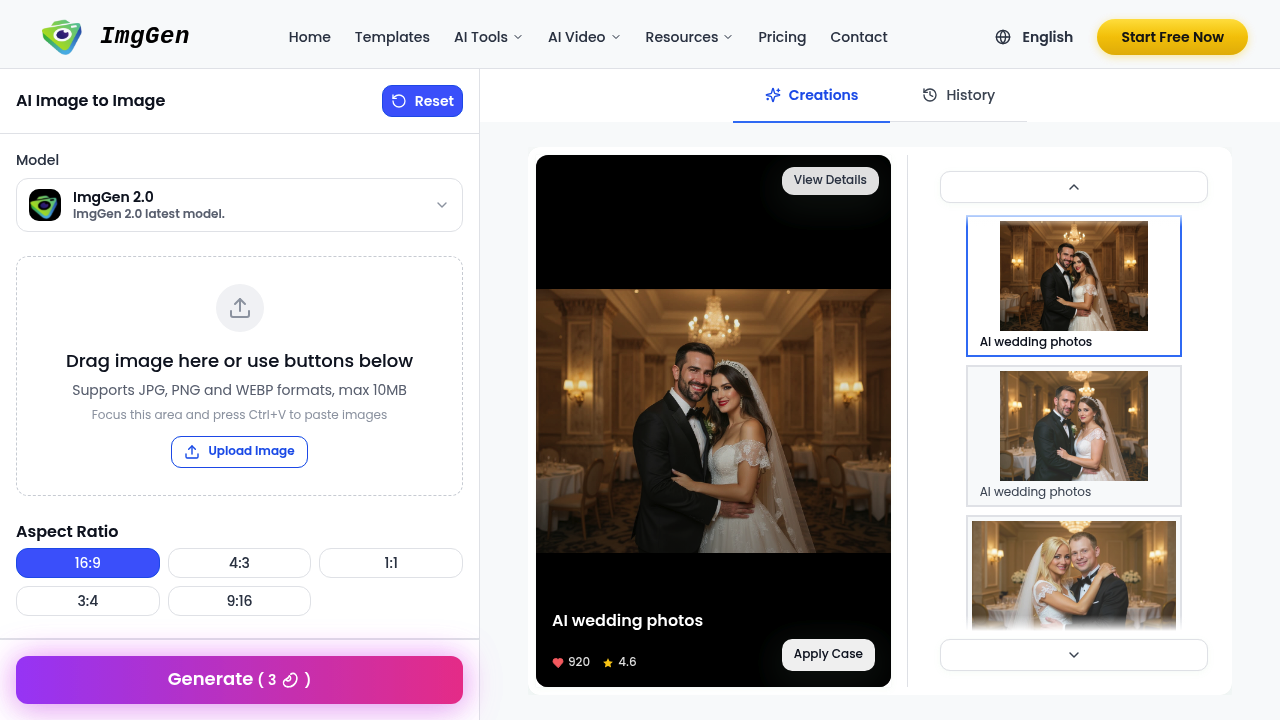
Upload a photo and ImgGen remixes it through AI models that shift style and composition. This application runs on their ImgGen 2.0 model and accepts JPG, PNG, and WEBP files. Drag, drop, or paste with Ctrl+V to start. The prompt box handles up to 5000 characters. That's enough room to describe what you want in detail. Five aspect ratios cover most needs — 16:9 for wide shots, 1:1 for squares, 9:16 for vertical formats. The system tracks your creation history so you can revisit past work. Wedding photos get special treatment here. The dedicated feature carries a 4.6 rating and shows 920 applications, suggesting people actually use it for that purpose. Beyond weddings, this application converts sketches to full images and images back to sketches. There's also a comics smile generator, though no details explain what that produces. File size caps at 10MB. That's tight for high-resolution photos. A DSLR image at full quality often exceeds that limit. You'll need to compress before uploading. The three supported formats cover most bases, but no TIFF or RAW support means professional photographers hit a wall. The interface shows aspect ratios and upload options clearly. No obvious export settings or quality controls appear in the facts. Can't tell if you get full-resolution outputs or compressed versions. That matters when you're planning to print or use images professionally. No team features mentioned. No API access listed. Can't batch process multiple images. Each upload seems like a one-off operation. The creation history helps track what you've made, but there's no indication you can organize projects or share workspaces. This application does specific things well — aspect ratio flexibility, reasonable prompt length, paste functionality. Wedding photos as a use case is notable since most image-to-image tools don't call that out specifically. But the 10MB cap and format restrictions narrow who can use this effectively. Professional work needs bigger files and more formats. Works for casual remixing and specific applications like wedding photos. Falls short for high-resolution professional work. The 5000-character prompt limit gives room to be detailed. Just don't expect to upload your camera's full-size files without compression first.

ImgGen
Upload a photo and ImgGen remixes it through AI models that shift style and composition
This application runs on their ImgGen 2.0 model and accepts JPG, PNG, and WEBP files. Drag, drop, or paste with Ctrl+V to start. The prompt box handles up to 5000 characters. That's enough room to describe what you want…
ImgGen alternatives

Deep Art Effects 87%
IMAGE TO IMAGE

Image to Image.tech 88%
IMAGE TO IMAGE

Img2Img AI 87%
IMAGE TO IMAGE

Nano Banana 83%
IMAGE TO IMAGE

Image To Image AI 82%
IMAGE TO IMAGE

AIAI.com | Image to Image AI Generator 79%
IMAGE TO IMAGE
By goal:
for Image Generation
Frequently asked
Does ImgGen have a free version?
ImgGen operates on a freemium model, but the facts don't spell out what the free tier includes. Can't say which features cost money or if uploads get limited on the free plan. No trial period shows up in the available information either. You'll need to check their site directly to see what's actually free versus paid.
What file types does ImgGen support?
ImgGen accepts JPG, PNG, and WEBP files up to 10MB each. That file size limit cuts out most full-resolution DSLR photos, which often hit 15-25MB straight from the camera. No TIFF or RAW support means professional photographers will need to convert and compress before uploading. You can drag and drop files or paste them with Ctrl+V.
Can I use ImgGen for wedding photos?
ImgGen features a dedicated AI wedding photos tool with a 4.6 rating and 920 applications logged. That suggests people actually use it for wedding work, not just marketing talk. The facts don't explain what specific transformations it applies to wedding photos or show before-and-after examples. Just know the 10MB file limit might force you to compress high-quality wedding shots before upload.
How long can my prompt be in ImgGen?
Prompts max out at 5000 characters. That's enough space to describe style, composition, lighting, and specific details without running out of room. Most image generators cap prompts at a few hundred characters, so this gives more control. Just describe what you want clearly — more words don't automatically mean better results.
What aspect ratios does ImgGen offer?
ImgGen provides five aspect ratios: 16:9 for wide shots, 4:3 for traditional photos, 1:1 for squares, 3:4 for portrait orientation, and 9:16 for vertical formats like phone screens. That covers most common use cases from social media posts to presentations. The system also converts sketches to images and images to sketches, plus generates something called comics smile, though no details explain what that produces.
Does ImgGen work with high-resolution professional photos?
The 10MB file size cap creates problems for professional work. A full-resolution image from a modern camera typically runs 15-30MB, forcing compression before upload. Only JPG, PNG, and WEBP formats work — no TIFF or RAW files that photographers prefer. The facts don't mention output resolution or quality settings either, so can't confirm if you get print-ready files back. This tool fits casual remixing better than professional photography workflows.
Traffic
Estimated monthly website visits · last 9 months
Monthly visits
8.4K
↑ 6.5% MoM
Global rank
#2,985,597
US #3,872,069
Category rank
#58
Image to Image
Reviews (0)
No reviews yet. Be the first to share your experience.