#3 in AI Assistant Google CC logo

Google CC

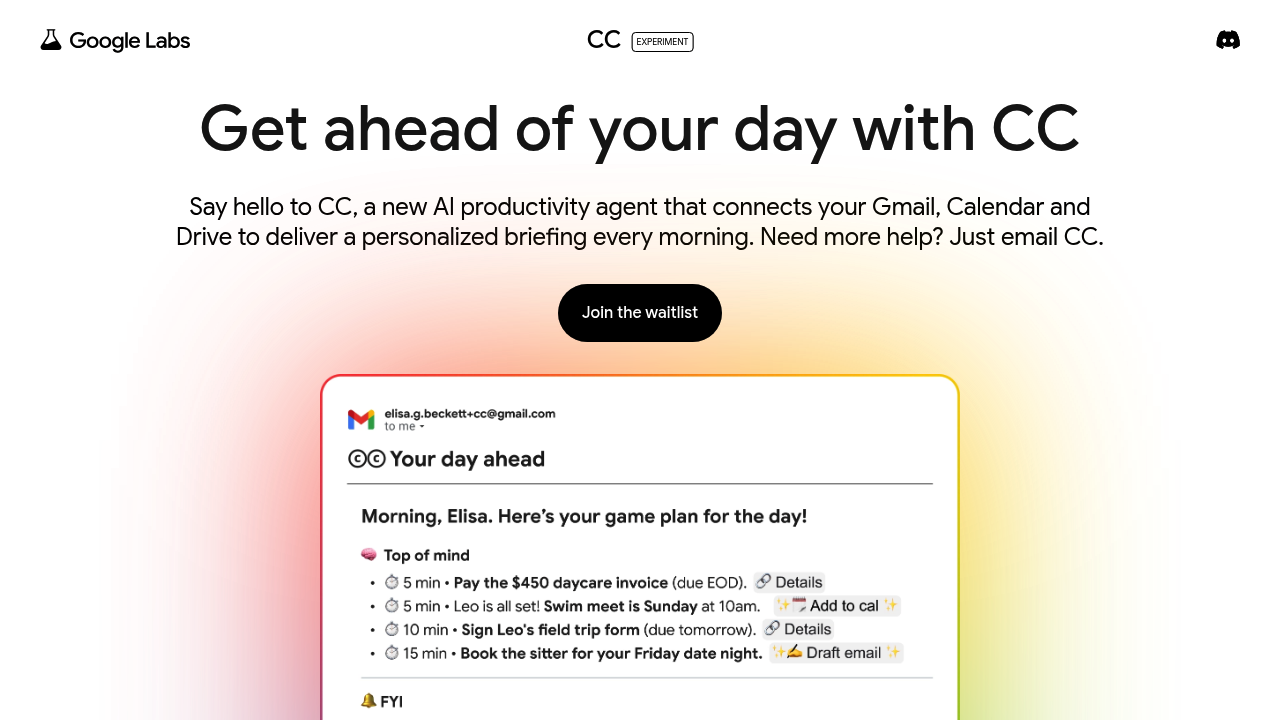
Google's experimental productivity agent sends a personalized morning briefing called "Your Day Ahead" by pulling together your Gmail, Calendar, and Drive activity

It's a Google Labs project, not part of Workspace or the standard productivity suite, which means it exists in a testing phase with all the access restrictions that come with it. The daily briefing shows up in your…

Google CC screenshot

Google's experimental productivity agent sends a personalized morning briefing called "Your Day Ahead" by pulling together your Gmail, Calendar, and Drive activity. It's a Google Labs project, not part of Workspace or the standard productivity suite, which means it exists in a testing phase with all the access restrictions that come with it.

The daily briefing shows up in your inbox automatically. You can also email CC directly at [email protected] to ask questions or request help. Add it to email threads and it'll send you a private summary—just you, not the other people on the thread. Teach it about yourself by replying to its emails or sending corrections. It learns what matters to you.

Customization works through simple email replies. Don't like something in your briefing? Tell CC. Want it to track specific tasks? Send those over. Every email includes thumbs up and thumbs down buttons for quick feedback.

Now the walls. US and Canada only. Must be 18 or older. Consumer Google account required, not Workspace. You need Smart Settings enabled in your Google account. The waitlist's the only way in, and Google AI Ultra or paid subscribers jump the line. Not exactly open access.

The mobile experience has rough edges. Some URLs don't work properly in the Gmail mobile app, though Google's working on fixes. More concerning: deleting an email or file from Gmail or Drive doesn't automatically wipe it from CC's memory. You have to disconnect from the entire service to clear your data. That's not intuitive.

CC can't send emails on your behalf to other people. It only communicates with you. This limits what an "agent" can actually do—no delegating responses or forwarding summaries to teammates.

The experiment label matters here. Google Labs projects can disappear. They can change completely. They can stay in waitlist mode for months. There's no promise this becomes a real product or that your access continues if you get in.

What works: morning briefings save time if you're drowning in calendar conflicts and unread emails. The ability to customize through natural language beats clicking through settings menus. Integration with Gmail, Calendar, and Drive means it's working with data you already trust Google to handle.

What doesn't: geographic restrictions, waitlist access, data deletion quirks, mobile bugs, and the experimental status all limit usefulness. It's a peek at what AI assistants might do with your productivity tools, not a finished solution you can rely on today.


Google CC alternatives

See all →

Frequently asked

6 questions
How do I get access to Google CC?
Google CC runs on a waitlist through Google Labs, available only in the United States and Canada for users 18 and older. You need a consumer Google account with Smart Settings enabled—Workspace accounts don't work. Google AI Ultra and paid subscribers get prioritized access, but there's no timeline for when waitlist invites go out. The experimental status means access could stay limited indefinitely or the project could shut down entirely.
Is Google CC free?
Google hasn't published pricing for CC because it's still an experimental Google Labs project. Right now access comes through a waitlist, not a purchase. Whether it stays free or becomes a paid feature depends on what Google decides after testing wraps up. The experimental label means the business model could change completely or the project could disappear.
What does Google CC actually do with my emails?
CC reads your Gmail, Calendar, and Drive to generate a morning briefing called Your Day Ahead that lands in your inbox automatically. You can email CC directly at [email protected] to ask questions or add it to email threads for private summaries that only you see. It learns from your feedback through thumbs up and down buttons in every email, plus any corrections or preferences you send by replying to its messages. Deleting an email or file from Gmail or Drive doesn't erase it from CC's memory—you have to disconnect from the service entirely to clear your data.
Can Google CC send emails for me?
CC can't send emails to other people on your behalf. It only sends messages directly to you, which means you can't use it to delegate responses or forward summaries to teammates. When you add CC to an email thread for a summary, it replies privately to you alone, not to everyone on the thread. This limits what the agent can actually handle compared to a true assistant that acts on your behalf.
Does Google CC work on mobile?
CC works through Gmail on mobile, but the experience has known issues. Some URLs in CC's emails don't function properly in the Gmail mobile app, though Google's working on fixes. Since CC delivers its daily briefing and all responses through regular Gmail, you'll see them wherever you check email. The mobile bugs affect specific interactions, not the core ability to receive and read CC's messages.
What happens to my data if I stop using Google CC?
Deleting emails or files from Gmail and Drive doesn't automatically remove them from CC's memory. The only way to fully clear your data is to disconnect from the CC service entirely. This isn't how most people expect data deletion to work—removing something from Gmail should logically remove it from tools that read Gmail. The disconnect requirement means you can't selectively clean up what CC knows without losing access to the whole experiment.

Traffic

Estimated monthly website visits · last 8 months

76.1M visits/mo
Monthly visits
76.1M
↑ 11.4% MoM
Global rank
#293
IN #167
Category rank
#3
AI Assistant
76.1M 65.6M 55.2M 44.7M 34.2M Dec 2025: 34.2M visits Dec 2025 Jan 2026: 41.2M visits Jan 2026 Feb 2026: 43.8M visits Feb 2026 Mar 2026: 55.3M visits Mar 2026 Apr 2026: 62M visits Apr 2026 May 2026: 68M visits May 2026 Jun 2026: 68.3M visits Jun 2026 Jul 2026: 76.1M visits Jul 2026

Reviews (0)

Write review

No reviews yet. Be the first to share your experience.