AI Photo Editor by The Influencer AI logo

AI Photo Editor by The Influencer AI

Text prompts replace traditional photo editing tools in this AI-powered editor built for quick visual transformations

Users type what they want changed and the system handles the technical execution, from swapping backgrounds to inserting objects into existing photos. The core editing approach centers on single-prompt modifications.…

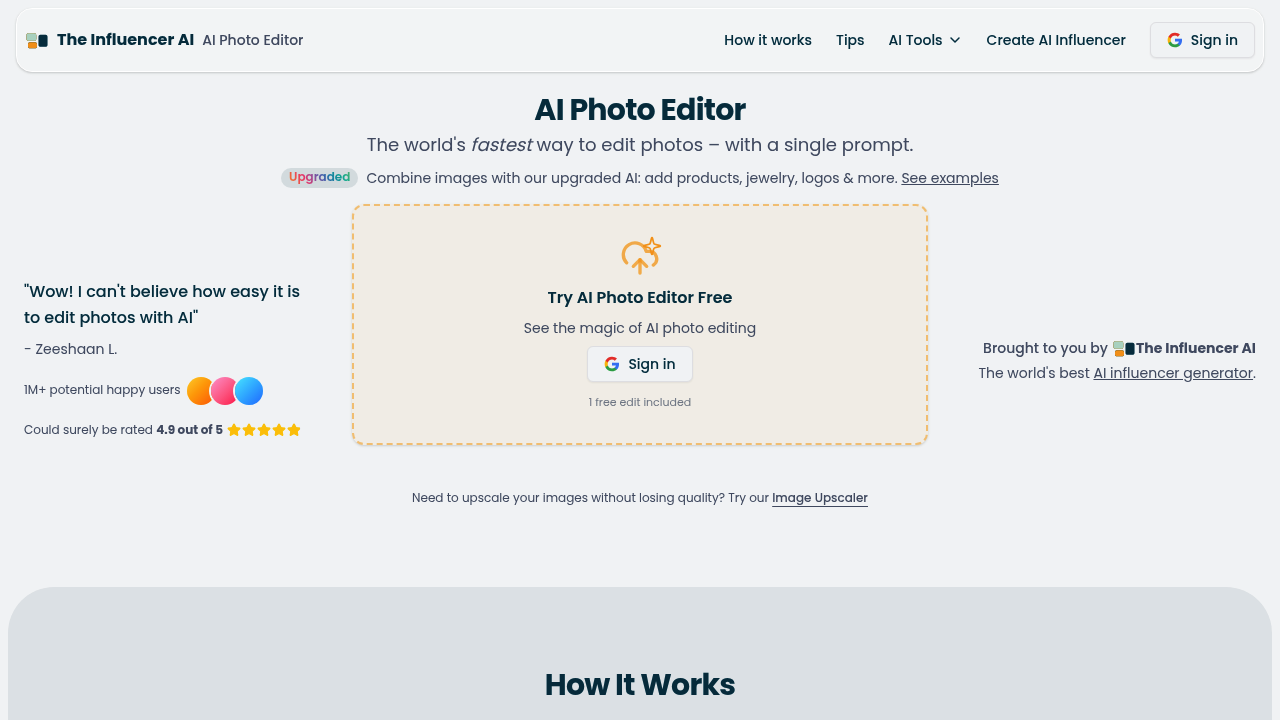
AI Photo Editor by The Influencer AI screenshot

Text prompts replace traditional photo editing tools in this AI-powered editor built for quick visual transformations. Users type what they want changed and the system handles the technical execution, from swapping backgrounds to inserting objects into existing photos.

The core editing approach centers on single-prompt modifications. Type a description of the desired change and the software processes the request without requiring layer manipulation or manual selection tools. This method works for adding jewelry to product shots, placing logos on images, or inserting products into lifestyle scenes. The system handles image combining and merging, letting users overlay photos or insert one image into another through text instructions rather than manual positioning.

Background replacement happens through the same prompt-based system. Users describe the new background and the software generates the swap. Style transformations convert photos into different aesthetic formats, including vintage poster looks or photorealistic conversions from other image types. This service includes a profile view generator that creates side-angle versions of subjects and an image upscaler for resolution enhancement.

File handling accepts JPG, PNG, and WebP formats with a 6MB maximum size limit. This service implements daily data deletion, removing all uploaded photos and associated information at the end of each day. This privacy approach means images never get retained beyond 24 hours or used for training purposes. Quick submit functionality works through Cmd or Ctrl + Enter keyboard shortcuts.

New users get one free edit included upon signing in. This service markets itself to 1M+ potential happy users with a projected rating of 4.9 out of 5, though these represent aspirational rather than verified metrics.

The 6MB file size cap restricts high-resolution professional photography. Format support excludes RAW files and other specialized image types. The single free edit creates a hard stop for experimentation without payment commitment. Users report needing multiple attempts when combining images to achieve desired results, particularly with complex compositions. The software performs best with clean, well-lit item photos featuring transparent or simple backgrounds, meaning cluttered or poorly lit source images produce inconsistent outputs.

Content creators building social media posts find the quick editing useful for mockups. Ecommerce businesses use it for product staging without photoshoot costs. Marketers generate visual content variations without design software expertise. Anyone needing fast photo modifications for digital content can skip traditional editing software learning curves, though the prompt-based approach requires clear communication of visual goals rather than precise manual control.


AI Photo Editor by The Influencer AI alternatives

See all →

Frequently asked

7 questions
How many free edits do you get with AI Photo Editor by The Influencer AI?
New users receive exactly one free edit when they sign in to the platform. After using this single complimentary edit, the service requires payment for additional modifications. This approach differs from trial-based models that offer time-limited access, instead providing one opportunity to test the prompt-based editing system. The single-edit limitation means users can't experiment with multiple prompt variations or test different approaches without committing to paid usage.
What file formats does AI Photo Editor by The Influencer AI support?
The editor accepts JPG, PNG, and WebP image formats with a maximum file size of 6MB per upload. This format restriction excludes RAW files commonly used in professional photography and other specialized image types like TIFF or PSD. The 6MB size cap creates problems for high-resolution images from modern cameras, which often exceed this limit even after compression. Users working with professional photography need to downscale images before uploading, potentially reducing the quality available for editing.
Can I combine multiple photos together in AI Photo Editor by The Influencer AI?
The platform handles image combining and merging through text prompts, allowing users to overlay photos or insert one image into another without manual positioning tools. Users describe the combination they want and the system processes the request, though multiple attempts often prove necessary to achieve desired results with complex compositions. The prompt-based approach works best when combining clean, well-lit item photos with transparent or simple backgrounds. Cluttered source images or complicated merging scenarios produce inconsistent outputs that require iteration to refine.
What can you do with AI Photo Editor by The Influencer AI?
This editor performs text-prompt-driven modifications including background replacement, object insertion, style transformations, and image combining without traditional editing tools. Specific capabilities include adding jewelry or logos to photos, placing products into lifestyle scenes, converting images to vintage poster aesthetics or photorealistic formats, and generating profile view angles of subjects. The platform includes an image upscaler for resolution enhancement and handles all modifications through typed descriptions rather than manual selection or layer manipulation. Keyboard shortcuts enable quick submission through Cmd or Ctrl + Enter for faster workflow.
How does AI Photo Editor by The Influencer AI handle privacy and data storage?
The service implements daily data deletion that removes all uploaded photos and associated information at the end of each 24-hour period. This privacy approach guarantees images never get retained beyond one day or used for training the AI system or any other secondary purpose. Users working with sensitive product photography or confidential visual content benefit from this automatic purge cycle. The deletion policy applies universally to all uploads regardless of whether edits were completed or abandoned.
Who should use AI Photo Editor by The Influencer AI?
Content creators building social media posts benefit from quick mockup generation without design software expertise. Ecommerce businesses use the tool for product staging and lifestyle scene creation without arranging physical photoshoots. Marketers generate visual content variations for campaigns by describing modifications rather than learning traditional editing tools. The prompt-based system works for anyone needing fast photo modifications for digital content, though it requires clear communication of visual goals since users can't manually control precise positioning or layering.
Why does combining images in AI Photo Editor sometimes require multiple attempts?
The prompt-based system interprets text descriptions rather than following manual positioning instructions, which creates variability in how images get merged together. Complex compositions with multiple elements or unclear spatial relationships prove particularly challenging for the AI to execute correctly on first attempt. Source image quality significantly affects results, with clean, well-lit photos on transparent or simple backgrounds producing more consistent outcomes than cluttered or poorly lit images. Users need to refine their text prompts and potentially try different phrasings to guide the system toward the intended visual result.

Traffic

Estimated monthly website visits · last 9 months

54.6K visits/mo
Monthly visits
54.6K
↓ 2.7% MoM
Global rank
#579,507
GB #194,250
Category rank
#26
AI Photo Editor
94.5K 83.3K 72.1K 61K 49.8K Dec 2025: 62.6K visits Dec 2025 Jan 2026: 94.5K visits Jan 2026 Feb 2026: 65.7K visits Feb 2026 Mar 2026: 66.9K visits Mar 2026 Apr 2026: 54K visits Apr 2026 May 2026: 51.8K visits May 2026 Jun 2026: 49.8K visits Jun 2026 Jul 2026: 56.1K visits Jul 2026 Aug 2026: 54.6K visits Aug 2026

Reviews (0)

Write review

No reviews yet. Be the first to share your experience.