WinFeedback logo
AI Project Management FREE TRIAL from $40/mo

WinFeedback

WinFeedback sits between client feedback and design execution, parsing unstructured comments into structured task specifications

The system ingests feedback through client-facing sharing links, then routes it through an AI translation layer that converts subjective statements into quantified parameters. This translation process achieves 94% to…

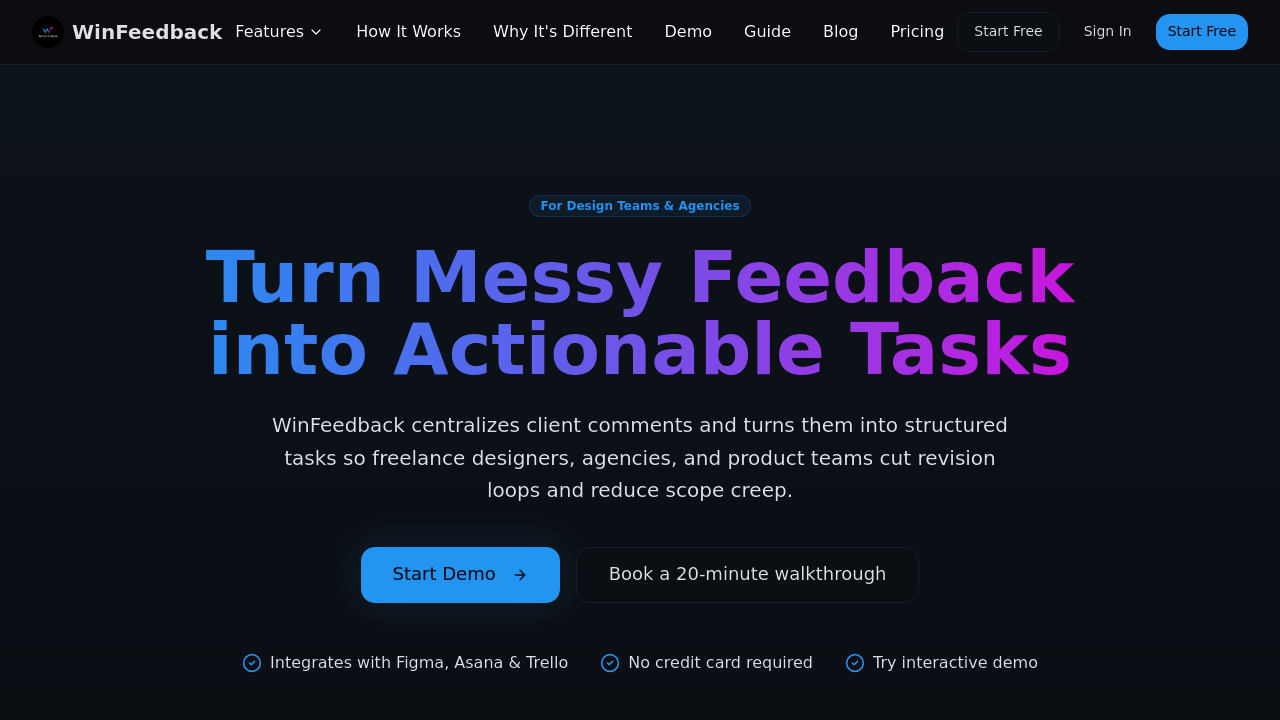
WinFeedback screenshot

WinFeedback sits between client feedback and design execution, parsing unstructured comments into structured task specifications. The system ingests feedback through client-facing sharing links, then routes it through an AI translation layer that converts subjective statements into quantified parameters. This translation process achieves 94% to 98% accuracy depending on the subscription tier, with higher tiers using team-calibrated or custom-trained models that learn from a specific organization's terminology and standards.

The technical pipeline starts when a client submits feedback through a shared link. The AI analyzes the comment against design context pulled from Figma, including layer structure and design tokens. It then generates a structured task with specificity metrics, time estimates, and scope classification. Time estimation works in two modes: baseline algorithmic prediction (accurate to within 30 minutes on lower tiers) or team velocity-based calculation (within 15 minutes on higher tiers) that adjusts based on historical completion data from that specific team.

Output tasks include translated requirements, estimated effort, and automatic scope flags. The system tracks revision counts against preset caps and alerts teams when feedback pushes beyond agreed boundaries. This prevents the common agency problem where vague requests balloon into uncompensated work. The service claims agencies typically waste $4,500 monthly interpreting unclear feedback, and its structured approach reduces revision loops by 30% to 50%.

Integration architecture uses one-click sync to push completed tasks directly into Figma, Asana, or Trello. The Solo plan restricts users to one integration at a time. The Per-Project plan enables all three simultaneously. Higher tiers promise early access to additional integrations and custom development for enterprise workflows. Task sync happens in under 10 minutes from initial feedback submission to appearance in the connected project management tool.

Workflow customization ranges from three preset templates on the Solo plan to unlimited custom configurations on Team and Enterprise tiers. These workflows define how feedback gets categorized, routed, and prioritized within the translation pipeline. The analytics dashboard surfaces patterns in client feedback types, team velocity trends, and scope creep indicators. Custom reporting becomes available at Team level and above.

Storage limits create practical boundaries. Solo accounts get 1 GB, Per-Project allocates 5 GB per active project, and Team delivers 100 GB shared across the organization. Editor seats also scale: one on Solo, two per project on Per-Project, ten on Team, unlimited on Enterprise. Viewer access stays unlimited across all tiers.

The Solo plan costs $49 monthly with 50 feedback items, while Per-Project runs $40 monthly per active project with 100 items each. Team sits at $299 monthly for 1,000 items total, and Enterprise charges $499 monthly with no item limits. Higher tiers also upgrade support response times from 48 hours down to 4 hours, add SOC 2 certification, and include SSO through SAML.

Technical constraints show clearly. The 94% accuracy floor means roughly one in twenty translations needs manual correction. Time estimates carry 15 to 30 minute margins of error even with team calibration. The system requires existing Figma files and active Asana or Trello accounts, it won't work as a standalone tool. Monthly feedback limits force teams to prioritize which client comments get processed through the AI versus handled manually.

The service targets a narrow use case: design teams already embedded in the Figma and modern PM tool ecosystem who face high volumes of ambiguous client feedback.

WinFeedback alternatives

See all →

Frequently asked

7 questions
How does WinFeedback translate vague client feedback into tasks?
WinFeedback runs client comments through an AI model that analyzes them against Figma design context, including layer structure and design tokens. The system converts subjective statements into structured task specifications with quantified parameters, time estimates, and scope classifications. Translation accuracy ranges from 94% on Solo and Per-Project plans to 98% on Enterprise, where the model gets custom-trained on an organization's specific terminology. Higher tiers use team velocity data from historical completions to refine time estimates down to within 15 minutes, compared to 30-minute margins on basic plans.
Does WinFeedback have a free plan or trial?
There's no permanent free plan, but WinFeedback offers a free trial before committing to paid tiers. Paid plans start at $40 monthly for the Per-Project option or $49 monthly for Solo. The Per-Project plan processes 100 feedback items per project monthly with access to all three integrations, while Solo handles 50 items monthly but restricts users to one integration at a time. Teams processing high feedback volumes can jump to the $299 monthly Team plan for 1,000 items.
Which project management tools does WinFeedback integrate with?
WinFeedback syncs with Figma, Asana, and Trello through one-click task export. Solo plan users pick one integration, Per-Project enables all three simultaneously, and Team or Enterprise tiers add early access to new integrations plus custom development options. The system pulls design context from Figma to inform its AI translations, then pushes completed task specifications into Asana or Trello in under 10 minutes from initial feedback submission. It won't function as a standalone tool without these existing accounts.
What are the monthly feedback limits on WinFeedback plans?
Solo processes 50 feedback items monthly, Per-Project handles 100 items per active project, Team accommodates 1,000 items across the organization, and Enterprise removes limits entirely. These caps force teams to choose which client comments get AI translation versus manual handling. Storage constraints also apply: Solo gets 1 GB, Per-Project allocates 5 GB per project, and Team provides 100 GB shared. Editor seats scale from one on Solo to two per project on Per-Project, ten on Team, and unlimited on Enterprise.
How accurate is WinFeedback's AI at interpreting design feedback?
Translation accuracy sits at 94% for Solo and Per-Project plans, 96% for Team with team-calibrated models, and 98% for Enterprise with custom-trained AI. This means roughly one in twenty translations on basic plans needs manual correction, dropping to one in fifty on Enterprise. The system learns from an organization's specific terminology and design standards on higher tiers. Time estimates carry 30-minute margins of error on lower plans, tightening to 15 minutes on Team and Enterprise when the AI incorporates team velocity data from past project completions.
Can WinFeedback prevent scope creep on design projects?
WinFeedback tracks revision counts against preset caps and automatically flags when client feedback exceeds agreed boundaries. The system classifies each translated task by scope impact, alerting teams before vague requests expand into uncompensated work. Users report 30% to 50% fewer revision loops and claim the average agency wastes $4,500 monthly interpreting unclear feedback that this structure prevents. Custom workflows on Team and Enterprise tiers let organizations define exactly how feedback gets categorized and when scope alerts trigger based on their specific client agreements.
What's included in WinFeedback's Founding 50 Teams program?
The Founding 50 Teams program offers lifetime discounted pricing locked in for early adopters, though specific discount percentages aren't disclosed. Participants get 1:1 onboarding sessions conducted on their actual client projects rather than generic demos. Priority support includes direct input into the product roadmap, letting these teams influence which features and integrations get built next. This targets agencies and studios willing to adopt early in exchange for preferential treatment and cost savings that compound over time compared to standard pricing.

Traffic

Estimated monthly website visits · last 0 months

Not enough historical data for a chart yet.

Reviews (0)

Write review

No reviews yet. Be the first to share your experience.