#8 in AI Thumbnail Maker Thumbspot logo
AI Thumbnail Maker FREE TRIAL from $11/mo

Thumbspot

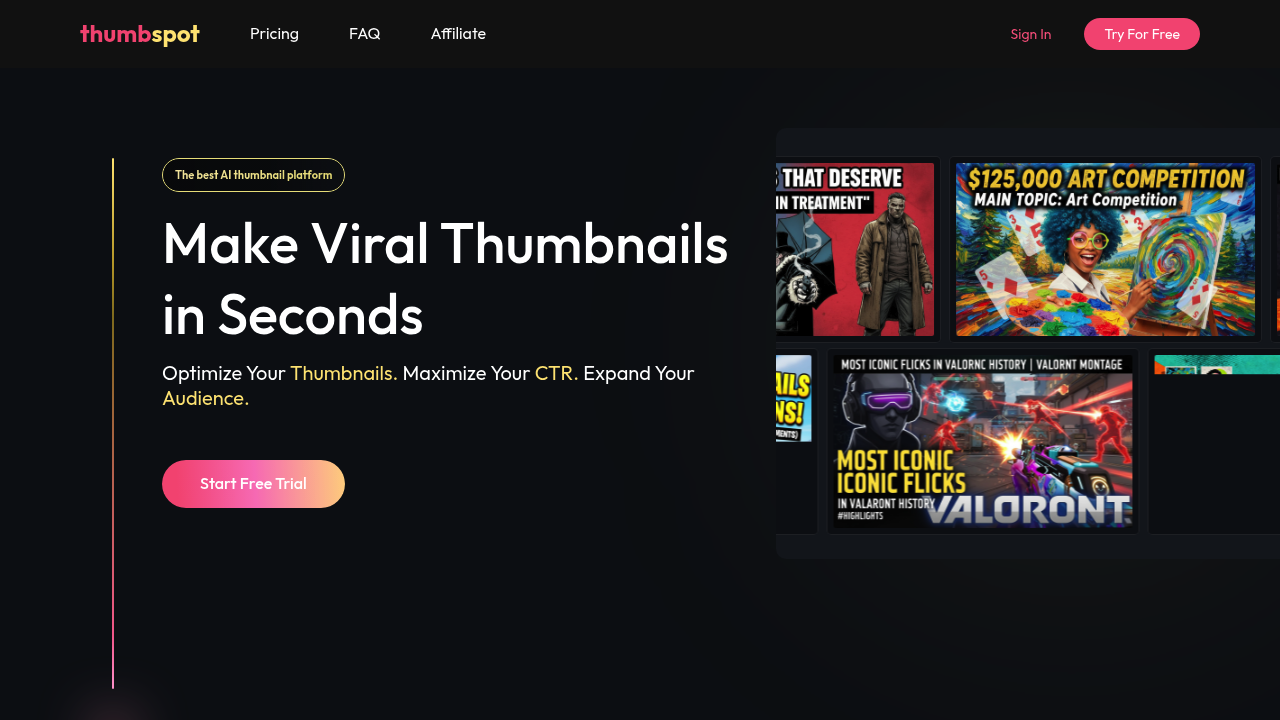
Thumbspot generates YouTube thumbnails from video titles or descriptions using AI models trained on viral content patterns

You input text describing your video, and the system processes it through a template matching algorithm that pulls from over 20 categories including Gaming, Tech Review, Tutorial, Vlog, Comedy, Finance, Fitness,…

Thumbspot screenshot

Thumbspot generates YouTube thumbnails from video titles or descriptions using AI models trained on viral content patterns. You input text describing your video, and the system processes it through a template matching algorithm that pulls from over 20 categories including Gaming, Tech Review, Tutorial, Vlog, Comedy, Finance, Fitness, Cooking, Beauty, Music, Education, Entertainment, Sports, Cars, Travel, Fashion, DIY, Pets, News, and Kids. The system displays trending templates with actual view counts from real videos, ranging from 380,547 to 25,048,847 views, giving you data-backed options rather than generic designs.

The technical pipeline works in stages. First, the AI analyzes your input text to determine content category and emotional tone. Then it generates thumbnail compositions based on templates that've performed well in similar contexts. You can upload photos to create an AI persona, which is a digital version of yourself that the system can insert into thumbnails. This involves facial recognition and feature mapping to maintain consistency across different thumbnail styles. The face swap functionality uses similar computer vision techniques to replace faces in templates while preserving lighting and perspective.

Thumbnail recreation is interesting from a technical standpoint. You upload a reference image, and the system analyzes its composition, color palette, text placement, and visual hierarchy. It then generates a new thumbnail matching those patterns while incorporating your specific content. The editing tools let you fine-tune outputs, adjusting elements the AI generated. All thumbnails export at high resolution suitable for direct YouTube upload, which means the system outputs at YouTube's recommended 1280x720 pixel minimum.

The service integrates directly with YouTube for thumbnail uploads. You can also upload existing channel thumbnails as reference material, which feeds into the AI's understanding of your brand's visual style. This creates a feedback loop where the system learns your preferences over time.

Credit allocation determines usage limits. The Starter plan includes 400 monthly credits, producing approximately 40 thumbnails. Creator offers 1,200 credits for roughly 120 thumbnails. Pro provides 4,800 credits for about 480 thumbnails. This credit system suggests different operations consume varying amounts, likely based on computational complexity. Face swapping and persona generation probably cost more than basic template application.

Persona limitations exist. Starter and Creator plans restrict you to one AI persona. Only Pro supports multiple personas, which matters if you run several channels or feature different hosts. This restriction makes sense from a storage and processing perspective since each persona requires maintaining facial data and model weights.

The pricing structure starts at $11 monthly for Starter, $21 monthly for Creator, and $64 monthly for Pro. Annual subscriptions save 20 percent, translating to $42, $96, and $180 in yearly savings respectively. There's a free trial available, though no permanently free tier exists.

Technical limitations center on the credit system's monthly caps. Once you exhaust your credits, you wait for the next billing cycle or upgrade. The service doesn't mention API access, which means you can't automate thumbnail generation through external scripts. No team features appear in the documentation, so collaboration workflows aren't supported. The system also lacks mobile apps or browser extensions, restricting you to web-based access.

The trending template approach creates a dependency on their data collection. If their view count metrics become outdated or their template library stagnates, the system's effectiveness diminishes. you are trusting their curation of what constitutes "viral" content.


Thumbspot alternatives

See all →

Frequently asked

7 questions
How does Thumbspot generate thumbnails from text?
Thumbspot processes your video title or description through an AI model that analyzes content category and emotional tone, then matches it against a template library organized into 20+ categories like Gaming, Tech Review, Tutorial, and Vlog. The system pulls from templates based on real videos with documented view counts ranging from 380,547 to 25 million views, giving you options backed by actual performance data rather than generic designs. After category matching, it generates compositions by applying your content to high-performing visual patterns. The output exports at 1280x720 pixels minimum, meeting YouTube's resolution requirements for direct upload.
Can I use Thumbspot for free?
Thumbspot doesn't offer a permanently free tier, though there's a free trial available to test the platform. Paid plans start at $11 monthly for the Starter tier, which includes 400 credits producing approximately 40 thumbnails per month. The Creator plan costs $21 monthly for 1,200 credits and around 120 thumbnails, while Pro runs $64 monthly for 4,800 credits and roughly 480 thumbnails. Annual subscriptions save 20 percent, translating to $42, $96, or $180 in yearly savings depending on your plan.
What are AI personas in Thumbspot?
AI personas are digital versions of yourself created from uploaded photos that Thumbspot can insert into thumbnails. The system uses facial recognition and feature mapping to analyze your photos, then maintains consistency when placing your persona across different thumbnail styles and compositions. This involves computer vision techniques that preserve lighting, perspective, and facial characteristics when integrating your likeness into various templates. Starter and Creator plans limit you to one persona, while Pro supports multiple personas, which matters if you run several channels or feature different hosts.
How does thumbnail recreation work?
Thumbnail recreation analyzes a reference image you upload by breaking down its composition, color palette, text placement, and visual hierarchy. The system then generates a new thumbnail that matches those design patterns while incorporating your specific video content and text. This differs from direct copying since it extracts the underlying visual structure rather than duplicating the exact image. The feature's useful when you see a thumbnail style that performed well and want to apply similar design principles to your own content without manually recreating the layout.
Does Thumbspot work with YouTube channels?
Thumbspot integrates directly with YouTube for thumbnail uploads, letting you push generated images straight to your videos without downloading and manually uploading files. You can also upload existing channel thumbnails as reference material, which feeds into the AI's understanding of your brand's visual style over time. This creates a learning loop where the system adapts to your preferences based on past thumbnails. All outputs meet YouTube's technical requirements at 1280x720 pixel resolution minimum.
What happens when I run out of monthly credits?
Once you exhaust your monthly credit allocation, you'll need to wait until the next billing cycle for credits to reset or upgrade to a higher tier. Different operations consume varying amounts of credits, with computationally intensive features like face swapping and persona generation likely costing more than basic template application. The Starter plan's 400 credits produce approximately 40 thumbnails, Creator's 1,200 credits make around 120 thumbnails, and Pro's 4,800 credits generate roughly 480 thumbnails. There's no API access mentioned, so you can't automate generation through external scripts to work around these limits.
What limitations does Thumbspot have?
Thumbspot restricts access to web-based usage only, with no mobile apps, browser extensions, or API access for automation. Team collaboration features aren't mentioned in the documentation, so multiple users can't work together on thumbnail projects within the platform. The trending template system depends entirely on their data collection and curation, meaning if their view count metrics become outdated or their template library stagnates, effectiveness could diminish. Monthly credit caps create hard usage limits that require either waiting for the next billing cycle or upgrading plans when you hit your threshold.

Traffic

Estimated monthly website visits · last 6 months

140 visits/mo
Monthly visits
140
↓ 60.1% MoM
Category rank
#8
AI Thumbnail Maker
1.6K 1.2K 842 450 59 Dec 2025: 647 visits Dec 2025 Jan 2026: 1.6K visits Jan 2026 Feb 2026: 783 visits Feb 2026 Mar 2026: 59 visits Mar 2026 Apr 2026: 351 visits Apr 2026 Aug 2026: 140 visits Aug 2026

Reviews (0)

Write review

No reviews yet. Be the first to share your experience.