
#5 in AI Thumbnail Maker BerryViral logo
AI Thumbnail Maker FREEMIUM from $15/mo

BerryViral

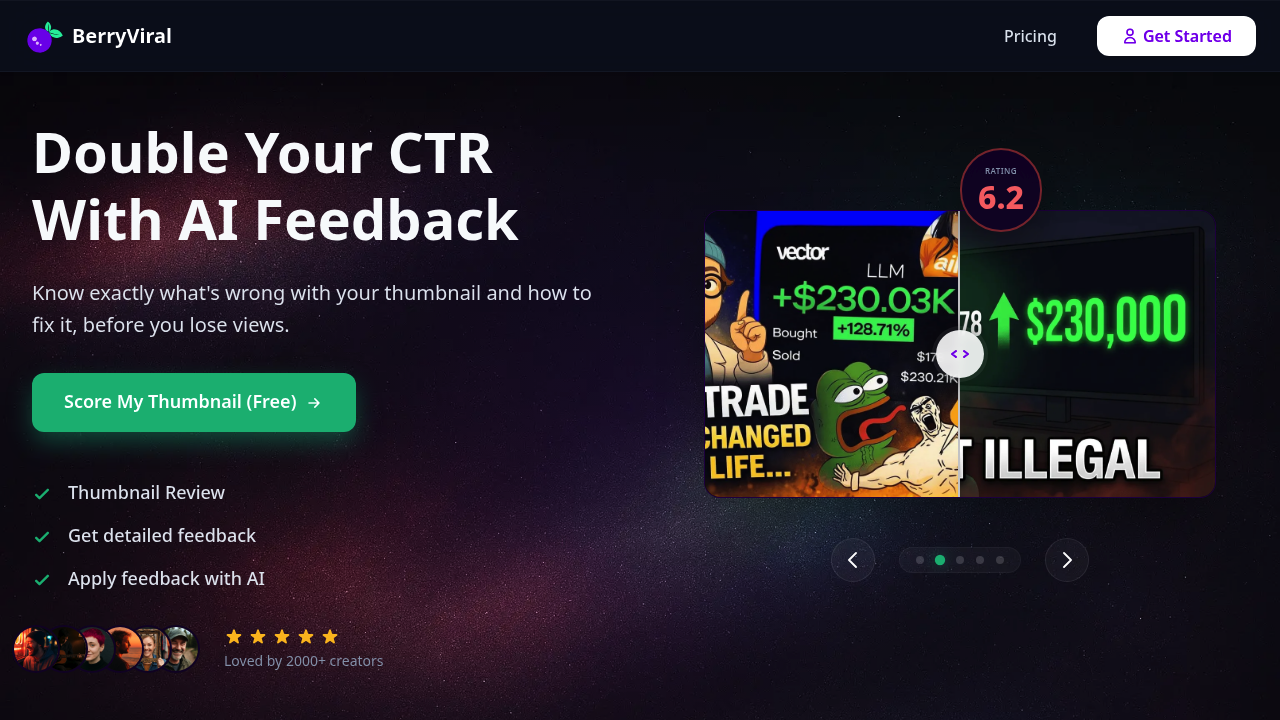
YouTube creators upload a thumbnail through BerryViral either as an image file or by pasting a YouTube URL

The system then runs the thumbnail through an AI analysis pipeline that evaluates visual elements against patterns correlated with high click-through rates. This software returns a numerical clickability score along…

BerryViral screenshot

YouTube creators upload a thumbnail through BerryViral either as an image file or by pasting a YouTube URL. The system then runs the thumbnail through an AI analysis pipeline that evaluates visual elements against patterns correlated with high click-through rates. This software returns a numerical clickability score along with specific feedback about what's working and what is not.

The analysis breaks down into concrete observations rather than vague suggestions. It'll flag issues like text readability, facial expression effectiveness, color contrast problems, or composition weaknesses. The system doesn't just score. It explains. This matters because creators get actionable direction rather than just a number to worry about.

After receiving feedback, creators can choose which suggestions to apply. This is where BerryViral differs from fully automated tools. you are not forced to accept every recommendation. BerryViral generates refined versions based only on the feedback points you select, and you can add custom refinement instructions on top of the AI suggestions. Total creative control stays with the creator throughout the workflow.

The video-to-thumbnail feature works differently. Upload a video and the system analyzes the content to generate multiple thumbnail concepts from scratch. Each concept comes as a distinct option rather than variations on a single theme. You pick which direction to pursue. The title suggestion feature follows the same pattern, generating five different title options per video rather than slight variations of one idea.

Data flows through the system in discrete steps. Upload leads to analysis, analysis produces scored feedback, feedback informs generation, generation outputs multiple options. Each stage requires a credit from your monthly allocation. Reviews don't roll over between months, so unused capacity expires.

The YouTube integration handles URL-based uploads, pulling thumbnails directly from videos already published on YouTube. This speeds up the review process for creators analyzing existing content performance. No need to download and re-upload files.

Over 2000 creators currently use BerryViral. The free tier packs three thumbnail review credits with no payment information required. This lets you test the scoring system and feedback quality before committing to a paid plan.

Paid tiers start at fifteen dollars monthly for the Starter Kit, which includes 25 thumbnail reviews, 15 batches of title suggestions with five options each, 25 generated thumbnails, and two video-to-thumbnail conversions with four concepts per video. The Creator+ plan doubles most limits at thirty dollars monthly. Creator Pro at sixty dollars monthly provides 100 reviews, 60 title suggestion batches, 200 generated thumbnails, and 30 video-to-thumbnail conversions.

The credit system creates a hard ceiling on usage. Heavy creators might exhaust monthly allocations mid-cycle with no rollover buffer. BerryViral doesn't offer API access or team collaboration features, so it's built for individual creators rather than production teams or agencies managing multiple channels.

The technical limitation worth noting is the monthly reset. If you're testing dozens of thumbnail variations for a single video, credits disappear fast. The system works best when you're selective about what to analyze rather than running every possible option through the pipeline. Quality over quantity makes sense here given the credit structure.


BerryViral alternatives

See all →

Frequently asked

6 questions
How does BerryViral analyze YouTube thumbnails?
BerryViral runs thumbnails through an AI pipeline that evaluates visual elements against patterns correlated with high click-through rates, then outputs a numerical clickability score with specific feedback. The analysis identifies concrete issues like text readability problems, facial expression effectiveness, color contrast weaknesses, and composition flaws rather than providing vague suggestions. You can upload thumbnails as image files or paste a YouTube URL to pull existing thumbnails directly. The system breaks down exactly what's working and what isn't in technical terms, giving you actionable direction instead of just a score.
Can I try BerryViral without paying?
The free tier provides three thumbnail review credits with no credit card required, letting you test the scoring system and feedback quality before committing to a paid plan. Each review consumes one credit and gives you the full clickability score plus detailed feedback. Paid plans start at fifteen dollars monthly for the Starter Kit with 25 reviews, or thirty dollars for Creator+ with 50 reviews, or sixty dollars for Creator Pro with 100 reviews. Credits don't roll over between months, so unused capacity expires at the end of each billing cycle.
Does BerryViral automatically improve my thumbnails?
BerryViral doesn't force automated improvements. Instead, it presents specific feedback points and you choose which suggestions to apply before the system generates refined versions. You can also add custom refinement instructions on top of the AI suggestions, maintaining total creative control throughout the workflow. The video-to-thumbnail feature generates multiple distinct thumbnail concepts from your video content rather than variations on a single theme, and you pick which direction to pursue. This approach keeps you as the decision-maker rather than handing control to the algorithm.
What happens when I run out of monthly credits?
Monthly review allocations create a hard ceiling with no rollover to the next billing cycle, so unused credits expire at month's end. If you exhaust your allocation mid-cycle, you'll need to upgrade to a higher tier or wait until the next month for credits to reset. The Starter Kit provides 25 reviews monthly, Creator+ doubles that to 50, and Creator Pro offers 100. This credit structure works best when you're selective about what to analyze rather than running every possible thumbnail variation through the pipeline, making it less suitable for heavy testing workflows or production teams managing multiple channels.
How does the video-to-thumbnail generation work?
The video-to-thumbnail feature analyzes your video content to generate multiple thumbnail concepts from scratch, with each concept representing a distinct creative direction rather than variations on one idea. You upload a video and the system processes the content to understand key moments, themes, and visual elements, then outputs four different thumbnail concepts per conversion. Each video-to-thumbnail conversion consumes one credit from your monthly allocation. The Starter Kit includes two conversions with four concepts each, Creator+ includes 10 conversions, and Creator Pro includes 30 conversions monthly.
Can BerryViral generate multiple title options for my videos?
The title suggestion feature generates five different title options per video rather than slight variations of a single title, giving you distinct approaches to test. Each batch of five titles consumes one credit from your monthly allocation. The Starter Kit includes 15 batches (75 total title options), Creator+ includes 30 batches (150 titles), and Creator Pro includes 60 batches (300 titles). This structure lets you explore different angles and hooks for your content without committing to a single direction.

Traffic

Estimated monthly website visits · last 8 months

4.7K visits/mo
Monthly visits
4.7K
↑ 22.8% MoM
Global rank
#3,785,096
US #1,922,171
Category rank
#5
AI Thumbnail Maker
11.5K 8.6K 5.7K 2.9K 0 Dec 2025: 0 visits Dec 2025 Jan 2026: 659 visits Jan 2026 Feb 2026: 1K visits Feb 2026 Mar 2026: 1.6K visits Mar 2026 Apr 2026: 11.5K visits Apr 2026 May 2026: 2.4K visits May 2026 Jun 2026: 3.9K visits Jun 2026 Jul 2026: 4.7K visits Jul 2026

Reviews (0)

Write review

No reviews yet. Be the first to share your experience.