
Snaploid logo
AI Photo Filter FREEMIUM from $12/mo

Snaploid

A social media manager needs 20 nostalgic Instagram posts for a brand's throwback campaign, but shooting actual Polaroids and scanning them would take days

She uploads digital photos to Snaploid, picks Polaroid SX-70 film style, adds captions, and generates batches of authentic-looking instant photos in minutes. A wedding videographer wants to create a retro slideshow for…

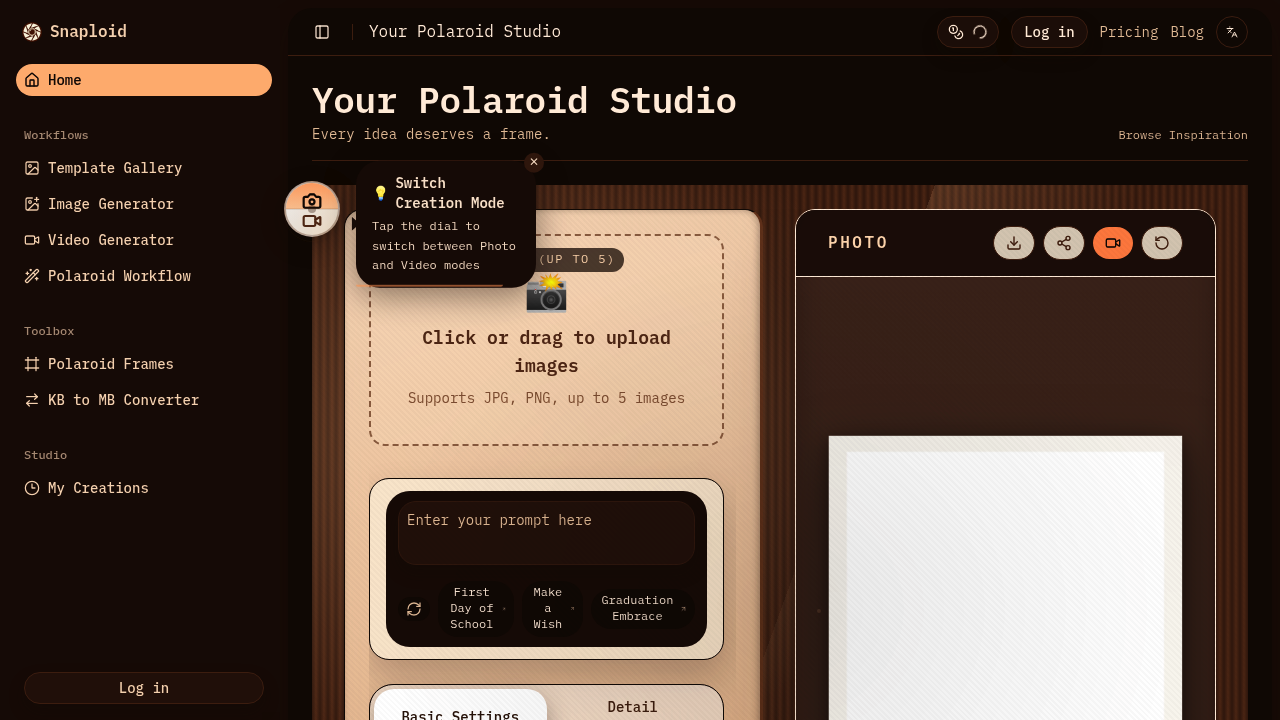
Snaploid screenshot

A social media manager needs 20 nostalgic Instagram posts for a brand's throwback campaign, but shooting actual Polaroids and scanning them would take days. She uploads digital photos to Snaploid, picks Polaroid SX-70 film style, adds captions, and generates batches of authentic-looking instant photos in minutes. A wedding videographer wants to create a retro slideshow for clients but doesn't own vintage cameras. He drops five ceremony photos into Snaploid, selects Fujifilm Instax Wide, and exports animated videos with that classic instant film border and color grading.

Snaploid converts modern digital photos into images that mimic specific instant film stocks. You can choose from Polaroid models like SX-70, 600, i-Type, and Go. It also replicates Fujifilm Instax formats including Mini, Wide, and Square. Classic film stocks like Kodak Gold 200 and Fujifilm C200 are available too. Each film type comes in color and black and white variants. The AI handles the aesthetic conversion, applying grain, color shifts, and border styles that match real instant film characteristics.

Upload up to five reference photos at once. Add custom captions to overlay text on the Polaroid frame. The template gallery offers pre-made styles if you don't want to start from scratch. Static frames work for single images, while animated frames add subtle motion to create video exports. HD resolution is available on paid plans. Pro and Ultra subscribers get watermark-free exports and priority in the generation queue. Ultra plan users also get usage analytics to track their monthly consumption.

A product photographer shooting for vintage-themed e-commerce listings finds this helpful. She needs consistent retro styling across 50 product shots. Snaploid lets her batch-process them with the same film preset. A YouTuber creating a nostalgia video about 90s culture drops in modern footage screenshots, converts them to Instax Mini style, and uses the animated versions as B-roll. A small design agency pitching a retro brand identity mocks up packaging concepts with Polaroid-style lifestyle photos without hiring a specialized photographer.

The limitations are real though. Free users get just five photos monthly with watermarks and no video animation. That's barely enough to test it properly. Standard resolution on the free tier won't work for print projects. The format restriction to JPG and PNG means you can't process RAW files directly. Video output is limited even on paid plans—15 videos monthly on Pro, 37 on Ultra. A wedding photographer needing 100 animated Polaroids for a single client project would blow through the Ultra plan allotment immediately.

The Pro plan costs $11.90 monthly and includes 200 photos plus 15 videos. Ultra runs $23.90 monthly for 500 photos and 37 videos. Yearly subscriptions save 40%. These numbers work for regular content creators who need a steady stream of retro-styled visuals. They don't work for one-off bulk projects or professional studios processing hundreds of images weekly.

Skip this if you need integration with Lightroom or Photoshop workflows. There's no API mentioned. Skip it if you're after subtle film simulation rather than obvious Polaroid borders and frames. Skip it if your budget is zero and you need more than five monthly exports. Skip it if you shoot in RAW and won't convert to JPG first. Snaploid does one thing specifically—it makes digital photos look like instant film prints. That's useful when that's exactly what you need.


Snaploid alternatives

See all →

Frequently asked

7 questions
Can I use Snaploid for free or do I need to pay?
Snaploid offers a free plan that gives you 5 Polaroid-style photos each month. You're stuck with static frames, standard resolution, and a watermark on every export. Video animation isn't available at all on the free tier. A lifestyle blogger testing the tool for occasional throwback posts could work within these limits, but a brand manager needing 30 retro images for a monthly campaign would hit the ceiling immediately and need the $11.90 Pro plan for 200 photos.
What film types does Snaploid support?
Snaploid replicates specific Polaroid models including SX-70, 600, i-Type, and Go. It also covers Fujifilm Instax formats like Mini, Wide, and Square. Classic film stocks like Kodak Gold 200 and Fujifilm C200 are available too. Each film type comes in both color and black and white variants. A photographer shooting a vintage-themed lookbook can match the exact aesthetic of Polaroid 600 film, while a designer creating 80s-inspired social content might pick Kodak Gold 200 for that warm, grainy look.
Does Snaploid work for video or just photos?
Snaploid generates both static images and animated videos with Polaroid-style frames. The free plan blocks video animation entirely—you only get still images. Pro plan subscribers get 15 videos monthly, while Ultra subscribers get 37. A wedding videographer creating a retro slideshow for one client could use the Pro plan's 15 videos, but someone running a YouTube channel with weekly nostalgia content would burn through the Ultra plan's 37 videos in a single month if each episode needs multiple clips.
How many photos can I upload at once to Snaploid?
You can upload up to 5 reference photos in a single batch. This works for a social media manager preparing a carousel post with multiple Polaroid-style frames—drop in five product shots, pick Instax Square, add captions, and generate the set. It doesn't work for a photographer who just shot a 200-image event and wants to convert the entire gallery. You'd need to process them in batches of five, which gets tedious fast. The monthly limits still apply regardless—200 photos on Pro, 500 on Ultra.
Can I remove the watermark from Snaploid photos?
The free plan stamps a watermark on every export, which kills the photos for client work or professional portfolios. Watermark removal requires a paid subscription—both Pro and Ultra plans give you clean exports. A freelance designer pitching mockups to clients can't present watermarked visuals, so the $11.90 monthly Pro plan becomes necessary. The watermark placement makes free-tier exports unusable for anything beyond personal testing.
What file formats does Snaploid accept?
Snaploid only accepts JPG and PNG files for upload. RAW files from your camera won't work—you'll need to convert them first in Lightroom or another processor. A product photographer shooting in RAW for maximum editing flexibility has to add an extra step, exporting JPGs before using Snaploid. This limitation isn't a problem for someone working with phone photos or social media images that are already in JPG format, but it adds friction for professional photography workflows.
Who actually needs Polaroid-style photo conversion?
A social media manager running a vintage brand aesthetic for a coffee shop needs 15 throwback-style posts monthly—Snaploid's Pro plan at 200 photos covers that easily. A wedding videographer creating retro slideshows for 3-4 clients monthly can use the animated video feature to add nostalgic motion to ceremony photos. A product photographer shooting for a 90s-themed clothing line needs consistent instant film styling across 40 product shots without owning actual Polaroid cameras. It doesn't fit a graphic designer who needs subtle film grain rather than obvious instant camera borders, or a photographer processing 500 images from a single shoot.

Traffic

Estimated monthly website visits · last 0 months

Not enough historical data for a chart yet.

Reviews (0)

Write review

No reviews yet. Be the first to share your experience.