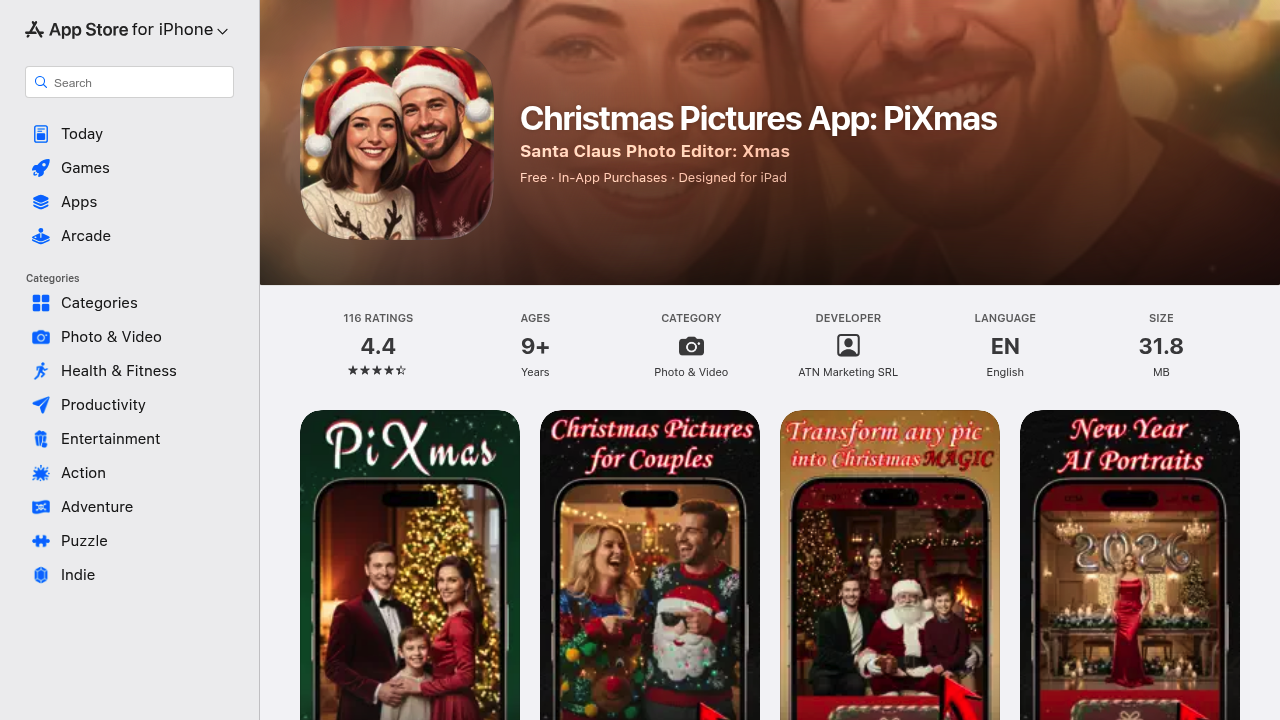
Skip the Christmas photo shoot. PiXmas drops your regular photos into festive scenes using AI transformation. Upload a picture of yourself, your kid, or your dog, and the app generates studio-quality holiday portraits with snow, fireplaces, Christmas trees, or Santa's workshop in the background. The whole thing happens in one tap.
The template library runs deep — cozy living rooms with twinkling lights. Snowy outdoor scenes. Classic fireplace settings. Santa's workshop for the kids. You're not stuck with generic Christmas either — the app includes New Year themes, Valentine's Day scenes, and Easter backdrops. Fun filters let you turn photos into Elf mode, Cartoon style, or full Grinch treatment. The app promises cinematic warmth and that nostalgic holiday feeling across all its styles.
Does the quality hold up? The 116 ratings average 4.4 out of 5, which suggests most people get usable results. Reviews don't tell you much about edge cases though. Will it handle group shots as well as solo portraits? Does it struggle with certain lighting conditions or photo angles? The app description emphasizes "ultra-realistic" and "professional studio" quality, but AI photo transformations can vary wildly based on your source image. You won't know until you try your own photos.
The app explicitly works with families, couples, kids, babies, and pets. That's a practical detail since not every AI photo tool handles animals well. Photos come out optimized for both social sharing and printing, which matters if you're making actual Christmas cards. Direct sharing works with Instagram, TikTok, Facebook, and WhatsApp.
Here's what limits you. iOS only. No Android version exists. The app demands uploading your photos, which is standard but worth noting if you're privacy-conscious about family pictures. There's a 9+ age restriction, though that seems more about App Store policy than actual functionality.
The app weighs 31.8 MB, so it won't eat your storage. One-tap transformation means you don't need editing skills, which is the whole point — this isn't Photoshop with training wheels. It's automated scene placement.
What's missing from the facts? Any mention of how the AI actually works. Does it use face detection to properly integrate your subject into the scene? How does it handle lighting consistency between your original photo and the Christmas background? The app promises handcrafted styles for each theme, but there's no detail on customization options. Can you adjust the intensity of effects or choose specific elements within a theme?
No word on how many transformations you get or whether processing happens on-device or server-side. Server processing would explain the upload requirement but might mean delays during peak holiday season when everyone's generating Christmas cards.
Best fit for parents making Santa photos without the mall line. Content creators prepping festive posts. Anyone who wants holiday cards but doesn't want to wrangle everyone into matching sweaters for a real photo session. Pet owners who can't get their animals to cooperate with actual Christmas props. The app removes logistics from holiday photography, trading real setup for AI generation speed.
The 4.4 rating with over 100 reviews suggests it delivers for most use cases. Just know you're working within preset themes rather than building custom scenes from scratch.