
Singify AI Vocal Remover logo
AI Vocal Remover FREEMIUM from $6/mo

Singify AI Vocal Remover

This software processes audio files through a series of machine learning models that identify and separate different frequency ranges and timbral characteristics within a song

Users can upload files directly in MP3, WAV, FLAC, AIFF, MP4, MOV, or M4A formats, or paste a YouTube video link to extract audio automatically. The system then routes the file through one of several specialized…

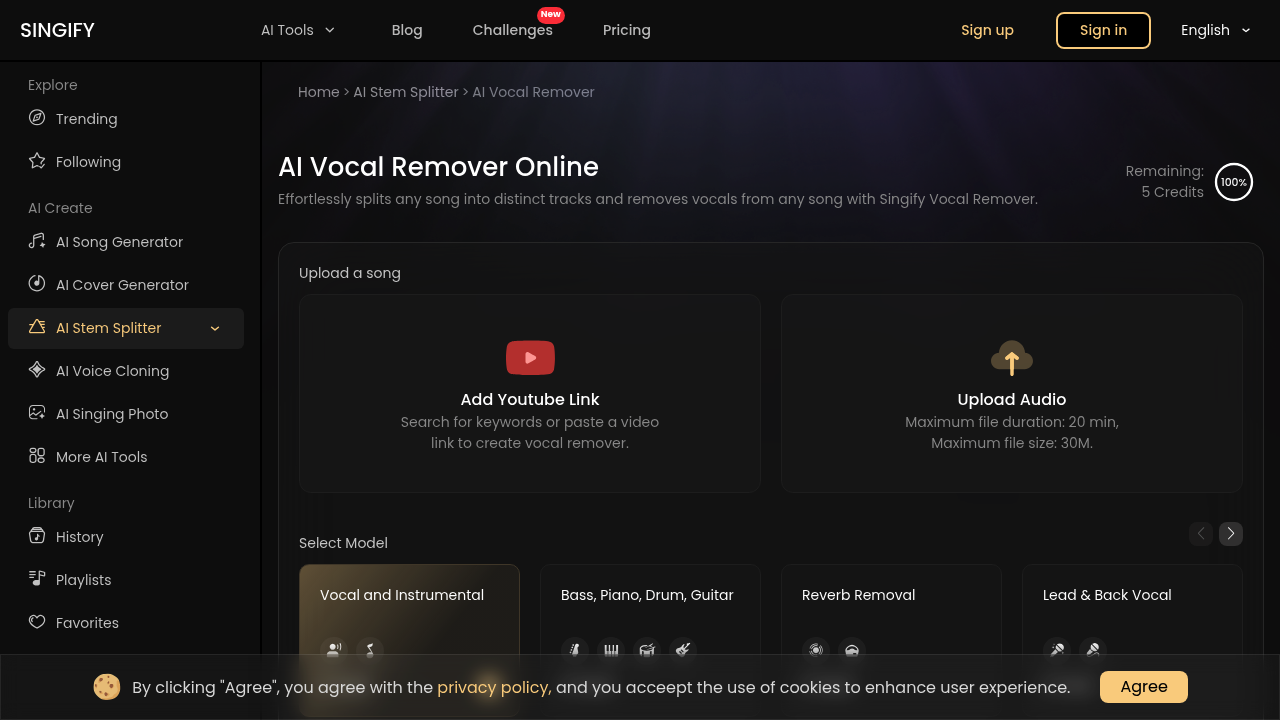
Singify AI Vocal Remover screenshot

This software processes audio files through a series of machine learning models that identify and separate different frequency ranges and timbral characteristics within a song. Users can upload files directly in MP3, WAV, FLAC, AIFF, MP4, MOV, or M4A formats, or paste a YouTube video link to extract audio automatically. The system then routes the file through one of several specialized separation models depending on what the user wants to isolate.

The separation architecture offers multiple model configurations. A 2-track model splits audio into vocal and instrumental components, or can target specific elements like reverb removal or lead versus background vocals. there is also a 3-track model that divides files into speech, music, and effects categories. The 4-track model isolates bass, piano, drums, and guitar simultaneously. The most complex 6-track model extracts all four instruments plus separate vocal and instrumental stems in a single pass.

Beyond the standard vocal and instrumental split, this software includes specialized models for isolating individual instruments. You can extract only drums, bass, piano, guitar, organ, strings, or wind instruments from a mix. There's a multi-singer model that attempts to separate different vocalists, and a male versus female vocal separator. The reverb removal model strips spatial effects from recordings, which is technically difficult since reverb occupies the same frequency space as the dry signal.

The separation happens in one click after model selection. The system processes the file and provides a preview before download. The underlying models get updated regularly, which means separation quality can improve over time as the algorithms are retrained on larger datasets.

Files can't exceed 20 minutes in duration or 30MB in size. These constraints likely exist because longer files require more computational resources and processing time. The 30MB limit means high-bitrate files might need compression before upload, which could affect the quality of the source material going into the separation process.

This software works across web browsers, iOS, Android, and macOS. This cross-platform approach means the processing happens server-side rather than on the device, so performance won't vary based on local hardware. The YouTube integration is the only external service connection, allowing direct extraction from video URLs without manual downloading and re-uploading.

Pricing starts at $5.99 monthly or $71.99 annually for the Basic plan, which includes 30 stem splitter credits per month. The Pro plan costs $8.33 monthly when billed annually at $99.99, providing 100 stem splitter credits. The Enterprise tier runs $24.99 monthly or $251.88 yearly with 200 credits. There's a free plan offering 5 stem splitter credits, but it doesn't allow song downloads and puts users in a wait queue rather than priority processing. Free users also get credits for other features like AI music generation and cover creation, though those fall outside the vocal removal functionality.

The credit system means each separation consumes one credit regardless of which model configuration you choose. This differs from services that charge based on file length or number of stems extracted. The free tier's download restriction is a significant limitation since you can preview separations but can't save them for actual use.

The lossless instrumental track production suggests the output maintains the original file's bit depth and sample rate where the format allows. Distortion-free processing is the goal, though separation quality depends heavily on the source material's mix complexity and the specific model used.


Singify AI Vocal Remover alternatives

See all →

Frequently asked

7 questions
How many stems can you separate with Singify AI Vocal Remover?
Singify can separate audio into up to 10 distinct stems depending on which model you select. The 6-track model extracts bass, piano, drums, guitar, vocals, and instrumentals simultaneously. You can also use specialized 2-track models to isolate individual elements like only drums, only guitar, or only piano from a mix. There's even models for reverb removal and separating male from female vocals, though each separation approach uses different underlying algorithms optimized for that specific task.
Does Singify AI Vocal Remover have a free version?
The free plan provides 5 stem splitter credits per month, which means you can separate 5 songs. The major limitation is that free users can't download the separated tracks, only preview them in the browser. Free accounts also go into a wait queue instead of getting priority processing, so separations take longer during peak usage times. You'll need at least the Basic plan at $5.99 monthly to actually download and use the separated stems.
What file formats does Singify support for vocal removal?
The software accepts MP3, WAV, FLAC, AIFF, MP4, MOV, and M4A file formats. You can either upload files directly or paste a YouTube video URL to extract the audio automatically. Files can't exceed 20 minutes in duration or 30MB in size, which means high-bitrate recordings might need compression before upload. The processing happens server-side regardless of whether you're using the web interface, mobile app, or desktop version.
Can Singify separate individual instruments like just the drums or just the bass?
The software includes specialized 2-track models that extract single instruments from a full mix. You can isolate only drums, bass, piano, guitar, organ, strings, or wind instruments by selecting the corresponding model. This differs from the multi-track models that separate everything simultaneously. The single-instrument models are trained specifically on that instrument's frequency and timbral characteristics, which can sometimes produce cleaner separation than extracting one stem from a 4-track or 6-track split.
How much does Singify AI Vocal Remover cost?
Paid plans start at $5.99 monthly for Basic, which includes 30 stem splitter credits. The Pro plan costs $8.33 monthly when billed annually at $99.99, providing 100 credits. Enterprise runs $24.99 monthly or $251.88 yearly with 200 credits. Each separation consumes one credit regardless of how many stems you extract, so a 2-track split and a 10-track split both cost the same. Annual plans save 30% compared to monthly billing.
What's the maximum song length Singify can process?
Files can't exceed 20 minutes in duration or 30MB in size. These constraints exist because longer files require significantly more computational resources for the machine learning models to process. If you're working with high-bitrate audio, the 30MB limit might force you to compress the file before upload, which could degrade the source quality going into the separation algorithm. The file size restriction is more likely to be the bottleneck for lossless formats like WAV or FLAC than for compressed formats like MP3.
Can you use Singify to make karaoke tracks?
The 2-track vocal and instrumental model splits songs into exactly what you'd need for karaoke: a vocal-free backing track. You can upload the original song or paste a YouTube link, select the vocal/instrumental separation model, and download the instrumental stem. The software claims lossless instrumental production, meaning the output maintains the original file's quality where the format supports it. This works well for practice or casual karaoke, though professionally mixed songs with heavily processed vocals sometimes leave artifacts in the instrumental track.

Traffic

Estimated monthly website visits · last 0 months

Global rank
#12,186,899

Not enough historical data for a chart yet.

Reviews (0)

Write review

No reviews yet. Be the first to share your experience.