AI Stem Splitter logo

AI Stem Splitter

This tool uses source separation algorithms to split audio tracks into individual components

Upload an audio or video file and the system analyzes the waveform to isolate vocals, drums, bass, guitar, piano, and other instruments into separate stems. Each stem gets exported as an independent audio file you can…

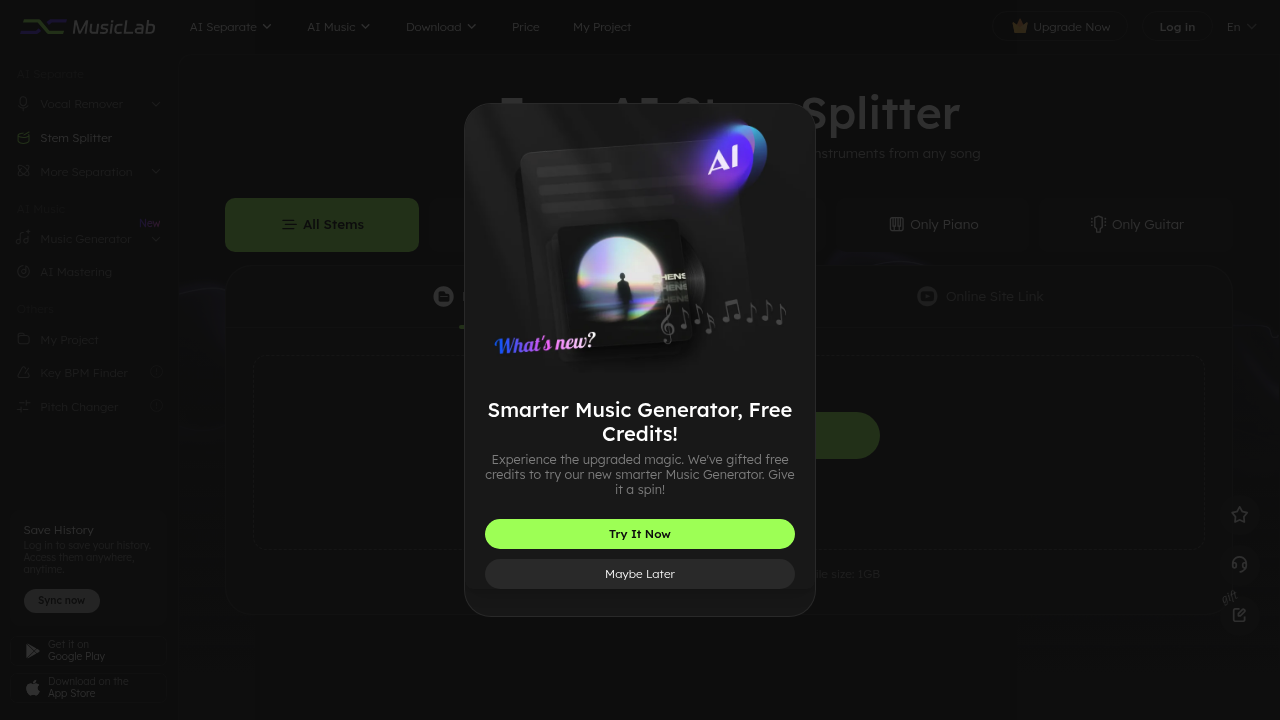
AI Stem Splitter screenshot

This tool uses source separation algorithms to split audio tracks into individual components. Upload an audio or video file and the system analyzes the waveform to isolate vocals, drums, bass, guitar, piano, and other instruments into separate stems. Each stem gets exported as an independent audio file you can manipulate individually.

The processing pipeline accepts files in MP3, WAV, MP4, MKV, MOV, M4A, FLAC, AC3, M4B, M4R, MKA, OGG, and MP2 formats. You can upload local files up to 1GB or paste YouTube and SoundCloud URLs directly. The system fetches the audio from these services and runs the separation without requiring downloads on your end. All exports come out in WAV format, which preserves the full fidelity of the separated tracks.

The separation engine identifies frequency patterns and spectral characteristics unique to each instrument type. Vocals get extracted by analyzing the human voice frequency range, typically between 85Hz and 255Hz for fundamental frequencies. Percussion separation focuses on transient detection and rhythmic patterns. Harmonic instruments like guitar and piano get isolated through overtone analysis. The algorithm maintains the original audio quality throughout this process, though some artifacts can appear when stems overlap heavily in the frequency spectrum.

Files process locally after upload, with the separation happening on the server side. The free trial handles tracks up to six minutes and processes three files per day. This limitation exists because stem separation requires significant computational resources. Each minute of audio needs to be analyzed across multiple frequency bands simultaneously. The Pro plan extends this to sixty-minute files with unlimited daily processing and packs enhanced separation algorithms that reportedly improve accuracy on complex mixes.

Additional features include a vocal remover specifically for karaoke track creation, a key and BPM finder that analyzes tempo and pitch, and a pitch changer for transposing separated stems. There's also an AI mastering tool and music generator, though these sit outside the core separation functionality. The system saves your processing history so you can re-download previous separations.

Mobile apps exist for both iOS and Android. They work similarly to the web version but with the same file size and duration constraints.

The main technical limitation is file size. One gigabyte caps all uploads. For lossless formats like WAV or FLAC, this translates to roughly sixty minutes at CD quality. Compressed formats like MP3 can fit longer tracks within that size limit. The free tier's six-minute restriction makes it useful for testing but impractical for full-length songs. Three files per day won't support serious production workflows.

Separation accuracy depends heavily on the source material. Clean studio recordings with distinct instrument placement separate better than live recordings or heavily compressed files. Bass and drums typically separate cleanly because they occupy distinct frequency ranges. Vocals and melodic instruments can bleed into each other when they share similar frequencies. The algorithm struggles with lo-fi recordings, heavy distortion, or tracks where instruments are panned to the center and occupy overlapping frequency spaces.

The YouTube and SoundCloud integration simplifies the workflow for quick separations. No need to download, convert, then upload, and just paste the link. This works well for reference tracks or covers but respects each service's terms of service limitations.

AI Stem Splitter alternatives

See all →

Frequently asked

6 questions
Can AI stem splitters separate vocals from music for free?
The free trial allows three file separations per day with a six-minute duration limit. You can extract vocals, drums, bass, guitar, piano, and other instruments from these short tracks without paying. The system exports all stems in WAV format to preserve audio quality. However, the free tier doesn't support full-length songs since most tracks exceed six minutes, and the three-file daily cap won't sustain regular production work.
How does AI separate individual instruments from a song?
Source separation algorithms analyze frequency patterns and spectral characteristics unique to each instrument type. The system identifies vocals by scanning the 85Hz to 255Hz fundamental frequency range where human voices typically sit. Drums get isolated through transient detection that recognizes percussive hits, while harmonic instruments like guitar and piano separate via overtone analysis across their specific frequency bands. The algorithm processes the entire waveform simultaneously across multiple frequency ranges, maintaining original quality though artifacts can emerge when instruments overlap heavily in the spectrum.
What audio formats work with stem separation tools?
The processing pipeline accepts MP3, WAV, MP4, MKV, MOV, M4A, FLAC, AC3, M4B, M4R, MKA, OGG, and MP2 formats up to 1GB in size. You can upload local files directly or paste YouTube and SoundCloud URLs for automatic audio extraction. All separated stems export as WAV files regardless of input format. The 1GB limit translates to roughly sixty minutes for lossless formats like WAV or FLAC at CD quality, though compressed MP3 files can fit longer durations within that cap.
Does stem separation work well on all types of music?
Separation accuracy varies significantly based on source material quality and mixing complexity. Clean studio recordings with distinct instrument placement separate far better than live recordings, heavily compressed files, or lo-fi tracks. Bass and drums typically isolate cleanly since they occupy different frequency ranges, but vocals and melodic instruments can bleed together when sharing similar frequencies. The algorithm struggles most with heavy distortion, center-panned instruments, and tracks where multiple elements occupy overlapping frequency spaces, resulting in incomplete separation or audible artifacts.
How many songs can you split into stems per day?
The free trial processes three files daily with each track limited to six minutes duration. This restriction exists because stem separation demands substantial computational resources, analyzing each minute of audio across multiple frequency bands simultaneously. The Pro plan removes the daily file limit entirely and extends track duration to sixty minutes. For anyone working on albums, remixes, or regular production tasks, the three-file cap becomes a bottleneck almost immediately.
Can you extract stems directly from YouTube videos?
Pasting a YouTube or SoundCloud URL triggers automatic audio extraction and separation without requiring manual downloads. The system fetches the audio from these services, runs the separation algorithm, then exports the individual stems. This workflow eliminates the download-convert-upload sequence that typically slows down quick separations. The feature works within each platform's terms of service and maintains the same file duration limits as direct uploads, so six minutes for free trials and sixty minutes for Pro accounts.

Traffic

Estimated monthly website visits · last 9 months

287.8K visits/mo
Monthly visits
287.8K
↓ 3.5% MoM
Category rank
#18
AI Vocal Remover
1.1M 932.2K 714.9K 497.5K 280.2K Dec 2025: 1.1M visits Dec 2025 Jan 2026: 993.8K visits Jan 2026 Feb 2026: 562.5K visits Feb 2026 Mar 2026: 560.8K visits Mar 2026 Apr 2026: 475.5K visits Apr 2026 May 2026: 334.8K visits May 2026 Jun 2026: 280.2K visits Jun 2026 Jul 2026: 298.2K visits Jul 2026 Aug 2026: 287.8K visits Aug 2026

Reviews (0)

Write review

No reviews yet. Be the first to share your experience.