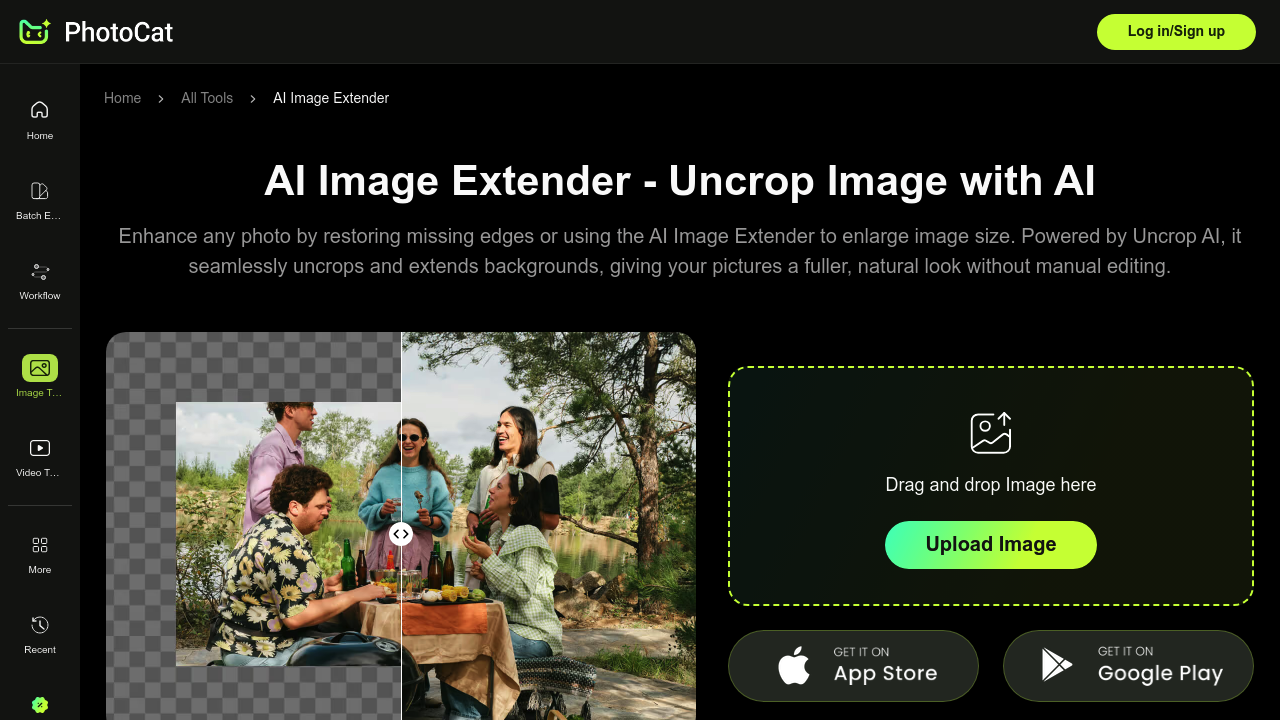
PhotoCat AI Image Extender fills in missing parts of cropped photos using AI generation. Drop in a tight headshot or product shot and it'll expand the canvas outward, adding background that matches what's already there. It runs free with no watermarks stamped on results, which sets it apart from competitors that slap branding across finished images.
The expansion tech handles 4K resolution without turning details mushy. Seven preset formats match Instagram, TikTok, Facebook, YouTube, and other platform specs. Don't want a preset? Drag the canvas borders manually to whatever dimensions work. Output stays sharp instead of getting stretched or blurred like basic resize tools do.
The use case for e-commerce is particularly strong. Product photos often get cropped too tight, leaving no room for sale banners or promo codes. Extend the background and suddenly there's space to overlay text without covering the product itself. Portrait and horizontal photographers can recover edges that got clipped during framing. Social media managers won't need to reshoot content that doesn't fit platform aspect ratios.
One-tap downloads. That's it. Upload, extend, grab the file. The interface doesn't bury functionality behind menus or require accounts for basic use.
What's missing here matters. No API access mentioned, so batch processing hundreds of images programmatically isn't happening. Team features don't appear in the facts, which means collaborative workflows probably aren't supported. Mobile app and browser extension details are absent — likely browser-only access. Integration with Shopify, WordPress, or design platforms isn't documented, so manual downloads and uploads are the workflow.
The AI analysis component reads existing image content to generate matching extensions, but there's no detail on how well it handles complex backgrounds. A simple gradient or solid color background should work fine. Busy patterns or detailed textures? That's where generative AI typically struggles with consistency. Architectural lines might not align perfectly. Faces at canvas edges could look weird if the AI guesses wrong about anatomy.
4K output sounds solid until you need higher resolution for print work. Digital platforms work fine, but large format printing might show limitations. The preset sizes solve common problems but won't cover every edge case — custom ratios still require manual border dragging.
The free tier with no watermarks is the real story. Most tools either charge for clean exports or limit resolution on free plans. PhotoCat gives full quality with unrestricted downloads. That pricing model won't last forever, but right now it's accessible without pulling out a credit card.