MenuPhotoAI logo
AI Product Photography FREEMIUM from $39/mo

MenuPhotoAI

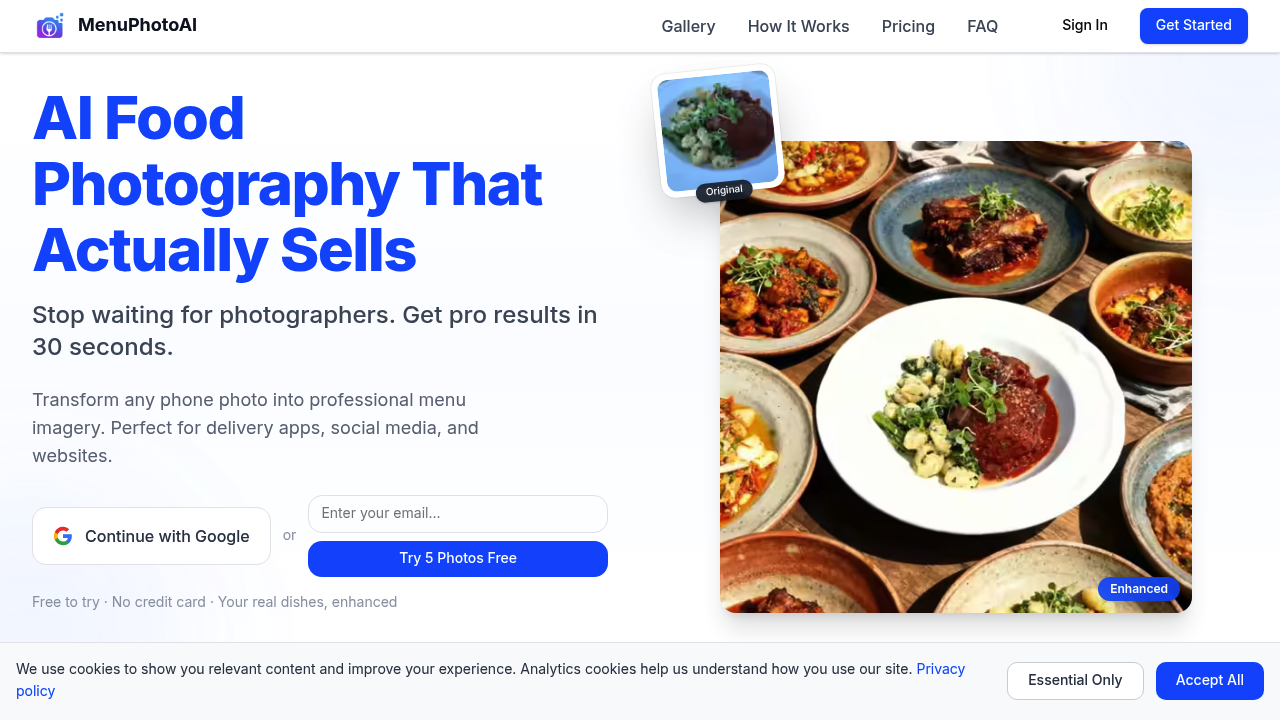
Restaurant owners taking phone photos of their dishes can turn those snapshots into professional menu imagery in 30 seconds

MenuPhotoAI transforms existing food photos rather than generating artificial ones, working from what you've actually cooked and photographed yourself. The founders Paolo and Shivani built this after spending years…

MenuPhotoAI screenshot

Restaurant owners taking phone photos of their dishes can turn those snapshots into professional menu imagery in 30 seconds. MenuPhotoAI transforms existing food photos rather than generating artificial ones, working from what you've actually cooked and photographed yourself. The founders Paolo and Shivani built this after spending years photographing over 1,000 dishes for restaurants across Europe, which shaped their core philosophy that food is real and photos should enhance reality rather than fake it.

The Style Match Mode lets you choose from editorial, commercial, and social photography styles to match where the image will appear. Eight delivery styles specifically optimize photos for food delivery apps, addressing the reality that visitors judge food in 0.3 seconds when scrolling through menus. Eighteen product photography styles cover different presentation approaches. Both color and surface customization run through the full spectrum, meaning you can adjust backgrounds, lighting tones, and the surfaces dishes sit on to match your brand aesthetic.

Hero Banner Mode combines multiple food photos into a single professional banner for website headers or promotional materials. MenuPhotoAI shows previews of how enhanced photos will perform across DoorDash, Instagram, and restaurant websites before you commit to the final version. This matters because the same photo often needs different treatments for a delivery app thumbnail versus an Instagram post versus a website hero image.

Re-editing comes included with every plan, letting you tweak results without burning through your monthly image allocation. The free plan offers five test images and ten re-edits, plus access to Style Match Mode, all eight delivery styles, all eighteen product photography styles, color and surface customization, delivery app optimization, and the premium AI model. That's everything except watermark-free downloads and commercial licensing.

Paid tiers start at $27 monthly for the Starter plan with 25 images and 50 re-edits. Professional runs $34 monthly for 50 images and 100 re-edits. Enterprise costs $62 monthly for 100 images with 200 re-edits, priority processing, and ultra-HD processing. All three paid plans include commercial licenses and watermark-free downloads. The pricing represents a 30 percent first-month discount from regular rates of $39, $49, and $89 respectively. At the Enterprise level, cost per photo drops to $0.89, compared to the $25-50 per image that professional food photographers typically charge or $600 for a full photoshoot session.

Monthly image limits create the main constraint. A restaurant updating its full menu quarterly might find 25 images tight, while a bakery highlighting weekly specials would have room to spare. MenuPhotoAI enhances only, never generates, which means you need actual photos of your actual food to upload. If you haven't photographed a dish yet, MenuPhotoAI cannot create it from a text description.

Small food businesses without photography budgets get the most obvious benefit. A cafe owner shooting dishes on an iPhone can produce images that look professionally lit and styled. Food delivery services can maintain visual consistency across their vendor menus. Multi-location restaurant chains can standardize menu imagery without flying photographers between cities. The 95 percent cost reduction compared to traditional food photography matters most to operators working on thin margins where a $600 photoshoot is not realistic.


MenuPhotoAI alternatives

See all →

Frequently asked

6 questions
Does MenuPhotoAI work with phone photos or do I need a professional camera?
MenuPhotoAI specifically works with phone photos of your actual dishes, which is the entire point of the service. The founders built it after photographing over 1,000 restaurant dishes across Europe and realized most small food businesses can't afford professional equipment or photographers. You upload whatever photos you've taken with your phone, and the AI enhances them into professional-quality menu imagery in 30 seconds. The service doesn't generate fake food images, so you do need to photograph your actual dishes first, but those photos can come from any smartphone camera.
How much does MenuPhotoAI cost compared to hiring a food photographer?
Professional food photographers typically charge $25-50 per image or around $600 for a full photoshoot session, while MenuPhotoAI costs as low as $0.89 per photo at the Enterprise tier. The Starter plan runs $27 monthly for 25 images, Professional costs $34 monthly for 50 images, and Enterprise is $62 monthly for 100 images. All paid plans currently offer 30 percent off the first month from regular prices of $39, $49, and $89 respectively. MenuPhotoAI claims a 95 percent cost reduction compared to physical photoshoots, which matters most for small bakeries, cafes, and food businesses operating on thin margins where a $600 photoshoot isn't realistic.
Can I try MenuPhotoAI before paying for a subscription?
The free plan includes five test images plus ten free re-edits, giving you a real trial of the service without entering payment information. This free tier includes full access to Style Match Mode, all eight delivery styles, all eighteen product photography styles, complete color and surface customization, delivery app optimization, and the premium AI model. The only features restricted to paid plans are watermark-free downloads and commercial licensing, so you can test the actual enhancement quality and see if it works for your food photos. Re-edits let you tweak results without using up your five test images, which means you can experiment with different styles on the same dish photo.
What happens if I need more than 100 photos per month?
The Enterprise plan caps at 100 images per month, which creates a hard limit for high-volume users. A restaurant completely refreshing a 50-item menu would use half the Enterprise allocation in one go, leaving only 50 images for the rest of the month. Multi-location chains updating menus across several restaurants or food delivery services managing dozens of vendor menus would hit this ceiling quickly. MenuPhotoAI doesn't mention any enterprise custom plans or pay-per-image options beyond the monthly tiers, so businesses needing more than 100 enhanced photos monthly would need to either wait for the next billing cycle or potentially maintain multiple subscriptions.
Does MenuPhotoAI optimize photos differently for Instagram versus delivery apps?
The service includes eight delivery styles specifically designed for food delivery apps and separate style options for Instagram, recognizing that the same dish photo needs different treatments depending on where it appears. MenuPhotoAI shows platform previews demonstrating how your enhanced photos will look across DoorDash, Instagram, and restaurant websites before you finalize them. This matters because delivery app thumbnails get judged in 0.3 seconds by hungry scrollers, while Instagram posts might prioritize editorial style and website hero banners need different composition entirely. The Style Match Mode lets you choose between editorial, commercial, and social photography styles to match your specific use case, and the Hero Banner Mode can combine multiple food photos into single professional banners for website headers.
Can MenuPhotoAI create photos of dishes I haven't cooked yet?
MenuPhotoAI cannot generate photos from text descriptions or create images of dishes you haven't photographed yet. The founders built the service around the philosophy that your food is real and your photos should be too, so it only enhances existing photos of actual dishes you've cooked and photographed yourself. If you're planning a new menu item and want to see what it would look like before cooking it, MenuPhotoAI won't help with that scenario. You need to actually prepare the dish, photograph it with your phone or camera, then upload that real photo for enhancement into professional-quality menu imagery.

Traffic

Estimated monthly website visits · last 8 months

3.1K visits/mo
Monthly visits
3.1K
↓ 26.8% MoM
Global rank
#5,100,064
US #3,097,896
Category rank
#25
AI Product Photography
7.1K 5.8K 4.6K 3.3K 2K Dec 2025: 7.1K visits Dec 2025 Jan 2026: 3.7K visits Jan 2026 Feb 2026: 3.1K visits Feb 2026 Mar 2026: 4.2K visits Mar 2026 Apr 2026: 2K visits Apr 2026 May 2026: 3K visits May 2026 Jun 2026: 4.3K visits Jun 2026 Jul 2026: 3.1K visits Jul 2026

Reviews (0)

Write review

No reviews yet. Be the first to share your experience.