#7 in AI Graphic Design Lovart logo
AI Graphic Design FREEMIUM from $15/mo

Lovart

Designers working with AI image generators often hit the same wall: getting something close to what they want, then watching that vision dissolve when they ask for changes

Every edit becomes a gamble with composition, colors shifting unpredictably and layouts breaking apart. Lovart tackles this problem by treating design decisions as interconnected systems rather than isolated outputs.…

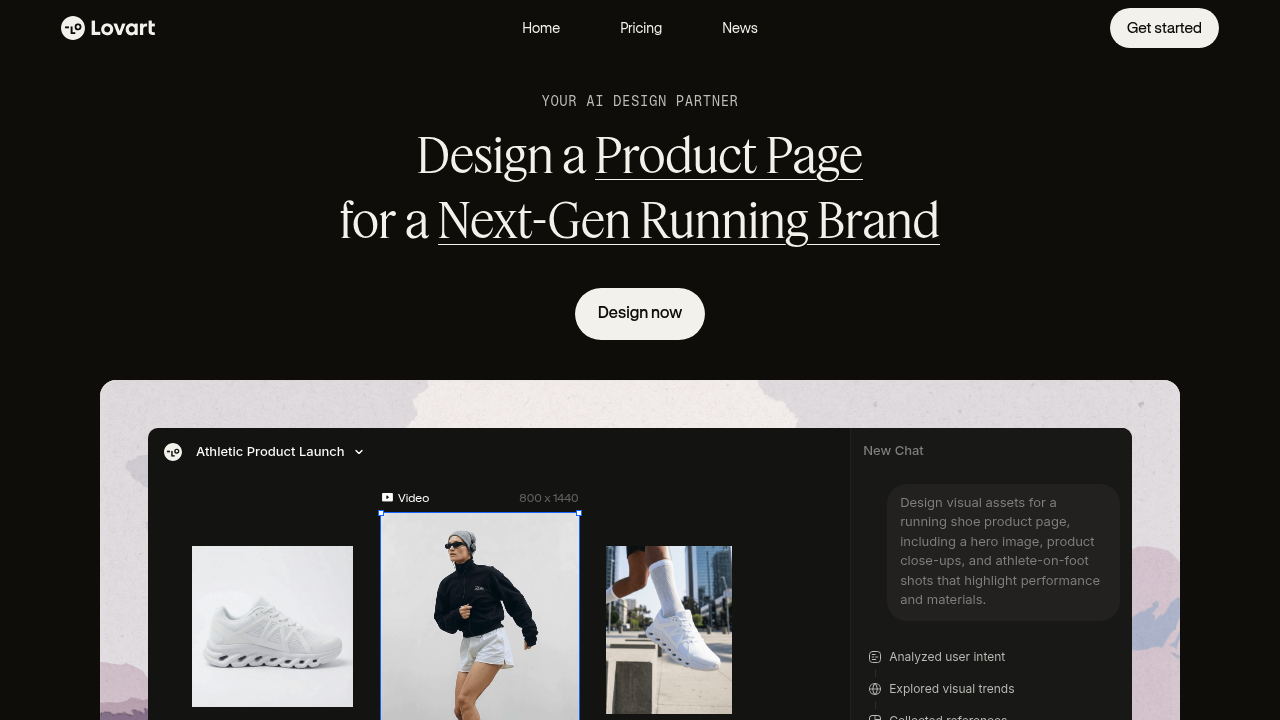
Lovart screenshot

Designers working with AI image generators often hit the same wall: getting something close to what they want, then watching that vision dissolve when they ask for changes. Every edit becomes a gamble with composition, colors shifting unpredictably and layouts breaking apart. Lovart tackles this problem by treating design decisions as interconnected systems rather than isolated outputs.

Lovart's Touch Edit feature lets designers make targeted changes while preserving elements that already work. Instead of regenerating entire compositions when adjusting a product angle or background color, users can modify specific areas without disturbing the rest. This addresses the common frustration where tweaking one detail forces you to start over because the AI interprets each prompt as a blank slate.

Style Consistency operates across iterations, formats, and projects by maintaining a design signature that persists through changes. When creating product pages or campaign materials that need visual cohesion, the AI remembers brand decisions about color palettes, layout principles, and visual voice. This matters for e-commerce work where hero images, product close-ups, and campaign posters need to feel like they belong together without manually specifying brand guidelines in every prompt.

Text Edit separates typography into editable layers that can be moved or rewritten without disrupting the underlying composition. For designers building product pages or promotional materials, this means adjusting headlines or repositioning text blocks doesn't require regenerating the entire image. The typography remains independent from background elements.

Visual Insights provides real-time web search for design references curated to user preferences. When exploring visual directions or seeking inspiration for specific aesthetics, this feature surfaces relevant examples rather than leaving designers to manually hunt through reference libraries.

Lovart generates assets at specific resolutions including 800 x 1440 for video, plus image formats at 720 x 960, 1440 x 800, and 960 x 720. These dimensions cover common aspect ratios for social media, web banners, and product displays. Output types span hero images, product photography, campaign posters, and video content.

Lovart's agentic intelligence unifies color, layout, and voice into cohesive brand systems. The AI understands context from previous decisions, so adjustments consider how changes affect the broader visual language rather than treating each generation as unrelated to the last.

A free plan lets users start without payment commitment. Lovart targets designers and brands building e-commerce assets, product pages, campaign materials, and complete brand systems where maintaining visual consistency across multiple touchpoints matters more than generating one-off images.


Lovart alternatives

See all →

Frequently asked

7 questions
Can you edit AI-generated images without regenerating everything in Lovart?
Lovart's Touch Edit feature lets you make targeted changes to specific areas while preserving elements that already work. Instead of regenerating an entire composition when you want to adjust a product angle or change a background color, you can modify just those elements without disturbing the rest of the design. This addresses the common problem with AI image generators where tweaking one detail forces you to start over because the system treats each prompt as a completely new request. The AI understands which parts of your design should remain stable and which need modification, so you don't lose progress with every iteration.
How does Lovart maintain consistent branding across multiple designs?
Lovart's Style Consistency feature maintains your design signature across iterations, formats, and projects by remembering brand decisions about color palettes, layout principles, and visual voice. The agentic intelligence unifies these elements into cohesive brand systems rather than treating each generation as isolated from previous work. When you're creating product pages or campaign materials that need visual cohesion, the AI applies learned brand guidelines without requiring you to manually specify them in every prompt. This matters particularly for e-commerce work where hero images, product close-ups, and campaign posters need to feel like they belong to the same visual family without constant manual intervention.
Does Lovart have a free plan or do you need to pay upfront?
Lovart offers a free plan that lets you start using the platform without any payment commitment. The service follows a freemium model where you can access core functionality at no cost, though the specific limitations or feature restrictions of the free tier aren't detailed in available information. This approach lets designers and brands test whether Lovart's agentic intelligence and editing capabilities fit their workflow before deciding whether to invest in paid features.
What image and video sizes does Lovart generate?
Lovart generates video at 800 x 1440 resolution and images at three different sizes: 720 x 960, 1440 x 800, and 960 x 720. These dimensions cover common aspect ratios needed for social media posts, web banners, product displays, and promotional materials across different platforms. The multi-format generation capability extends beyond static images to include video content, hero images, product close-ups, and campaign posters. These preset resolutions mean you don't need to manually specify dimensions for standard use cases in e-commerce and digital marketing.
Can you edit text in Lovart designs after they're generated?
Lovart's Text Edit feature separates typography into independent layers that can be moved or rewritten without disrupting the underlying composition. When you're building product pages or promotional materials and need to adjust headlines or reposition text blocks, you can make those changes without regenerating the entire image. The typography remains separate from background elements, so changing copy or moving text placement doesn't force you to recreate the visual foundation you've already established. This matters when you're iterating on messaging while keeping the visual design locked.
What types of businesses or projects is Lovart designed for?
Lovart targets designers and brands creating e-commerce assets, product pages, campaign materials, and complete brand systems where visual consistency across multiple touchpoints matters. The platform focuses on scenarios where you need cohesive design families rather than one-off images, making it relevant for product launches that require hero images, detail shots, and promotional graphics that feel connected. The emphasis on brand systems and style consistency suggests it's built for commercial work where maintaining a unified visual language across formats is more important than generating diverse standalone images. Businesses building comprehensive visual asset sets for products or campaigns represent the core use case.
Does Lovart integrate with design tools like Figma or Adobe products?
Available information doesn't specify any integrations between Lovart and design tools like Figma, Adobe Creative Suite, or other platforms. The service appears to function as a standalone AI design partner without documented connections to existing design workflows or asset management systems. This means you'd likely need to export generated assets from Lovart and manually import them into your preferred design tools for further refinement or incorporation into broader projects. The absence of integration details suggests the platform focuses on being a complete generation and editing environment rather than a plugin or extension to existing software.

Traffic

Estimated monthly website visits · last 9 months

2.7M visits/mo
Monthly visits
2.7M
↓ 4.6% MoM
Global rank
#18,675
CN #3,102
Category rank
#7
AI Graphic Design
6.8M 5.8M 4.7M 3.7M 2.7M Dec 2025: 6.8M visits Dec 2025 Jan 2026: 6.1M visits Jan 2026 Feb 2026: 4.5M visits Feb 2026 Mar 2026: 5.1M visits Mar 2026 Apr 2026: 4.6M visits Apr 2026 May 2026: 3.8M visits May 2026 Jun 2026: 3.1M visits Jun 2026 Jul 2026: 2.9M visits Jul 2026 Aug 2026: 2.7M visits Aug 2026

Reviews (0)

Write review

No reviews yet. Be the first to share your experience.