LoRA Tag logo
AI Image Recognition FREEMIUM from $9/mo

LoRA Tag

A machine learning engineer prepares a dataset for training a character LoRA and faces 500 images that need detailed captions

She could write them manually, spending 5-10 minutes per image describing poses, clothing, facial expressions, and backgrounds. Or she batches all 500 into LoRA Tag, selects "Character" as the LoRA type, picks her…

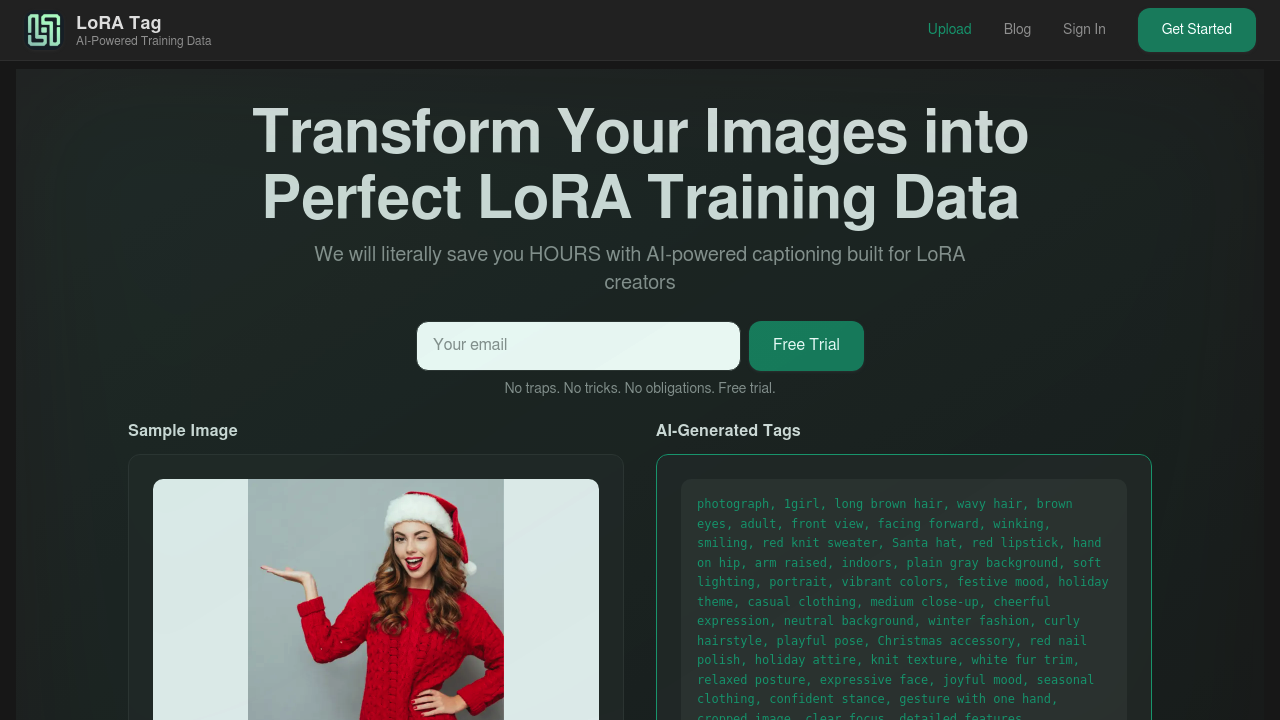
LoRA Tag screenshot

A machine learning engineer prepares a dataset for training a character LoRA and faces 500 images that need detailed captions. She could write them manually, spending 5-10 minutes per image describing poses, clothing, facial expressions, and backgrounds. Or she batches all 500 into LoRA Tag, selects "Character" as the LoRA type, picks her quality level, and gets organized caption files paired with each image in minutes instead of days.

The system generates descriptions using OpenAI Vision, identifying specific elements like character features, artistic styles, environmental details, and poses. A concept artist training a style LoRA uploads 100 images at once and gets captions that focus on art techniques, color palettes, and compositional elements because he selected "Style" as his LoRA type. Each prompt optimizes for what matters most to that training approach. Object and Concept LoRA types work similarly, tailoring descriptions to their training needs.

Quality levels range from quick drafts to exhaustive descriptions. The free plan handles standard quality, good enough for basic training datasets. Professional tier provides detailed quality with more sophisticated descriptions. Business and Enterprise tiers access all quality levels including the most thorough analysis. A research team testing different caption depths can compare how standard versus exhaustive descriptions affect model performance. They edit captions before downloading if something needs tweaking, or regenerate individual captions that missed important details. Global tags let them add consistent metadata across entire batches.

The batch processing matters most. Upload 100 images simultaneously with a 10MB file size limit per image on paid plans. The system pairs each caption as a .txt file with its corresponding image, maintaining the organizational structure training pipelines expect. No manual renaming or file matching. Priority processing on Professional and higher tiers means faster turnaround when deadlines press. Business plan adds bulk processing capabilities and custom tags for specialized workflows. Enterprise includes white glove support and custom integrations for teams running large-scale training operations.

Where it struggles: monthly image limits create hard stops. Free accounts get 10 images monthly. Starter handles 600, Professional does 1,200, Business covers 3,000, and Enterprise reaches 10,000. A solo creator building multiple LoRAs per month might burn through 1,200 images quickly. Top-ups exist but add costs. Starter top-ups run $5 for 600 images, Professional charges $8 for 1,200, Business needs $20 for 3,000 more. Annual plans save 20% but require upfront commitment.

The quality restrictions bite too with free users can't access detailed or exhaustive modes. Professional subscribers can't reach the most thorough analysis levels. Only Business and Enterprise provide everything. A hobbyist testing whether exhaustive captions improve results must upgrade immediately or stay limited.

Free tier starts with 10 images monthly at standard quality. Testing the service works fine. Starter costs $6.99 monthly for 600 images. Professional runs $10.99 for 1,200 images and priority processing. Business hits $24.99 for 3,000 images with custom tags. Enterprise reaches $69.99 for 10,000 images and dedicated support.

Skip this if you caption fewer than 10 images monthly or prefer manual control over every description detail. Teams not training LoRAs won't benefit from the specialized prompt optimization. Anyone needing unlimited processing should look elsewhere. But for LoRA creators facing hundreds of images and tight timelines, it eliminates the most tedious part of dataset preparation.


LoRA Tag alternatives

See all →

Frequently asked

6 questions
How many images can I caption for free with LoRA Tag?
The free plan processes 10 images per month at standard quality. That's enough for testing the service or handling a small character LoRA dataset, but a machine learning engineer preparing a 200-image training set would hit the limit immediately. Paid plans start at $6.99 monthly for 600 images on Starter, climbing to $10.99 for 1,200 images on Professional. The free tier won't work for ongoing LoRA development, but it confirms whether the AI-generated captions match your quality expectations before committing to a subscription.
Can LoRA Tag handle batch processing for large datasets?
LoRA Tag processes up to 100 images simultaneously, pairing each caption as a .txt file with its corresponding image automatically. A concept artist training a style LoRA uploads an entire folder at once instead of processing images individually, saving hours of manual file management. The system maintains naming conventions training pipelines expect, so files drop directly into workflows without reorganization. Priority processing on Professional and higher tiers speeds up turnaround for batches, while Business and Enterprise plans add bulk processing capabilities for teams running multiple training projects.
What's the difference between LoRA Tag quality levels?
Quality levels range from quick drafts to exhaustive descriptions, but access depends on your plan tier. Standard quality on the free plan provides basic descriptions sufficient for simple training datasets, while detailed quality on Professional tier generates more sophisticated analysis of poses, styles, and environments. A research team comparing caption depth effects on model performance hits a wall because only Business and Enterprise plans access the most thorough exhaustive mode. Free users testing whether richer captions improve their character LoRA results must upgrade to Business tier immediately or settle for limited descriptions.
Does LoRA Tag optimize captions for different LoRA types?
The service tailors descriptions based on whether you're training Character, Style, Object, or Concept LoRAs. A character LoRA creator gets captions focusing on facial expressions, clothing details, and poses, while a style LoRA creator receives descriptions emphasizing art techniques, color palettes, and compositional elements. An object-focused dataset highlights physical attributes and contexts, while concept training gets abstract pattern recognition. This optimization matters because generic image descriptions miss the specific features each LoRA type needs to learn effectively during training.
What happens when I run out of monthly images on LoRA Tag?
Monthly limits create hard stops at 10 images for free, 600 for Starter, 1,200 for Professional, 3,000 for Business, and 10,000 for Enterprise. A solo creator building three character LoRAs in one month could burn through Professional's 1,200-image allowance quickly if each dataset needs 500 captions. Top-ups add capacity but cost extra: $5 for 600 images on Starter, $8 for 1,200 on Professional, $20 for 3,000 on Business. Annual plans save 20% but require upfront payment, so creators with unpredictable monthly volumes face either overpaying for unused capacity or hitting limits mid-project.
Can I edit captions before downloading from LoRA Tag?
LoRA Tag allows caption editing before download and individual caption regeneration if something misses important details. A machine learning engineer notices the AI described a character's eye color incorrectly in 3 out of 100 images, edits those three captions manually, and downloads the complete set without reprocessing everything. Business plan subscribers add custom tags for specialized workflows, like consistent metadata across entire batches. Global tags support lets teams maintain standardized labeling conventions across multiple training datasets, though this flexibility still operates within the monthly image processing limits of each tier.

Traffic

Estimated monthly website visits · last 0 months

Global rank
#13,867,572

Not enough historical data for a chart yet.

Reviews (0)

Write review

No reviews yet. Be the first to share your experience.