#2 in Image to Prompt ImagePromptGuru logo

ImagePromptGuru

ImagePromptGuru converts images and text into optimized prompts for AI art generators through a straightforward pipeline

Upload an image file or paste a URL, and the system analyzes the visual content to generate a descriptive prompt that works with major image generation models. The technical approach differs from simple image…

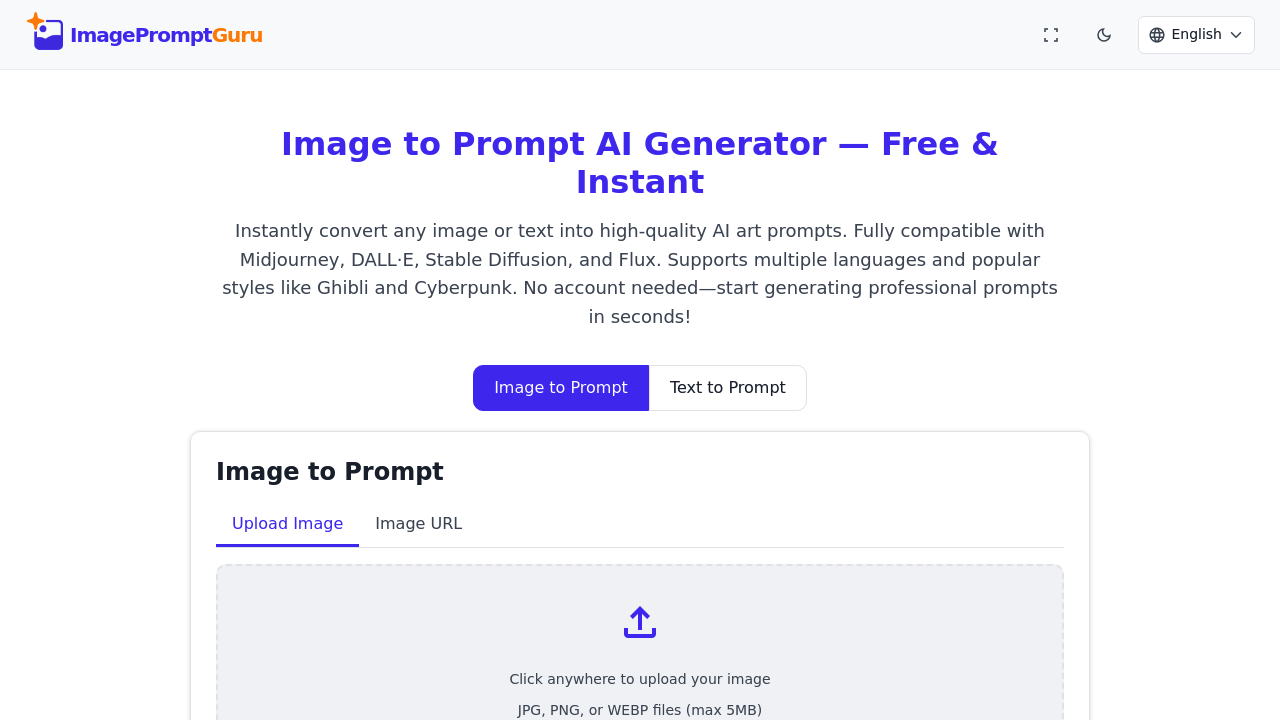
ImagePromptGuru screenshot

ImagePromptGuru converts images and text into optimized prompts for AI art generators through a straightforward pipeline. Upload an image file or paste a URL, and the system analyzes the visual content to generate a descriptive prompt that works with major image generation models. The technical approach differs from simple image captioning. It extracts compositional elements, lighting conditions, artistic style markers, and subject matter details, then reconstructs these into prompt syntax that AI art models understand.

The conversion process happens client-side in real-time. When you upload an image, the system processes it immediately and deletes it from memory. Nothing gets stored on servers. This architectural choice means there's no database of user images and no training data collection happening in the background. Your prompt history lives in your browser's local storage only.

Text to prompt enhancement works differently. Input a basic description and this platform restructures it using AI art best practices. It adds technical qualifiers, style descriptors, and formatting that tends to produce better results in image generators. The system knows the syntax preferences of different models, so you can optimize output specifically for Midjourney, DALL-E, Stable Diffusion, Flux, or keep it general purpose.

Model-specific optimization matters technically. Midjourney responds well to certain parameter structures and style keywords. Stable Diffusion has different prompt weighting syntax. DALL-E prefers natural language descriptions over technical jargon. This platform adapts its output format based on which target model you select. This isn't just template switching. The underlying prompt construction changes.

Eight scene and style presets provide starting points for different aesthetic directions. Select Photorealistic and the system emphasizes lighting terms, camera specifications, and realistic rendering cues. Choose Ghibli and it shifts toward Studio Ghibli's characteristic visual language. Cyberpunk, Fantasy, Anime, Watercolor, Oil Painting, and Steampunk each reshape the prompt structure around genre-specific terminology.

Language support covers 18 input languages but outputs prompts in English. This makes sense technically since most AI art generators train primarily on English descriptions. You can describe what you want in your native language and get back English prompts optimized for the models.

File handling has clear constraints. Images cap at 5MB and must be JPG, PNG, or WEBP format. These limitations keep processing fast and client-side feasible. URL uploads work if you're pulling reference images from the web instead of local files.

This platform is completely free with no subscription model, no watermarked outputs, and no account requirement. Full feature access doesn't gate behind payment tiers. This includes all model optimizations, language support, and both image and text conversion modes. Commercial use is allowed.

Technical limitations center on the local-only architecture. Since prompt history lives in browser storage, clear your cache and you lose your saved prompts. There's no cloud sync or account system to preserve work across devices. The 5MB file size limit also restricts high-resolution reference images, though most photos compress fine within that boundary.

The instant deletion policy has privacy benefits but means you can't retrieve uploaded images later. Once processed, they're gone. This architectural decision prioritizes data minimization over convenience features like image libraries or revision history.

Integration compatibility comes through prompt formatting rather than direct API connections. This platform generates text that you copy into Midjourney, DALL-E, Stable Diffusion, or Flux manually. It doesn't automate the actual image generation step.

ImagePromptGuru alternatives

See all →

Frequently asked

7 questions
How does ImagePromptGuru convert images into AI art prompts?
ImagePromptGuru analyzes uploaded images client-side by extracting compositional elements, lighting conditions, artistic style markers, and subject matter details. It then reconstructs these visual components into prompt syntax optimized for AI art generators rather than just generating simple captions. The processing happens in real-time within your browser, and the system immediately deletes the image from memory after conversion. This approach differs from cloud-based services since nothing gets stored on external servers or used for training data collection.
Can I use ImagePromptGuru for free or does it require a subscription?
ImagePromptGuru provides 100% free access to all features with no subscription model, payment tiers, or hidden costs. You get full access to image and text to prompt conversion, all 5 AI model optimization options, 18 language support, and commercial use rights without any watermarks on outputs. The platform doesn't require account creation, so you can start generating prompts immediately without sign-up friction. This free-forever model covers everything including the specialized presets for Photorealistic, Ghibli, Cyberpunk, Fantasy, Anime, Watercolor, Oil Painting, and Steampunk styles.
What AI art generators work with ImagePromptGuru prompts?
ImagePromptGuru generates prompts compatible with Midjourney, DALL-E, Stable Diffusion, and Flux through model-specific optimization. The system adapts prompt structure based on which target model you select since each has different syntax preferences. Midjourney responds to certain parameter structures and style keywords, while DALL-E prefers natural language descriptions over technical jargon, and Stable Diffusion uses different prompt weighting syntax. You copy the generated text into whichever AI art generator you're using since this platform handles prompt creation rather than direct image generation.
Does ImagePromptGuru store my uploaded images?
ImagePromptGuru processes images entirely client-side and deletes them from memory immediately after conversion. The architectural design means no database of user images exists and nothing gets stored on servers or collected for training purposes. This instant deletion policy prioritizes data minimization but comes with the tradeoff that you can't retrieve uploaded images later or build an image library. Your prompt history does save locally in browser storage, but the actual image files never persist beyond the initial processing moment.
What file types and sizes can I upload to ImagePromptGuru?
ImagePromptGuru accepts JPG, PNG, and WEBP image formats with a maximum file size of 5MB per upload. These constraints keep processing fast and maintain the client-side architecture where everything happens in your browser. You can upload images either from local files or by pasting a URL if you're pulling reference images from the web. The 5MB limit restricts very high-resolution reference images, though most standard photos compress within that boundary without quality loss that'd affect prompt generation.
How does text to prompt enhancement improve my descriptions?
Text to prompt enhancement restructures basic descriptions using AI art best practices by adding technical qualifiers, style descriptors, and formatting that produces better results in image generators. The system applies different prompt construction logic based on your selected target model since each AI art generator has distinct syntax preferences. Input works in any of 18 supported languages, but output prompts generate in English since most AI art models train primarily on English descriptions. This isn't simple translation but reconstruction of your concept into optimized prompt language with genre-specific terminology when you select presets like Cyberpunk or Watercolor.
What happens to my prompt history in ImagePromptGuru?
ImagePromptGuru stores prompt history exclusively in your browser's local storage with no cloud sync or account system. This means your saved prompts remain accessible only on the specific device and browser where you created them. Clearing your browser cache will delete all saved prompts permanently since there's no server-side backup or cross-device preservation. The local-only architecture prioritizes privacy and eliminates the need for account creation, but comes with the limitation that you can't access your work from different devices or recover prompts after clearing browser data.

Traffic

Estimated monthly website visits · last 9 months

26.8K visits/mo
Monthly visits
26.8K
↑ 6.4% MoM
Global rank
#1,129,745
JP #223,035
Category rank
#2
Image to Prompt
107.4K 85.9K 64.3K 42.8K 21.2K Dec 2025: 21.2K visits Dec 2025 Jan 2026: 62.8K visits Jan 2026 Feb 2026: 107.4K visits Feb 2026 Mar 2026: 78.4K visits Mar 2026 Apr 2026: 81.1K visits Apr 2026 May 2026: 67.6K visits May 2026 Jun 2026: 43.2K visits Jun 2026 Jul 2026: 25.2K visits Jul 2026 Aug 2026: 26.8K visits Aug 2026

Reviews (0)

Write review

No reviews yet. Be the first to share your experience.