Fotor AI Image Combiner logo

Fotor AI Image Combiner

Fotor AI Image Combiner merges two or more photos into a single frame using prompts and ready-made templates.

You upload your images, describe the result you want, and generate a blended picture that you can download. Prompt templates cover common requests such as putting two people together, swapping a background, morphing…

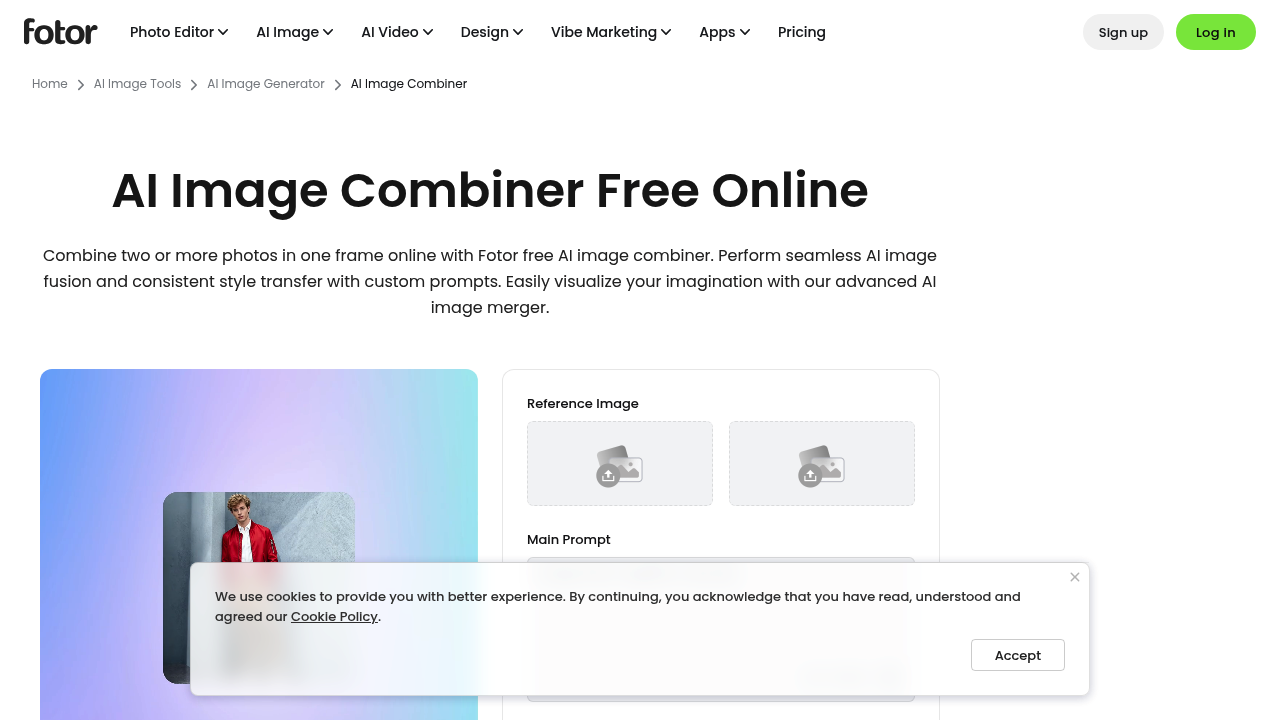
Fotor AI Image Combiner screenshot

Fotor AI Image Combiner merges two or more photos into a single frame using prompts and ready-made templates. You upload your images, describe the result you want, and generate a blended picture that you can download. Prompt templates cover common requests such as putting two people together, swapping a background, morphing faces, mixing animals, or creating a double exposure, and a style-strength control lets you decide how strongly an art style is applied to the combined image.

This feature suits people who want a finished composite without learning layers and masks in a traditional photo editor. Social media creators can fuse portraits and scenes for posts, small online sellers can place products into marketing visuals, and families can bring separate photos into one shared picture. Designers who need quick concept mockups, and hobbyists who enjoy playful edits such as meeting a younger version of themselves, can reach a usable result in a few steps. No editing background is required, and the workflow runs in a browser.

Typical uses include building team or family photos from separate shots, creating product marketing images that mix a product with a lifestyle backdrop, and telling a story by merging several scenes into one frame. Style transfer lets you apply classic art looks, keep a uniform brand style across a set of images, or blend several styles together for surreal artwork. Annotation-based fusion lets you point at what should go where when the combination needs more precise direction. Fotor also offers background removal, upscaling, and other photo tools in the same ecosystem, so a combined image can be refined afterward.
Fotor AI Image Combiner alternatives

See all →

Frequently asked

6 questions
How does the combiner merge photos?
You upload two or more images, write or pick a prompt describing the composition and style, and the AI generates one blended image. Prompt templates cover scenarios like putting two people together or changing the background.
Who is the image combiner for?
Social media creators, small sellers, designers, and everyday users who want composite images without manual layer work. No photo-editing experience is needed.
Can I use it for product marketing visuals?
Product marketing is one of the listed scenarios, where product images are merged with other photos to build promotional visuals. Brand-consistent looks can be kept by applying a uniform style across images.
What creative effects are available?
Templates include face morph, animal hybrid, double exposure, background changer, and hug-your-younger-self compositions. Style fusion options cover classic art, surrealism, and mixing multiple styles.
Can the output style be controlled precisely?
A style-strength control adjusts how much of an art style is applied to the combined result. Annotation-based fusion adds further direction by marking how elements should be placed.
Do I need to install anything to start?
The combiner runs online in a browser. Upload your images, define your vision in a prompt, then generate and download the result.

Reviews (0)

Write review

No reviews yet. Be the first to share your experience.