
Emberly logo

Emberly

Visual thinking meets structured note-taking in Emberly, a workspace that organizes information through mind maps instead of traditional folders

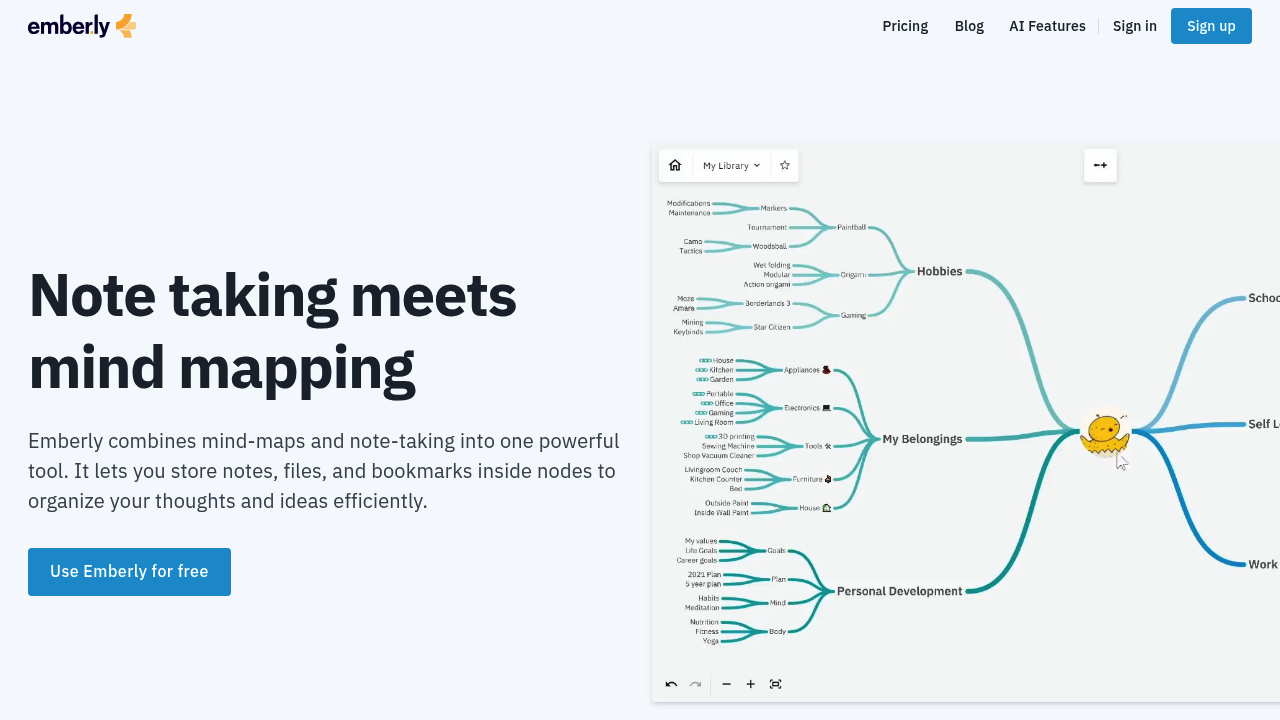
Each node in the map can hold notes, files, and bookmarks, creating a network of interconnected ideas linked through bi-directional connections. Emberly includes an AI writing assistant for drafting and summarizing…

Emberly screenshot

Visual thinking meets structured note-taking in Emberly, a workspace that organizes information through mind maps instead of traditional folders. Each node in the map can hold notes, files, and bookmarks, creating a network of interconnected ideas linked through bi-directional connections. Emberly includes an AI writing assistant for drafting and summarizing content, automatic quiz generation from stored notes, and a discussion simulator that acts as a virtual debate partner. A Chrome web-clipper saves websites with one click, storing them directly into the visual structure. Emberly offers a free Basic plan with limits on nodes, maps, and file uploads, plus paid tiers with a 20% discount for annual billing.

Students managing coursework and research materials form a core user group, particularly those who retain information better through visual connections than linear lists. Knowledge workers building personal wikis or reference libraries benefit from the bi-directional linking system that surfaces related ideas without manual tagging. Teams collaborating on shared knowledge bases use the real-time editing features to build interconnected documentation. Emberly suits learners who struggle with traditional note apps because they lose track of where information lives, offering a spatial alternative to hierarchical filing systems.

Research projects benefit from Emberly's ability to connect disparate sources—academic papers, web articles, personal observations—into a single visual map that reveals patterns across materials. Content creators use Emberly to organize reference materials and brainstorm article structures, embedding finished maps into Medium posts or Notion pages for readers to explore. Teams building internal documentation create public maps that serve as interactive guides, replacing static wiki pages with explorable knowledge graphs. The browser extension fits into daily workflows by capturing web content directly into existing maps without switching contexts. Students preparing for exams use the automatic quiz feature to test retention on material they've already organized, turning their visual notes into active study tools.


Emberly alternatives

See all →

Frequently asked

6 questions
How does Emberly organize notes and information?
Emberly uses visual mind maps where each node can contain notes, files, and bookmarks, replacing traditional folder hierarchies with spatial layouts. Bi-directional links connect related nodes to create an interconnected web of thoughts, making it easier to surface related ideas without manual tagging. This approach suits people who retain information better through visual connections than linear lists.
Who should use Emberly?
Students managing coursework and research materials benefit from the visual organization system, particularly those who lose track of information in traditional note apps. Knowledge workers building personal wikis or reference libraries use the bi-directional linking to connect disparate sources. Teams collaborating on shared knowledge bases leverage the real-time editing features to build interconnected documentation together.
Can I use Emberly to prepare for exams?
Emberly generates automatic quizzes from your stored notes, turning visual maps into active study tools that test retention. The mind map structure helps you see connections between topics while studying, and the discussion simulator acts as a virtual debate partner for exploring concepts. This combination works well for students who need to both organize material and actively practice recall.
Does Emberly have a free plan?
Emberly offers a free Basic plan that includes bi-directional linking, real-time collaboration, the Chrome web-clipper, and the ability to create public maps. The free tier has limits on the number of nodes and maps you can create, plus restrictions on file uploads once you exceed the limit. Paid plans offer a 20% discount when billed annually.
What can't I do with Emberly's free tier?
The free Basic plan restricts how many nodes and maps you can create, setting hard limits on the size of your knowledge base. Once you hit the file upload limit, you cannot add new files until you upgrade or remove existing ones. These constraints make the free tier suitable for testing the tool or managing smaller projects rather than extensive knowledge libraries.
What platforms and tools does Emberly work with?
Emberly runs in most browsers and offers a mobile app for on-the-go access. The Chrome extension saves bookmarks and web content directly into your maps with one click, while embed support lets you display maps in Notion, Medium, and thousands of other platforms. Bulk export to markdown ensures you can move your notes and files out if needed.

Traffic

Estimated monthly website visits · last 1 months

1.5K visits/mo
Monthly visits
1.5K
Category rank
#15
AI Mind Mapping

Not enough historical data for a chart yet.

Reviews (0)

Write review

No reviews yet. Be the first to share your experience.