
ToolSmart Free Paraphrasing Tool logo

ToolSmart Free Paraphrasing Tool

This paraphrasing tool processes text through nine distinct rewriting modes, each applying different transformation rules to the input

The Standard mode makes general improvements while preserving structure. Fluency focuses on readability and flow. Humanize adjusts tone to sound less mechanical. Formal refines language for professional contexts.…

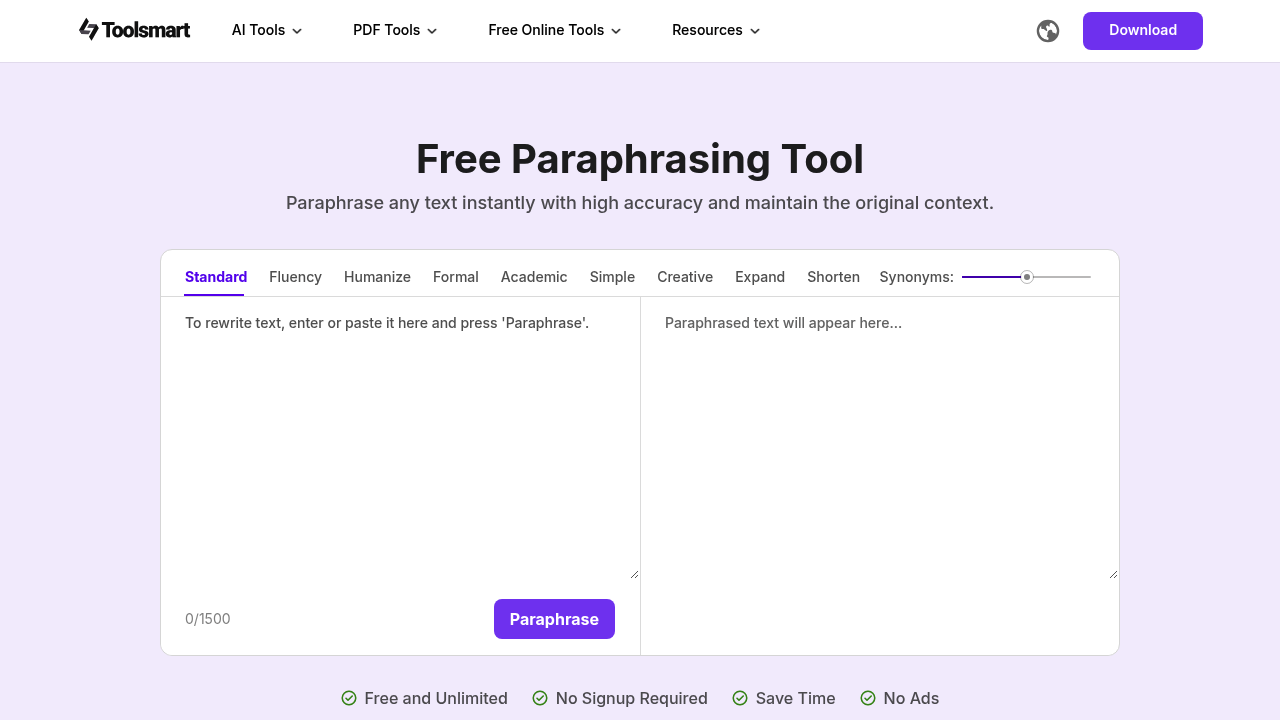
ToolSmart Free Paraphrasing Tool screenshot

This paraphrasing tool processes text through nine distinct rewriting modes, each applying different transformation rules to the input. The Standard mode makes general improvements while preserving structure. Fluency focuses on readability and flow. Humanize adjusts tone to sound less mechanical. Formal refines language for professional contexts. Academic applies scholarly conventions. Simple reduces complexity. Creative introduces fresh expressions. Expand adds detail and length. Shorten condenses without losing meaning.

The technical architecture accepts up to 1,500 words per processing session. Users paste text into the interface, select a mode, and adjust a word variation control that determines transformation intensity. Low settings produce minor tweaks for clarity. High settings generate complete rewrites. The system analyzes sentence structure, identifies replaceable phrases, and substitutes alternatives while maintaining semantic consistency with the original context.

Output quality depends on mode selection and variation settings. This application aims to preserve the source meaning while changing enough surface-level language to avoid repetition. It's designed for content writers drafting blog posts, students working on essays and reports, marketers creating product descriptions, and professionals refining documents. Each mode applies specific linguistic rules. Academic mode might favor passive constructions and formal vocabulary. Creative mode introduces figurative language and unconventional phrasing.

This application integrates with WPS Office, an alternative office suite compatible with Microsoft Office formats including Word, Excel, PowerPoint, and PDF. This lets users paraphrase within their existing document workflow rather than switching between applications.

The service requires no signup while no ads interrupt usage. There's no limit on how many paraphrasing sessions you can run, though each individual session caps at 1,500 words. For longer documents, you'll need to break content into chunks and process them separately.

The 1,500-word session limit is the primary technical constraint. If you are working on a 5,000-word article, you'll run three separate sessions. This application doesn't store previous sessions or maintain context across multiple runs, so processing a long document in pieces means each chunk gets paraphrased independently. This can create inconsistencies in terminology or style across sections.

The word variation control provides granular adjustment, but it's unclear exactly how the underlying algorithm interprets different settings. Small adjustments might still change technical terms you wanted preserved. Complete rewrites might occasionally drift from the original meaning despite the system's semantic preservation goals. The nine modes offer flexibility, but choosing the right one requires understanding how each applies its transformation rules to your specific content type.


ToolSmart Free Paraphrasing Tool alternatives

See all →

Frequently asked

6 questions
How many words can you paraphrase at once with ToolSmart?
The system processes up to 1,500 words in a single session. If you're working on longer content like a 5,000-word article, you'll need to break it into chunks and run separate sessions for each piece. Each session operates independently without retaining context from previous runs, which can create inconsistencies in terminology or style when you're paraphrasing sections of the same document. There's no limit on how many sessions you can run, so you can process as much content as needed by splitting it up.
What paraphrasing modes does ToolSmart offer?
The tool includes nine modes that apply different transformation rules: Standard for general improvements, Fluency for readability, Humanize to reduce mechanical tone, Formal for professional contexts, Academic for scholarly conventions, Simple to reduce complexity, Creative for fresh expressions, Expand to add detail, and Shorten to condense text. Each mode follows specific linguistic patterns, like Academic favoring passive constructions or Creative introducing figurative language. You can also adjust a word variation control that determines transformation intensity from minor tweaks to complete rewrites.
Does ToolSmart paraphrasing tool cost anything?
The service operates entirely free with no paid tiers or premium features. You get unlimited paraphrasing sessions with access to all nine modes and the full 1,500-word capacity per session without creating an account. The interface doesn't display ads during usage.
Can ToolSmart paraphrase inside Word documents?
This application integrates with WPS Office, an alternative office suite that handles Microsoft Office formats including Word, Excel, PowerPoint, and PDF files. The integration lets you paraphrase within your document workflow instead of copying text to a separate web interface. WPS Office maintains compatibility with standard Microsoft file formats.
What happens when you paraphrase text across multiple sessions?
The system doesn't store context or maintain consistency between separate paraphrasing runs. When you process a long document in 1,500-word chunks, each section gets transformed independently without reference to previous sections. This can create terminology inconsistencies where the same concept gets paraphrased differently across chunks, or stylistic shifts where tone varies between sections. The word variation control settings also don't guarantee preservation of specific technical terms you might want kept consistent throughout the full document.
Who should use ToolSmart paraphrasing tool?
The application targets content writers drafting blog posts, students working on essays and reports, marketers creating product descriptions, and professionals refining business documents. The nine modes address different content needs: Academic mode for scholarly writing, Formal for professional communications, Simple for accessibility, Creative for fresh marketing copy, and Shorten or Expand for length adjustments. Dropshipping experts specifically benefit from generating unique product descriptions at scale.

Traffic

Estimated monthly website visits · last 9 months

721.4K visits/mo
Monthly visits
721.4K
↓ 16.1% MoM
Global rank
#75,603
VN #8,045
Category rank
#11
AI Rewriter
2.7M 2.2M 1.7M 1.2M 721.4K Dec 2025: 2.7M visits Dec 2025 Jan 2026: 2.2M visits Jan 2026 Feb 2026: 1.6M visits Feb 2026 Mar 2026: 1.7M visits Mar 2026 Apr 2026: 1.7M visits Apr 2026 May 2026: 1.4M visits May 2026 Jun 2026: 971.6K visits Jun 2026 Jul 2026: 859.4K visits Jul 2026 Aug 2026: 721.4K visits Aug 2026

Reviews (0)

Write review

No reviews yet. Be the first to share your experience.