
Sentence Rewriter.cc logo

Sentence Rewriter.cc

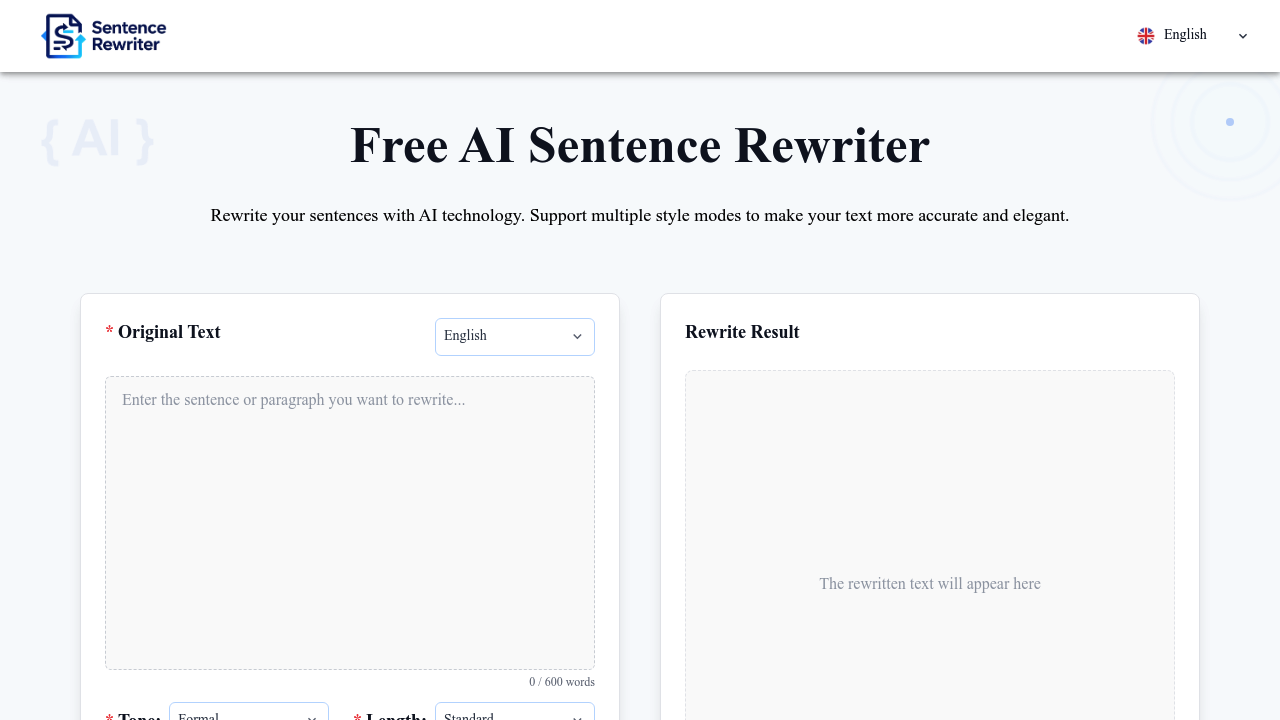
You paste or type text into the main input box, which caps at 600 words per session

41 views
Sentence Rewriter.cc screenshot

You paste or type text into the main input box, which caps at 600 words per session. That limit is fairly tight if you are working with longer content, meaning you'll need to break things up into chunks and run multiple rewrites.

Below the input box sit dropdown menus for tone and length. The tone selector includes options like Formal, though the full range isn't specified. Length adjustment appears as Standard and presumably other options. After selecting your preferences, you hit the rewrite button.

This rewriter processes your text using natural language processing and machine learning, then displays the rewritten version alongside your original in a side-by-side layout. This comparison view makes it easy to spot changes without toggling between screens. The rewriter swaps words and phrases while aiming to keep your core meaning intact, with particular attention to readability. Complex sentences get simplified, dense phrasing gets untangled.

One click does everything. No manual tweaking required upfront, though you'll likely need to review the output since AI rewrites don't always nail context or nuance. This rewriter prioritizes vocabulary diversity and originality, so you're not getting the same stock phrases recycled across different inputs.

The 600 word ceiling becomes annoying fast. Academic papers, blog posts, marketing copy often exceed that threshold by a large margin. You'll find yourself copying sections, rewriting, pasting back, then repeating for the next chunk. It breaks flow.

The interface mentions integration with commonly used software, but doesn't name specific platforms. That vagueness makes it hard to know if it'll plug into your existing workflow or require copy-paste gymnastics.

Over a million users rely on this rewriter according to the site. The user base spans professionals needing polished client communications, students clarifying essay language, copywriters testing different phrasings, marketers adjusting tone for various audiences, journalists simplifying complex reporting, and researchers making technical writing more accessible.

The free plan covers all core functionality without advertisements or surprise paywalls. You get the full tone and length options, unlimited rewrites within the 600 word constraint, and the comparison view. No trial period exists because there's nothing locked behind paid tiers. Everything runs free. The business model isn't transparent, but this rewriter doesn't push upgrades or restrict features based on usage volume beyond that per-session word count.


Frequently asked

6 questions
How many words can you rewrite at once in Sentence Rewriter.cc?
You can paste or type up to 600 words per rewrite session. The interface stops you at that ceiling, so longer content requires splitting into chunks. You'll copy a section, run the rewrite, paste the result back into your document, then repeat for the next 600 words. This chunking process gets tedious with blog posts, academic papers, or marketing copy that runs several thousand words.
Is Sentence Rewriter.cc completely free to use?
The rewriter runs entirely free with no paid tiers or trial periods. You get unlimited rewrites within the 600 word limit per session, access to all tone options including Formal, length adjustments, and the side-by-side comparison view without advertisements or hidden charges. The site doesn't push upgrades because nothing sits behind a paywall.
Can you change the tone when rewriting sentences?
You select tone from a dropdown menu below the input box before hitting rewrite. Options include Formal and others not explicitly listed on the site. The AI applies that tone across your entire text block, so a casual paragraph shifts to professional language or vice versa depending on your selection. You can't mix tones within a single rewrite session.
Does Sentence Rewriter.cc show you the original and rewritten text together?
The rewriter displays both versions side by side after processing. Your original text sits in one column while the AI-generated rewrite appears in the adjacent column. This layout lets you scan changes without switching tabs or scrolling between separate sections, though you'll still need to review carefully since the AI sometimes misses context or introduces awkward phrasing.
What happens if you need to rewrite more than 600 words?
You hit the word limit and can't proceed until you trim content. Most users split longer documents into 600 word sections, rewrite each chunk separately, then reassemble everything in their original document. This manual splitting and stitching disrupts workflow, especially with academic papers or marketing materials that need consistent tone across thousands of words.
Can students use Sentence Rewriter.cc for essays and papers?
Students paste essay paragraphs into the rewriter to clarify awkward phrasing or adjust tone for academic standards. The tool simplifies complex sentences and swaps vocabulary while attempting to preserve meaning, which helps when you've written something technically correct but clunky. The 600 word limit means rewriting a full research paper requires breaking it into multiple sessions and manually tracking which sections you've already processed.

Reviews (0)

No reviews yet. Be the first to share your experience.

Similar tools

See all →