#6 in AI Sketch Generator PencilArt logo

PencilArt

PencilArt processes uploaded photos through a neural network trained to replicate the characteristics of hand-drawn pencil sketches

The system analyzes the input image for edges, shading gradients, and tonal values, then reconstructs these elements using algorithmic patterns that mimic graphite strokes on paper. Users upload JPEG or PNG files up to…

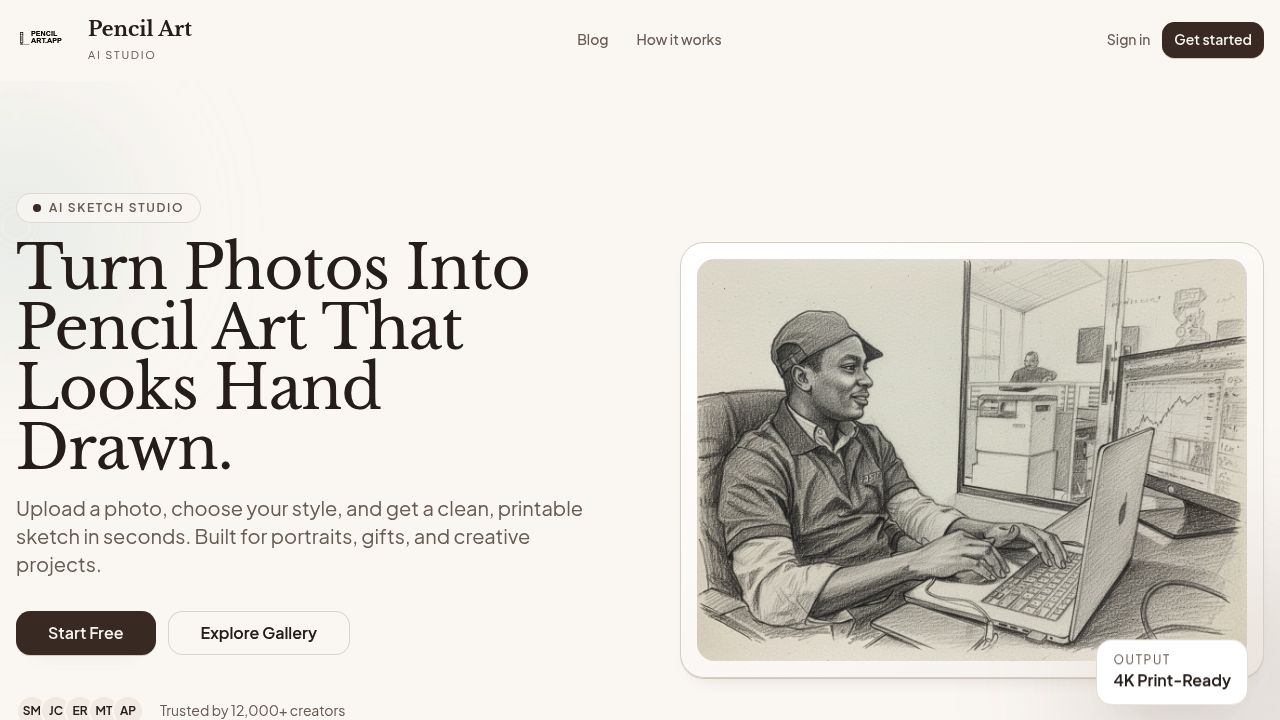
PencilArt screenshot

PencilArt processes uploaded photos through a neural network trained to replicate the characteristics of hand-drawn pencil sketches. The system analyzes the input image for edges, shading gradients, and tonal values, then reconstructs these elements using algorithmic patterns that mimic graphite strokes on paper. Users upload JPEG or PNG files up to 10MB through a web interface, select from realistic, artistic, or detailed style presets, and adjust intensity on a 1-10 scale to control how pronounced the pencil effect appears.

The conversion pipeline takes close to 60 seconds. During processing, the AI identifies facial features, texture boundaries, and light sources in the original photo. It then applies style-specific rendering rules. The realistic mode prioritizes accurate shading and proportion. Artistic mode introduces more expressive line work. Detailed mode emphasizes fine textures like hair strands or fabric weave. There's a toggle for fine detail preservation that tells the algorithm to retain smaller visual elements that might otherwise get smoothed out during the sketch conversion.

Output quality targets print readiness at 4K resolution. The system generates images suitable for physical printing without visible pixelation at standard poster sizes. For specialized use cases, the rendering adjusts automatically. Pet portraits receive extra processing for fur texture, applying directional strokes that follow hair growth patterns. Wedding and anniversary photos get romantic styling with softer line treatment. Memorial artwork uses gentle rendering and produces output compatible with engraving equipment. Professional headshots optimize for business card and LinkedIn profile dimensions.

The interface includes a full-screen preview modal where users can examine the sketch before saving. All processed images automatically go into a personal gallery tied to the user's account. The dashboard workspace lets users browse past conversions and download files as needed. Google Sign-In handles authentication, which is currently the only third-party integration available.

The free account provides access to the Pencil Art Studio and all basic conversion features. There's no trial period because the free tier isn't limited by time. Over 12,000 creators use this service.

Technical constraints center on input quality. The AI performs best when faces and details are clearly visible in well-lit source photos. Poor lighting or blurry originals produce less convincing sketches because the edge detection algorithm struggles to identify clean boundaries. The 10MB file size ceiling means extremely high-resolution professional photography might need compression before upload. Format support stops at JPEG and PNG, so users working with TIFF, RAW, or WebP files need to convert first.

The intensity slider gives users control over the sketch effect's strength, but it operates within the boundaries of whichever style preset they've chosen. You can't blend multiple styles in a single output. The fine detail preservation toggle is binary, either on or off, without granular control over which specific details to emphasize. The system doesn't offer batch processing, so users converting multiple images need to upload and process them individually. There's no API for programmatic access or integration into external workflows.

PencilArt alternatives

See all →

Frequently asked

7 questions
How long does it take to convert a photo to pencil sketch?
The conversion pipeline processes each image in roughly 60 seconds from upload to finished sketch. During this time, the neural network analyzes edges, shading gradients, and tonal values in your photo, then reconstructs them using algorithmic patterns that replicate graphite strokes. Processing speed doesn't vary significantly between the realistic, artistic, and detailed style presets. The system handles one image at a time with no batch processing option, so converting multiple photos means uploading and waiting for each individually.
Can I use PencilArt for free?
PencilArt offers a free account that provides full access to the Pencil Art Studio and all basic conversion features without time restrictions. There's no trial period because the free tier isn't temporary. All style options, the intensity slider, fine detail preservation, and 4K print-ready output work in the free account. Over 12,000 creators currently use the service, though it's unclear what percentage operate on the free tier versus any paid options.
What image formats does PencilArt accept?
The platform accepts JPEG and PNG files up to 10MB in size. If you're working with TIFF, RAW, or WebP files from professional cameras, you'll need to convert them to JPEG or PNG before uploading. The 10MB ceiling means extremely high-resolution images from professional photography equipment might require compression first. This format limitation stems from the web interface's processing constraints rather than the AI model's capabilities.
Does PencilArt work well with blurry or dark photos?
The AI performs best with well-lit images where faces and details are clearly visible, because the edge detection algorithm relies on clean boundaries to generate convincing sketches. Poor lighting or blurry originals cause the system to struggle during the analysis phase when it identifies facial features, texture boundaries, and light sources. Dark photos lack the tonal range the algorithm needs to reconstruct realistic shading gradients. If your source material has visibility issues, the output sketch will reflect those limitations with less defined lines and muddier shading.
What's the difference between realistic and artistic pencil styles?
The realistic mode prioritizes accurate shading and proportion, keeping the sketch faithful to the original photo's visual structure. Artistic mode introduces more expressive line work that takes creative liberties with stroke placement and emphasis. Detailed mode focuses on fine textures like individual hair strands or fabric weave patterns. Each preset applies different rendering rules during the conversion process, but you can't blend multiple styles in a single output or customize beyond choosing one preset and adjusting the intensity slider from 1 to 10.
Can I print PencilArt sketches at poster size?
The system generates output at 4K resolution specifically targeting print readiness without visible pixelation at standard poster sizes. This resolution choice makes the files suitable for physical printing through commercial services or home printers. For specialized applications, memorial artwork outputs in formats compatible with engraving equipment, maintaining the line quality needed for that production method. The automatic gallery saves full-resolution files, so you won't lose quality when downloading for print later.
Does PencilArt have an API for bulk processing?
There's no API available for programmatic access or integration into external workflows. The platform operates entirely through the web interface with manual uploads and individual processing. Users needing to convert multiple images must upload each one separately and wait through the 60-second processing time for every file. The only integration currently supported is Google Sign-In for authentication, which doesn't extend to automation or batch operations.

Traffic

Estimated monthly website visits · last 4 months

1.3K visits/mo
Monthly visits
1.3K
↓ 4.8% MoM
Global rank
#11,238,976
Category rank
#6
AI Sketch Generator
2.9K 2.3K 1.7K 1.1K 553 Jan 2026: 553 visits Jan 2026 Feb 2026: 2.9K visits Feb 2026 Mar 2026: 1.4K visits Mar 2026 Apr 2026: 1.3K visits Apr 2026

Reviews (0)

Write review

No reviews yet. Be the first to share your experience.