LuminaBrush logo

LuminaBrush

Digital artists get a specialized lighting tool that promises to transform artwork through AI-powered illumination effects

LuminaBrush tackles the specific challenge of adding realistic lighting to digital work, targeting everyone from concept artists to visual effects supervisors. The core approach uses a two-stage system. First, it…

LuminaBrush screenshot

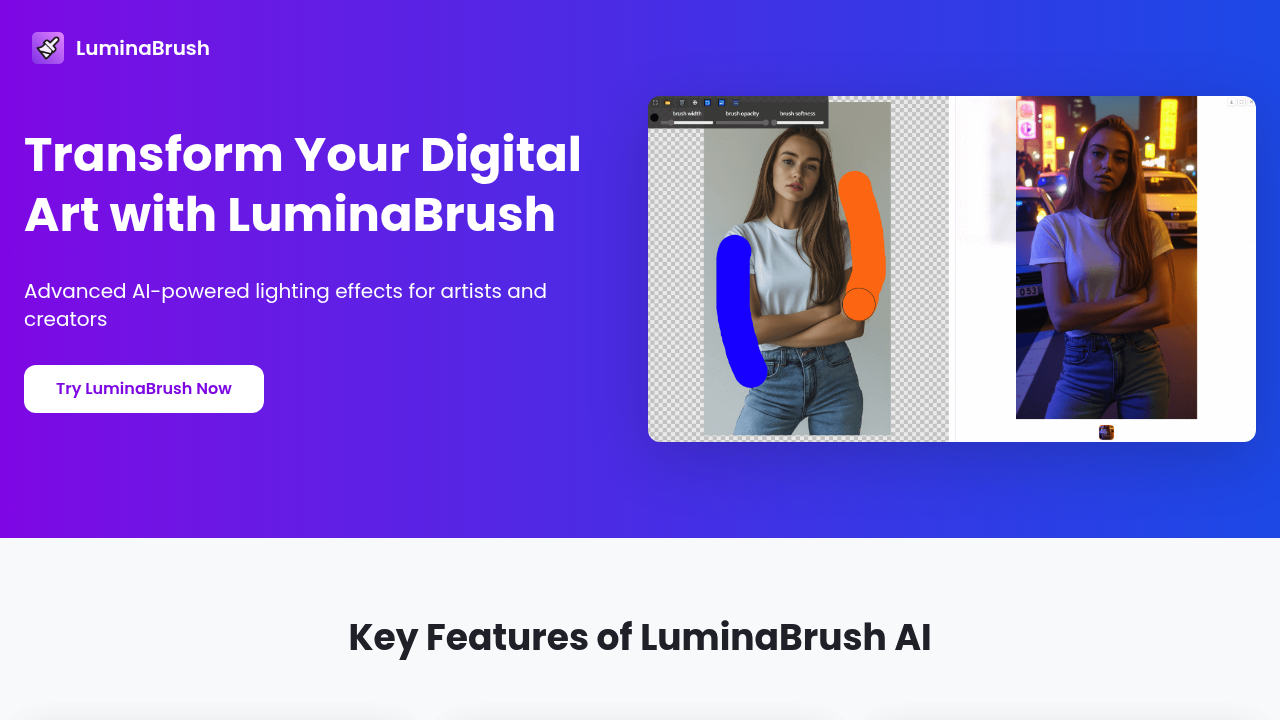
Digital artists get a specialized lighting tool that promises to transform artwork through AI-powered illumination effects. LuminaBrush tackles the specific challenge of adding realistic lighting to digital work, targeting everyone from concept artists to visual effects supervisors.

The core approach uses a two-stage system. First, it transforms images to create uniform lighting across the piece. Then it generates precise illumination effects based on where you direct it. Built on the Flux framework, which handles the consistency side of things.

What's actually there: a brush engine with texture and opacity controls, layer management, and real-time preview so you can see changes instantly. Import photos, upload backgrounds or pick from what's available, then hit the AI relight button to process. The brush system responds to input with what the specs call precise control, though how that translates to actual use depends on your workflow and expectations.

The intelligent lighting algorithms sound promising but lack specifics. No details on what makes them intelligent versus standard lighting tools. Cannot tell if they adapt to different art styles automatically or if you are doing most of the heavy lifting through manual adjustments. The advanced brush engine claim needs real-world testing. Advanced compared to what? Standard Photoshop brushes? Other AI art tools? That context matters.

Artists working in game development or film pre-production might find value here for quick lighting mockups. Digital illustrators exploring different mood options could benefit from the real-time preview. But anyone expecting one-click perfection will hit reality fast. Lighting remains complex. AI assists, doesn't replace understanding.

Missing from the picture: any user numbers, adoption rates, or processing times. No mention of export formats, resolution limits, or how it handles different art styles. Does it work equally well on photorealistic renders and stylized illustrations? Unknown. Integration list shows only Flux framework, so don't expect this to plug into your existing design suite without friction.

This software's free to use. No paid tiers listed, which raises questions about the business model and long-term sustainability. Free tools either monetize later or disappear. Worth trying since there's no cost barrier, but don't build your entire workflow around it until the pricing picture clarifies.

Best fit: artists who already understand lighting fundamentals and want to speed up iteration. Worst fit: beginners expecting the AI to teach them lighting theory through magic buttons.


LuminaBrush alternatives

See all →

Frequently asked

6 questions
Does LuminaBrush work with Photoshop or other design software?
LuminaBrush only integrates with the Flux framework according to available specs. No plugins or extensions exist for Photoshop, Illustrator, Procreate, or other standard design tools. You'll need to export your work, process it in LuminaBrush, then import back into your main software. This creates friction in workflows built around Adobe or other ecosystems. Artists expecting tight integration with existing tools will face manual file transfers between programs.
Can LuminaBrush handle different art styles like anime or photorealistic renders?
The tool doesn't specify how it adapts to different art styles. Documentation mentions intelligent lighting algorithms but provides zero details on whether these adjust for stylized illustration versus photorealistic work. The two-stage system transforms images for uniform lighting first, but whether that works equally well on flat cel-shaded anime and detailed 3D renders remains untested in public information. Artists working in niche styles should test thoroughly before committing to this in production workflows.
How long does LuminaBrush take to process lighting effects?
Processing times aren't documented anywhere in the available information. The real-time preview feature suggests some operations happen fast, but the AI-powered relight button likely takes longer depending on image complexity and resolution. Without specific numbers on render times or hardware requirements, you can't plan project timelines around this tool. Artists on tight deadlines need concrete performance data that simply doesn't exist in public specs.
Will LuminaBrush stay free or add paid plans later?
LuminaBrush currently offers free access with no paid tiers listed. The complete absence of pricing information beyond free raises sustainability questions that the company hasn't addressed publicly. Free tools either introduce paid features eventually or shut down when funding runs out. Artists building workflows around this tool face uncertainty about future costs or feature restrictions. Download and test it now, but maintain backup lighting solutions until the business model clarifies.
What's the learning curve for LuminaBrush compared to manual lighting?
Artists who already understand lighting fundamentals will adapt fastest since the tool assists rather than replaces knowledge. The brush controls, layer management, and real-time preview mirror standard digital art software patterns. However, the two-stage AI process introduces new concepts that don't exist in traditional tools. Beginners hoping the AI will teach them lighting through automation will struggle because the tool assumes you know where light should go and why. Expect days of experimentation to understand how the AI interprets your input.
Can game developers use LuminaBrush for production lighting mockups?
Game art directors and concept artists working on pre-production lighting studies could find value here for rapid iteration. The real-time preview helps explore different mood options without manual painting. But production use depends on export format compatibility and resolution limits, which aren't specified anywhere. The tool works best for exploration and client presentations, less so for final assets that need precise technical specs. Visual effects supervisors might use it for pitch decks but probably not for shots going directly into games or films.

Traffic

Estimated monthly website visits · last 0 months

636 visits/mo
Monthly visits
636

Not enough historical data for a chart yet.

Reviews (0)

Write review

No reviews yet. Be the first to share your experience.