Kiki The Tooth Fairy Tracker logo

Kiki The Tooth Fairy Tracker

This tool creates a simulated tracking experience for the tooth fairy by delivering timed video content and map animations to parents

The system works through email delivery of a personalized tracker link that doesn't require any downloads or app installations. Parents input their child's name during a 10-second signup process, then receive immediate…

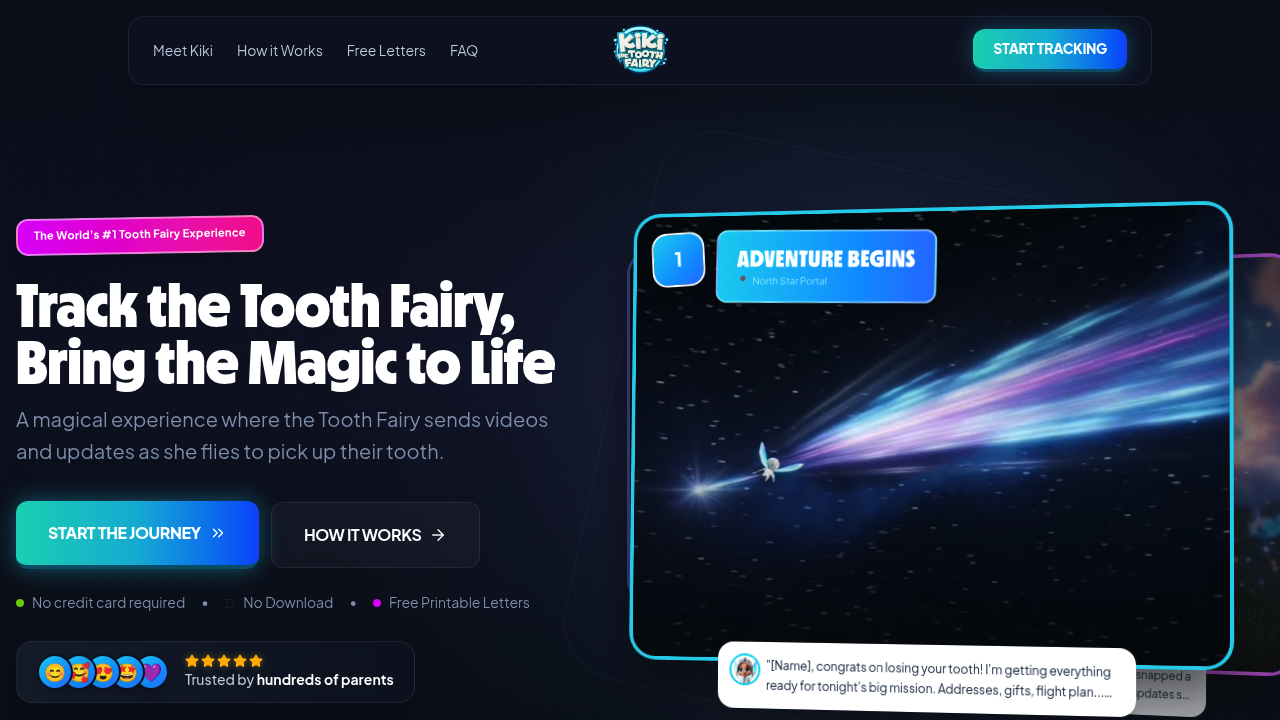
Kiki The Tooth Fairy Tracker screenshot

This tool creates a simulated tracking experience for the tooth fairy by delivering timed video content and map animations to parents. The system works through email delivery of a personalized tracker link that doesn't require any downloads or app installations. Parents input their child's name during a 10-second signup process, then receive immediate access to a custom page showing Kiki the Tooth Fairy's supposed journey.

The data pipeline operates on a staged release model. It delivers content in two distinct phases: three updates before bedtime and three that become available in the morning. Parents manually trigger the morning stages, giving them control over timing. The system doesn't push notifications during sleeping hours, which prevents phones from lighting up or making noise overnight.

The tracking interface displays a live map with six journey stages: North Star Portal, Sparkle Mountains, Silver Lining Lane, Your Neighborhood, Your Pillow, and Fairy HQ. Each stage includes mission stats showing location and speed data. The map animations appear to update in real-time, though they're following predetermined paths rather than actual GPS coordinates.

Video content features a specific character named Kiki who appears in vlog-style recordings. She's portrayed as cheerful and typically running late. The six videos include messages and selfies that create a narrative arc across the evening and morning. These aren't dynamically generated for each child. The personalization comes through the child's name appearing on the tracker page itself.

The system also provides downloadable tooth fairy letters with multiple template options. Parents can print these separately from the tracking experience. Currently, 35 families are using the tracker, with hundreds having tried it previously.

The entire experience runs completely free. No credit card required. All features including the personalized tracker, live map, six video updates, and printable letters come at no cost.

Technical constraints are minimal but worth noting. The system requires email delivery for the tracker link, so there's no anonymous access. Updates follow a fixed schedule rather than adapting to individual bedtimes or wake times. The morning stages won't automatically become available, which means parents need to remember to trigger them. The tracking map shows a predetermined route rather than generating unique paths based on the child's actual address. Video content features the same character and storyline for all users, with only the tracker page itself reflecting the child's specific name.

Kiki The Tooth Fairy Tracker alternatives

See all →

Frequently asked

7 questions
How does the Tooth Fairy tracker work?
The tracker delivers a personalized link via email after a 10-second signup where you enter your child's name. It displays a live map showing Kiki the Tooth Fairy's journey through six stages, from the North Star Portal to your child's pillow, with predetermined animations that simulate real-time movement. The system releases three video updates before bedtime and three more in the morning that you manually unlock. Each video shows Kiki in vlog-style recordings with messages and selfies, following the same storyline for all users but with your child's name displayed on the tracker page.
Is the Tooth Fairy tracker free?
The entire service runs completely free with no credit card required at any point. You get the personalized tracker link, live map tracking, all six video updates with messages and selfies, and printable tooth fairy letters without paying anything. There aren't any paid tiers or premium features locked behind a paywall. Hundreds of parents have used it at no cost.
Can I control when my child sees the Tooth Fairy updates?
The system automatically delivers three updates before bedtime, but the three morning updates require manual triggering by the parent. This gives you control over when your child sees the final stages of Kiki's journey. The tracker won't send any notifications during sleeping hours, preventing your phone from lighting up overnight. You decide when to unlock the morning content based on when your child wakes up.
What happens if I miss unlocking the morning updates?
The morning stages won't automatically become available, so you'll need to remember to trigger them yourself when your child wakes up. The system doesn't send reminders or push notifications to prompt you. This manual control prevents accidental spoilers but also means the experience depends on you taking action. The tracker page remains accessible through your email link, so you can unlock the stages whenever you're ready.
Does the tracker show the Tooth Fairy's actual location?
The map displays a predetermined route through six fictional stages like Sparkle Mountains and Silver Lining Lane rather than generating unique paths based on your actual address. It shows animated movement with location and speed stats, but these follow a fixed storyline instead of real GPS coordinates. The "Your Neighborhood" and "Your Pillow" stages reference your child's location by name only, not through actual geolocation data. The tracking creates the illusion of real-time movement through timed animations.
How long does it take to set up the Tooth Fairy tracker?
Signup takes about 10 seconds where you enter your email and child's name, then you receive the tracker link instantly. From there, it's roughly 30 seconds to start the experience since the tracker page loads immediately with no downloads or app installations required. The system works entirely through a web browser, so there's no software to configure. Parents can have the tracking experience running within a minute of deciding to use it.
Are the Tooth Fairy videos personalized for my child?
The six videos feature the same character, Kiki, and follow identical storylines for all users rather than generating unique content per child. Personalization appears only on the tracker page itself, which displays your child's name throughout the interface. Each video shows Kiki in vlog-style recordings with messages and selfies, but she doesn't address individual children by name in the footage. The narrative arc remains consistent across all families using the tracker.

Traffic

Estimated monthly website visits · last 0 months

Not enough historical data for a chart yet.

Reviews (0)

Write review

No reviews yet. Be the first to share your experience.