ImgEdify AI | AI Video logo
AI Video Generator FREEMIUM from $8/mo

ImgEdify AI | AI Video

A marketing manager needs 15-second product demos for Instagram Stories but switching between three different AI video platforms burns through her morning

She writes the same prompt in Sora's interface, then VEO's dashboard, then another tool's workspace, comparing outputs manually. ImgEdify AI consolidates OpenAI Sora 2, Google VEO 3.1, and ImgEdify 2.0 into one…

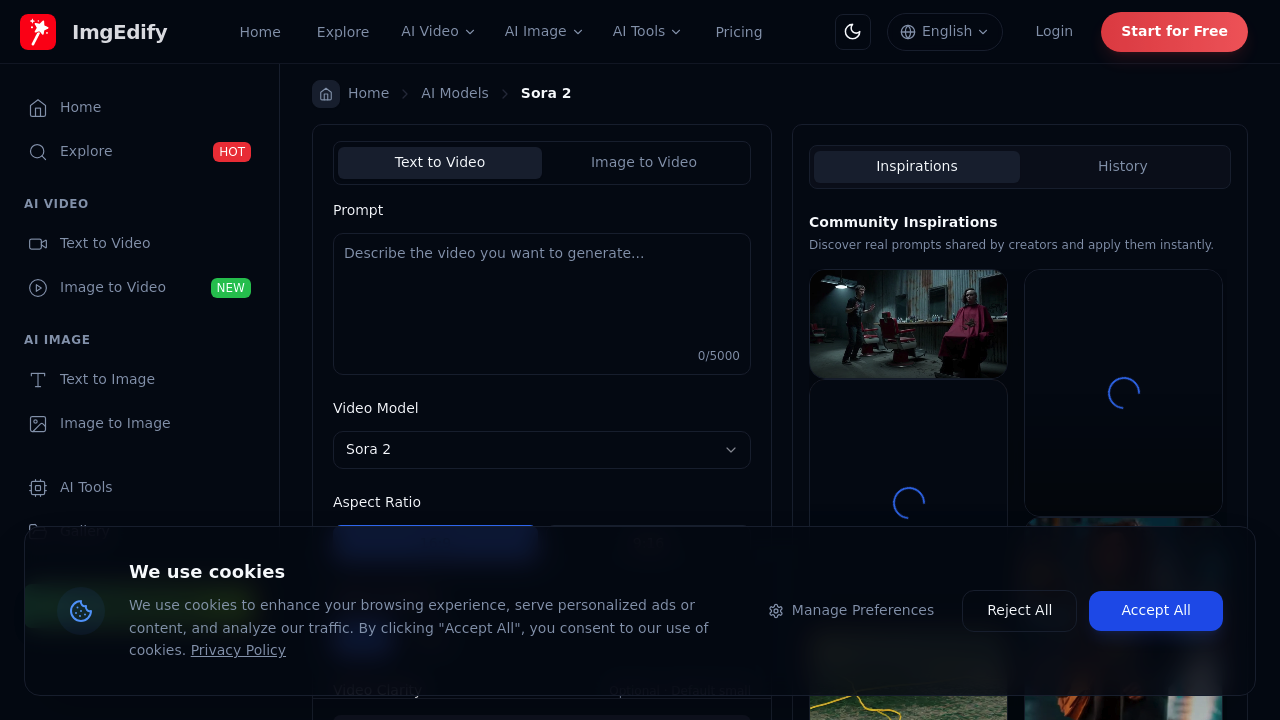
ImgEdify AI | AI Video screenshot

A marketing manager needs 15-second product demos for Instagram Stories but switching between three different AI video platforms burns through her morning. She writes the same prompt in Sora's interface, then VEO's dashboard, then another tool's workspace, comparing outputs manually. ImgEdify AI consolidates OpenAI Sora 2, Google VEO 3.1, and ImgEdify 2.0 into one interface where she types one prompt and generates videos across all three models side-by-side. Each video costs 20 credits from her shared pool, and she picks whichever output nails the brand aesthetic.

This tool handles text-to-video and image-to-video generation with controls most video generators skip. You set aspect ratio to 16:9 for YouTube or 9:16 for TikTok, pick duration between 10 or 15 seconds, and adjust clarity to Small or Large depending on file size needs. Prompts accept up to 5000 characters, so a brand filmmaker can specify camera movements, lighting conditions, and scene transitions in detail. Videos export as MP4 or WebM files at up to 4K resolution with cinematic lighting and motion blur baked in. The studio-grade audio, auto captions, and burned-in subtitles mean less post-production work.

A startup founder creating pitch deck videos browses the community inspirations gallery for prompt ideas, then customizes them for her product. The custom style creation feature lets her maintain visual consistency across multiple video generations. ProRes-ready assets export cleanly if she needs to hand files to an editor later.

The credit system constrains experimentation. Each video generation burns 20 credits regardless of which AI model you choose. The free plan provides 60 credits total, which translates to just 3 Sora-2 videos before you're done. That's one attempt per model if you're testing all three, with zero room for iteration. The Basic plan at $7.92 monthly supplies 700 credits for 35 Sora-2 videos. Heavy users hit limits fast. A content creator producing daily social media videos needs the Pro plan's 4000 credits for 200 videos monthly at $29.92.

Video duration caps at 15 seconds maximum. An educator building course content can't generate 30-second explainer segments or minute-long demonstrations. She'll stitch multiple 15-second clips together manually, burning more credits and losing narrative flow. The 5000 character prompt limit seems generous until you're describing complex multi-scene sequences with specific character actions and environmental details.

Free tier videos carry watermarks. That kills them for client work or professional brand content. The Lite plan at $11.92 monthly removes watermarks and provides 1500 credits for 75 Sora-2 videos, but agencies producing content at scale still outgrow this fast.

This service shines for marketers and agencies testing which AI model best fits their brand voice before committing to one ecosystem. It's built for content creators who need quick social media assets with minimal editing. Educators creating short instructional clips benefit from the auto captions and subtitle features.

It doesn't work for filmmakers needing longer-form content beyond 15 seconds. Video producers who iterate heavily on each concept will burn through credits inefficiently. Teams requiring collaboration features won't find workspace sharing or comment threads. Anyone needing API access to automate video generation at scale should look elsewhere.

The unified multi-model access solves real workflow friction. Just watch those credit limits closely.


ImgEdify AI | AI Video alternatives

See all →

Frequently asked

7 questions
How many videos can I make with ImgEdify AI free plan?
The free plan includes 60 credits total, and each video generation costs 20 credits regardless of which AI model you choose. That gives you exactly 3 Sora-2 videos before you're out. There's no room to test variations or retry prompts that don't land. A social media manager testing different product angles would burn through the entire allowance in one sitting, making the free tier more of a trial run than a working solution.
Can ImgEdify AI generate videos longer than 15 seconds?
Videos max out at 15 seconds, with only 10-second and 15-second duration options available. An educator building course explainers can't create 30-second concept introductions or minute-long demonstrations in a single generation. She'd need to produce multiple 15-second clips and stitch them manually in editing software, burning 20 credits per segment and losing narrative continuity between cuts. The platform's built for social media snippets and quick ads, not extended storytelling.
What's the difference between Sora 2, VEO 3.1, and ImgEdify 2.0?
ImgEdify AI provides access to OpenAI's Sora 2, Google's VEO 3.1 (both Fast and Pro versions), and its own ImgEdify 2.0 model through one interface. A brand filmmaker can type one prompt and generate the same concept across all three models side-by-side, comparing which engine handles lighting, motion, or specific subjects better for her aesthetic. Each generation costs the same 20 credits from your shared pool regardless of model choice. The platform doesn't lock you into one AI ecosystem, so you're testing commercial-grade models without maintaining separate subscriptions.
How much does ImgEdify AI cost without the watermark?
Watermark removal starts at $7.92 monthly on the Basic plan, which includes 700 credits for 35 Sora-2 videos. The Lite plan at $11.92 monthly provides 1500 credits for 75 videos, while Pro at $29.92 gives you 4000 credits for 200 videos. A content creator producing daily Instagram Stories would need at least the Lite plan to avoid running dry mid-month. The free plan's watermarked output kills it for client deliverables or professional brand work, so anyone beyond personal experimentation is paying.
Can I use ImgEdify AI for YouTube video creation?
A YouTube creator can generate 15-second intros, transitions, or B-roll clips in 16:9 aspect ratio at up to 4K resolution with burned-in subtitles. The platform exports MP4 files with cinematic lighting and studio-grade audio that drop straight into editing timelines as ProRes-ready assets. However, the 15-second duration cap means you're not producing full tutorial videos or vlogs. A tech reviewer would use it for product reveal sequences or channel bumpers, then edit those snippets into longer content rather than generating complete videos.
What happens when I run out of credits in ImgEdify AI?
Credits don't roll over between billing cycles, and you can't buy additional credit packs when you hit your monthly limit. A marketing agency that burns through the Pro plan's 4000 credits producing client work sits idle until the next billing cycle resets. There's no pay-as-you-go option for overflow months when campaign demands spike. The platform forces you to either upgrade to the next tier preemptively or halt production, which doesn't align with project-based workflows where video needs fluctuate drastically month to month.
Does ImgEdify AI work for creating TikTok and Instagram Reels?
A content creator can generate vertical 9:16 videos at 10 or 15-second durations, which fits TikTok and Instagram Reels formats perfectly. The auto captions and burned-in subtitles save post-production time since most viewers watch social video with sound off. The community inspirations gallery provides prompt ideas for trending styles, and custom style creation maintains visual consistency across a content series. Each Reel costs 20 credits to produce, so someone posting daily would need the Lite plan's 1500 credits at minimum to sustain a 75-video monthly output.

Traffic

Estimated monthly website visits · last 8 months

21.7K visits/mo
Monthly visits
21.7K
↑ 0.7% MoM
Global rank
#1,363,697
KR #213,834
Category rank
#123
AI Video Generator
21.7K 16.5K 11.2K 6K 780 Jan 2026: 780 visits Jan 2026 Feb 2026: 3.1K visits Feb 2026 Mar 2026: 7K visits Mar 2026 Apr 2026: 11.2K visits Apr 2026 May 2026: 17.6K visits May 2026 Jun 2026: 20.1K visits Jun 2026 Jul 2026: 21.6K visits Jul 2026 Aug 2026: 21.7K visits Aug 2026

Reviews (0)

Write review

No reviews yet. Be the first to share your experience.