
#4 in AI Contract Review Gavel Exec logo

Gavel Exec

Contract review tools usually ask you to upload documents to a web platform

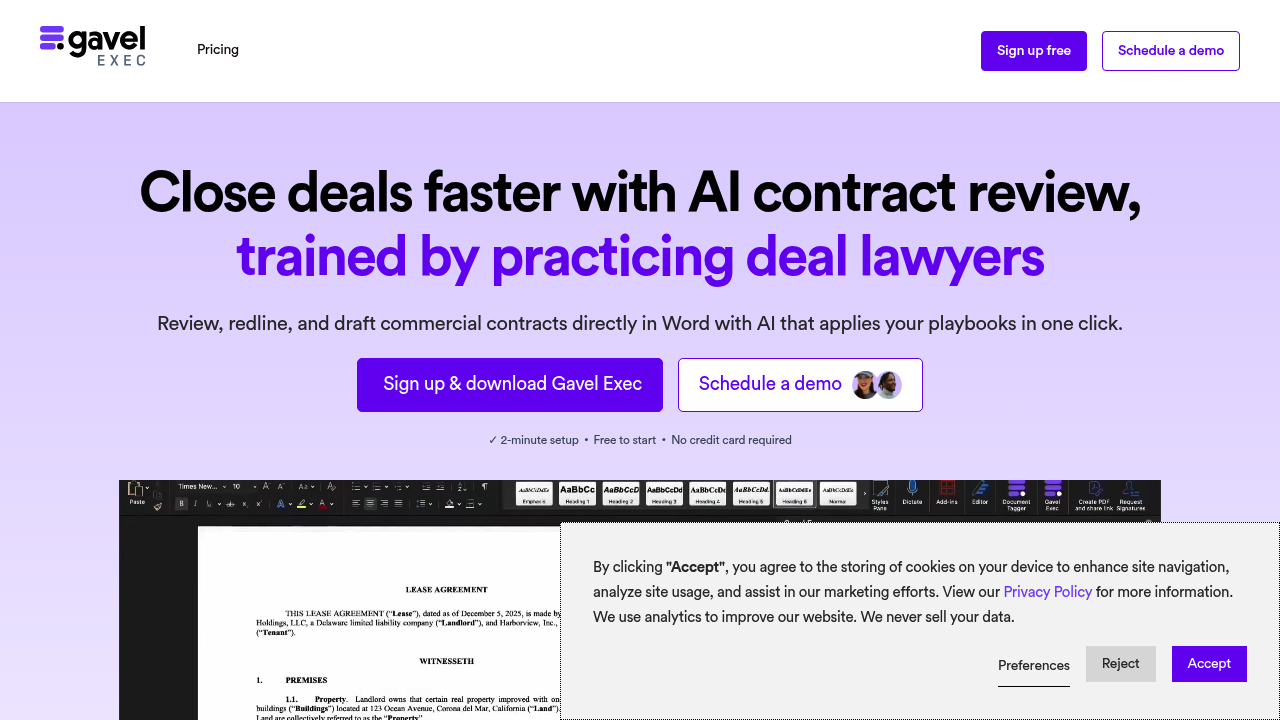
Gavel Exec takes the opposite approach. It runs inside Microsoft Word as an add-in, so you stay in the same environment where you already draft and redline agreements. The software uses your firm's deal history and…

Gavel Exec screenshot

Contract review tools usually ask you to upload documents to a web platform. Gavel Exec takes the opposite approach. It runs inside Microsoft Word as an add-in, so you stay in the same environment where you already draft and redline agreements. The software uses your firm's deal history and playbooks to suggest edits, flag missing terms, and explain its reasoning with traceable sources.

The core workflow centers on redlining. You open a contract in Word, and Gavel Exec can automatically mark it up based on your negotiation stance and precedent language. It checks for inconsistencies and missing clauses, then adds comments explaining what needs attention. You can also draft new contracts or specific clauses from scratch using either guided Quick Actions or open-ended prompts. The benchmarking feature compares clause language to market data, which helps when you're evaluating whether standard terms are actually standard.

Security gets more attention than usual. Gavel Exec doesn't retain data with AI providers after processing. Documents get AES-256 encryption, and the underlying databases meet SOC II and HIPAA compliance standards. The company runs regular vulnerability testing and offers 24-hour security support. For legal teams handling sensitive commercial agreements, that matters.

Does it actually save time? Setup takes two minutes according to the company. The free trial includes 25 queries per user with shared Workspace collaboration, so you can test it without a credit card. But that query limit runs out fast if you're reviewing multiple agreements daily. Once you hit 25, you need to upgrade. The trial gives you enough rope to understand the system but not enough to handle a busy week.

The Word integration is both the strength and the constraint. You don't context-switch between platforms, and your existing Word-based workflow stays intact through signature via Docusign. But you're also locked into the Microsoft ecosystem. If your team works in Google Docs or other editors, this will not help. It connects to Clio for practice management and Zapier for broader automation, but the foundation is Word or nothing.

Who gets the most value? Transactional attorneys and in-house legal teams handling commercial contracts. Deal lawyers who already live in Word and have established playbooks to feed the system. The precedent-based approach assumes you have prior agreements worth learning from. If you're a solo practitioner without a deep deal history, the software has less to work with.

The explanations are traceable. that is critical. When Gavel Exec suggests a redline or flags a risk, it shows you why based on your precedent or playbook rules. You're not blindly accepting AI suggestions. For attorneys worried about accountability, that transparency helps.

Formerly called Documate before rebranding to Gavel. The name changed but the core idea stayed the same. Work where you already work. Use your own precedent. Don't upload contracts to yet another platform. For firms drowning in contract volume, that directness has appeal. Just know the free queries disappear quickly, and pricing details for paid plans aren't publicly listed. You'll need to reach out for team pricing once you cross 10 users.

Gavel Exec alternatives

See all →

Frequently asked

6 questions
Does Gavel Exec work outside of Microsoft Word?
No, it only functions as a Word add-in. The entire system is built around staying inside Microsoft Word while you draft and review contracts. If your team primarily uses Google Docs or other editors, you can't use Gavel Exec at all. The trade-off is convenience for Word users versus complete inflexibility for everyone else.
How many free queries do you get with Gavel Exec?
Each user gets 25 free queries during the trial period, with access to shared Workspace collaboration. That sounds reasonable until you start reviewing multiple contracts in a day. The limit runs out fast if you're handling active deal flow. After that, you need to contact them for paid pricing, which isn't publicly listed.
Can Gavel Exec explain why it suggests specific contract edits?
Yes, and that's one of its stronger features. When it redlines a clause or flags a risk, the system shows you traceable explanations based on your firm's precedent or playbook rules. You're not just accepting mysterious AI suggestions without context. For attorneys who need to justify changes to clients or opposing counsel, that transparency matters more than speed alone.
Is Gavel Exec suitable for solo practitioners?
It depends on whether you have substantial deal history to feed the system. Gavel Exec learns from your precedent agreements and playbooks to suggest edits and draft clauses. If you're starting out without a library of prior contracts, the AI has less material to reference. The software assumes you already have established patterns worth replicating, which makes it more valuable for firms with volume than individual practitioners building from scratch.
Does Gavel Exec store your contracts with AI providers?
No, the company explicitly states zero data retention with AI providers after processing. Documents get AES-256 encryption and sit in SOC II and HIPAA-compliant databases. They also run regular vulnerability testing with 24-hour security support. For legal teams handling confidential commercial agreements, that's a more serious security posture than many contract review platforms offer.
What integrations does Gavel Exec support besides Word?
It connects to Clio for practice management, Docusign for signatures, and Zapier for broader workflow automation. The Docusign integration is particularly useful because it lets you move from draft to signature without leaving the Microsoft ecosystem. But the core dependency is still Word — the integrations extend functionality rather than replace the Word requirement. If you need something that works across multiple document editors, this won't do it.

Traffic

Estimated monthly website visits · last 9 months

88.4K visits/mo
Monthly visits
88.4K
↓ 17.3% MoM
Global rank
#280,192
US #84,975
Category rank
#4
AI Contract Review
141.9K 128.6K 115.2K 101.8K 88.4K Dec 2025: 122.9K visits Dec 2025 Jan 2026: 141.9K visits Jan 2026 Feb 2026: 125.8K visits Feb 2026 Mar 2026: 133.5K visits Mar 2026 Apr 2026: 124.7K visits Apr 2026 May 2026: 116.6K visits May 2026 Jun 2026: 98.6K visits Jun 2026 Jul 2026: 106.9K visits Jul 2026 Aug 2026: 88.4K visits Aug 2026

Reviews (0)

Write review

No reviews yet. Be the first to share your experience.