
AIPhotoEnhancer.Pro logo

AIPhotoEnhancer.Pro

This browser-based photo enhancement service processes images through AI algorithms that tackle multiple quality issues simultaneously

Users drag and drop files up to 10 MB, paste images directly, or pull from URLs to start the enhancement process. This application accepts PNG, JPG, JPEG, and WEBP formats. The sharpening feature analyzes focus problems…

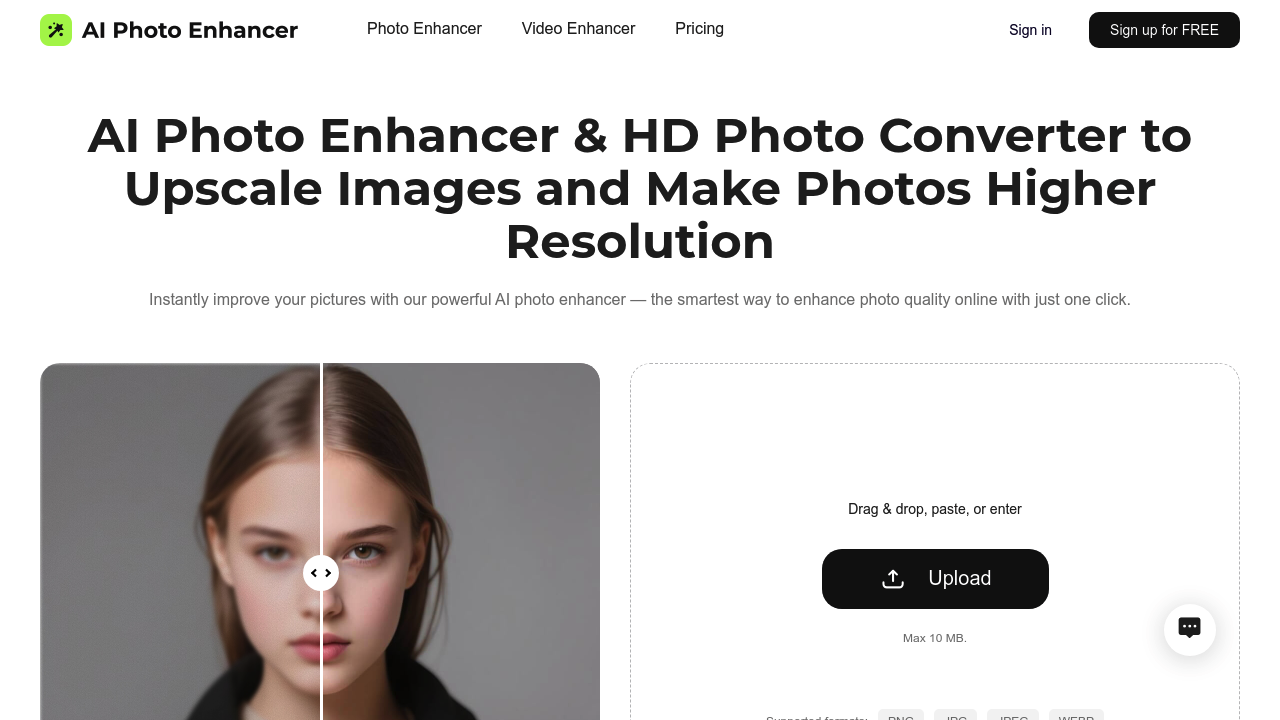
AIPhotoEnhancer.Pro screenshot

This browser-based photo enhancement service processes images through AI algorithms that tackle multiple quality issues simultaneously. Users drag and drop files up to 10 MB, paste images directly, or pull from URLs to start the enhancement process. This application accepts PNG, JPG, JPEG, and WEBP formats.

The sharpening feature analyzes focus problems and brings out finer details that blur or compression obscured. It works alongside noise reduction algorithms that strip out grain and color speckles common in low-light shots or heavily compressed images while preserving edge definition. The upscaling function pushes images to 4K resolution through AI reconstruction rather than simple interpolation, which helps maintain clarity when enlarging photos for prints or presentations.

Color correction runs automatically across tone, saturation, and contrast parameters. The system evaluates the image and adjusts these elements without manual slider tweaking. Pixel restoration addresses damaged areas in low-quality source files, attempting to rebuild information that degradation destroyed. Blur removal targets out-of-focus sections, though the 10 MB file size cap means large RAW files won't work.

Specialized processing modes cater to specific scenarios. Old photo restoration combines faded color correction with scratch removal and blur reduction in one pass. Outdoor scene enhancement emphasizes color vibrancy in nature photography. Night picture processing brightens low-light shots while managing the noise that typically accompanies darkness. Portrait improvement focuses on facial features and skin textures, refining details that matter most in people photography.

The one-click approach means the software decides which corrections to apply rather than offering granular control over individual parameters. This speeds up workflow for users who want quick improvements but limits options for photographers seeking precise adjustments. The service handles both photo and video enhancement, extending its utility beyond still images.

Free online access covers the core enhancement features. No paid tiers appear in the service structure. The 10 MB ceiling affects professional photographers working with high-resolution files from modern cameras, which often exceed this limit even after compression. Format restrictions rule out TIFF, RAW, and other specialized image types.

Product photographers needing clean backgrounds and sharp details can run catalog images through the software. Anyone digitizing old family photos gets dedicated restoration features. Presenters preparing visual materials for slides benefit from the quick enhancement pipeline. The system works for general quality improvement across portrait, outdoor, and low-light photography situations where source material needs refinement before sharing or printing.


AIPhotoEnhancer.Pro alternatives

See all →

Frequently asked

7 questions
Can AIPhotoEnhancer.Pro upscale images to 4K resolution?
The service upscales images to 4K resolution through AI reconstruction algorithms rather than basic interpolation methods. This approach rebuilds image information during the enlargement process instead of simply stretching existing pixels, which helps maintain clarity when preparing photos for large prints or high-resolution displays. The upscaling works within the 10 MB file size constraint, so extremely large source files need compression before processing. The AI analyzes the original image structure and generates additional detail during the resolution increase.
Is AIPhotoEnhancer.Pro completely free to use?
Free online access covers all the core photo enhancement features without requiring payment or subscription. The service doesn't appear to offer paid tiers or premium upgrades based on available information. Users get the sharpening, noise reduction, color correction, upscaling, and specialized restoration features through the free access model. This removes cost barriers for casual users, hobbyists, and anyone needing occasional image improvements without ongoing expenses.
What file formats does AIPhotoEnhancer.Pro accept?
The platform accepts PNG, JPG, JPEG, and WEBP formats for upload and processing. TIFF files, RAW camera formats like CR2 or NEF, and other specialized image types won't work with the service. This limitation affects photographers who shoot in RAW format and want to enhance images before converting to standard formats. The format restrictions keep the system focused on web-friendly image types that most casual users already work with, though it narrows options for professional workflows.
Can AIPhotoEnhancer.Pro restore old damaged photos?
Old photo restoration runs as a specialized processing mode that combines multiple correction techniques in one operation. The system automatically addresses faded colors that occur as prints age, removes visible scratches and damage marks, and reduces blur that accumulated through repeated copying or poor storage conditions. This consolidated approach targets the specific degradation patterns common in vintage photographs rather than treating them as generic quality issues. Users dealing with family archives or historical images get dedicated functionality beyond standard enhancement filters.
What's the maximum file size for AIPhotoEnhancer.Pro?
Files must stay under 10 MB to process through the enhancement system. This ceiling creates problems for professional photographers whose camera output routinely exceeds this limit, particularly when shooting at maximum resolution or capturing in formats that preserve extensive image data. Modern smartphone photos often fit comfortably under 10 MB, making the service accessible for casual photography and social media content. Anyone working with high-resolution professional equipment needs to compress images before upload, which introduces quality loss before enhancement even begins.
Does AIPhotoEnhancer.Pro work for product photography?
Product photographers can run catalog images through the system to sharpen details and improve overall presentation quality. The noise reduction helps clean up images shot in less-than-ideal lighting conditions, while color correction ensures accurate product representation across different lighting setups. The one-click processing speeds up workflow when handling multiple product shots that need consistent enhancement. The 10 MB limit accommodates typical e-commerce image sizes, though photographers shooting high-resolution lifestyle or detailed texture shots might hit the file size ceiling.
Can AIPhotoEnhancer.Pro enhance photos taken at night?
Night picture enhancement operates as a dedicated processing mode that brightens low-light shots while managing the noise that darkness typically introduces. The system addresses the grain and color speckles that appear when cameras boost ISO sensitivity in dim conditions, attempting to preserve detail while reducing visual artifacts. This specialized approach recognizes that nighttime photography creates specific challenges different from general blur or color issues. The enhancement works for street photography, event coverage, and any situation where insufficient light compromised the original capture quality.

Traffic

Estimated monthly website visits · last 0 months

577 visits/mo
Monthly visits
577

Not enough historical data for a chart yet.

Reviews (0)

Write review

No reviews yet. Be the first to share your experience.