AI Portrait - Remaker logo

AI Portrait - Remaker

Remaker AI starts you off with free credits

60 views
Visit remaker.ai
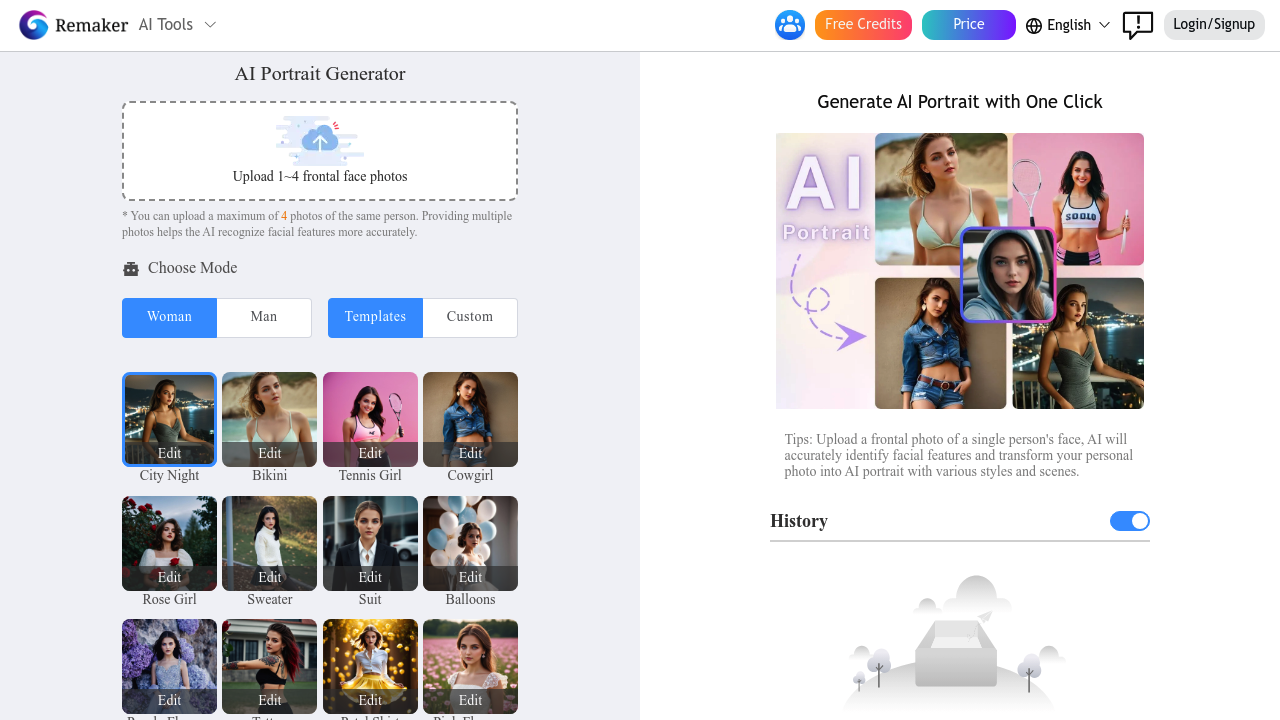
AI Portrait - Remaker screenshot

Remaker AI starts you off with free credits. Want better image quality and finer details? That costs extra through their advanced generate option.

Upload up to four frontal face photos. Watch the AI transform them into stylized portraits. Feed it multiple angles of the same person — Remaker recognizes your features better this way. You'll get two generated images per request across nine different aspect ratios.

Template mode gives you ready-made styles. City Night. Tennis Girl. Purple Flowers. Custom mode lets you type your own scene descriptions. Remaker preserves your facial structure while changing everything else. Makeup. Clothing. Hairstyles. Even accessories like earrings or garlands.

A marketing manager preparing for a LinkedIn campaign could upload their casual photos and generate professional headshots in suits or business attire. It handles full-body portraits too — not just headshots.

Your images disappear after one day though. You can store up to 80 results in your history before older ones get wiped. Remaker needs clear frontal photos with open eyes and won't work with group shots.

It sits somewhere between basic filter apps and expensive portrait photography sessions. Won't replace a real photographer for important business needs. But it'll give you decent AI-generated portraits for social media or casual professional use. Multiple photo upload helps Remaker nail your facial features more accurately than single-photo competitors.


Frequently asked

6 questions
How many photos should I upload to AI Portrait - Remaker for the best results?
You can upload up to four frontal face photos -- and honestly, you should use all four if you can. The app recognizes your facial features way better when you give it multiple angles. Single photos work fine, but you'll definitely get better likeness with more reference material.
What happens to my generated portraits after I create them?
Your images automatically disappear after one day. So download anything you want to keep right away! Remaker stores up to 80 results in your history before older ones get deleted. There's no permanent cloud storage option.
Can AI Portrait - Remaker handle group photos or multiple people?
Nope, it only works with individual portraits. You need clear frontal photos with open eyes -- just one person per upload. Group shots won't work at all.
What's the difference between template mode and custom mode?
Template mode gives you pre-made styles like City Night, Tennis Girl, or Purple Flowers that you can apply instantly. Custom mode lets you type your own scene descriptions to create unique backgrounds and settings. Both preserve your facial structure while changing everything else around it.
How does the advanced generate option work compared to the free version?
The free version gives you basic quality portraits using your included credits. The advanced generate option costs extra but delivers better image quality and finer details. You'll get two generated images per request in both modes -- across nine different aspect ratios.
Can I use AI Portrait - Remaker for professional business headshots?
It works for casual professional use like LinkedIn profiles or social media, but it won't replace a real photographer for important business needs. The quality sits between basic filter apps and expensive portrait photography sessions. Good enough for everyday professional use, but not high-stakes corporate photography.

Reviews (0)

No reviews yet. Be the first to share your experience.

Similar tools

See all →