VDraw - AI Carousel Generator appears to be discontinued. Its website has been unreachable across our last three checks. See similar tools below for alternatives.
#1 in AI Caption Generator VDraw - AI Carousel Generator logo

VDraw - AI Carousel Generator

You open VDraw's AI Carousel Generator and there's no learning curve to fight through

The interface asks what you want to create. Type in a topic or paste an idea and the AI writing assistant kicks in, generating copy slide by slide. It'll create hooks, tips, quotes, and list-style cards that actually…

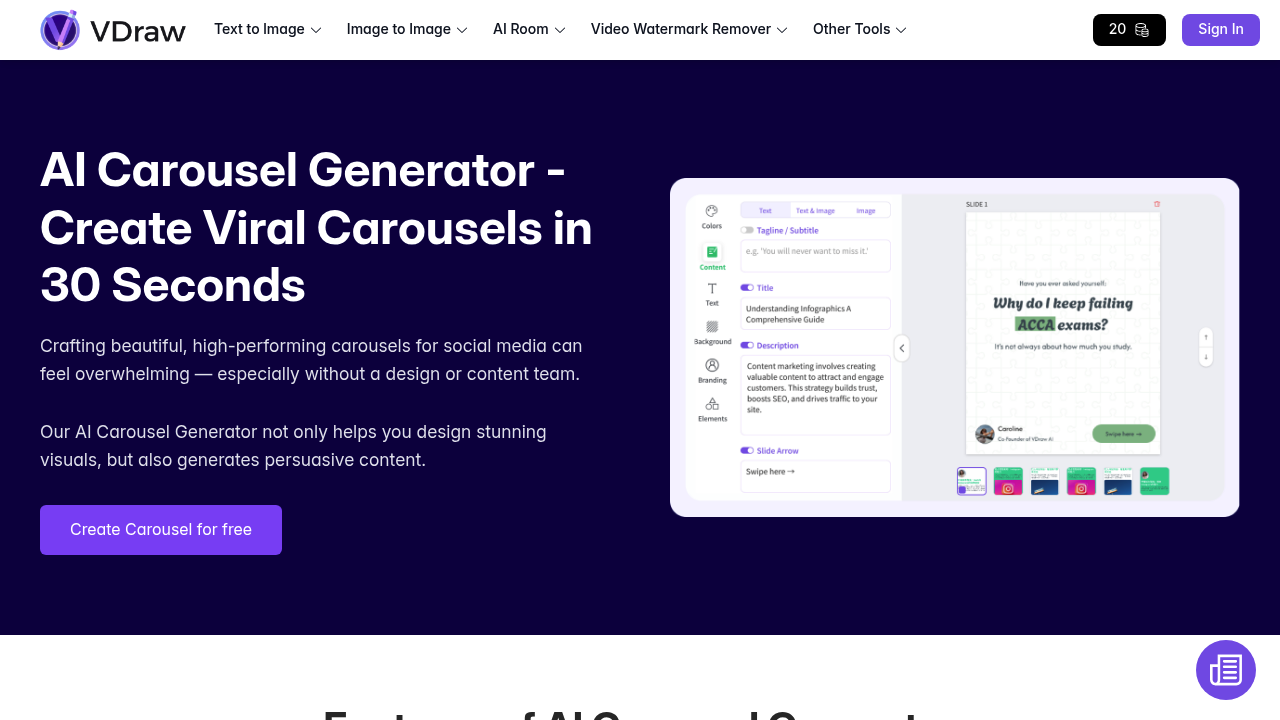
VDraw - AI Carousel Generator screenshot

You open VDraw's AI Carousel Generator and there's no learning curve to fight through. The interface asks what you want to create. Type in a topic or paste an idea and the AI writing assistant kicks in, generating copy slide by slide. It'll create hooks, tips, quotes, and list-style cards that actually flow like someone thought about sequencing.

Pick from over 100 templates made by actual designers. They don't look generic. Each one's built specifically for social media carousels, not repurposed from some presentation deck library. The smart layout engine takes your content and arranges it so it doesn't look like you threw text boxes at a canvas and hoped for the best.

Customization happens fast. Change colors with one click to match your brand palette. Swap images, adjust text, move elements around. Everything's editable but the defaults usually work, which saves time when you're pushing out content regularly. VDraw handles Instagram, LinkedIn, TikTok, and YouTube Shorts formats without making you guess dimensions.

Here's where it gets different. You can convert any carousel into a short video. Not just a slideshow with transitions, but something formatted for Instagram Reels, TikTok, and YouTube Shorts. One design becomes two content types, which matters when you're trying to stay visible across platforms without doubling your workload.

The export quality's high resolution and optimized for each platform. No pixelated text or compression artifacts that make your content look rushed. The whole process from opening VDraw to downloading a finished carousel takes about 30 seconds if you're not overthinking design choices.

It's built for people who don't have design skills or a content team. That shows. There's no assumption you know what kerning is or understand grid systems. But it's also not dumbed down to the point where you're stuck with cookie-cutter output. You've got control when you want it.

The friction shows up when you want really specific visual styles that don't match the template library. You'll spend time fighting the defaults instead of working with them. And while the AI writing assistant generates content, you'll still need to edit for voice and accuracy. It's a starting point, not a replacement for thinking.

There's a free plan that allows you create carousels with AI content generation, template access, and customization options. VDraw has a 4.9 rating from over 10,000 votes, which suggests people aren't just trying it once and bouncing.

Frequently asked

7 questions
How long does it take to create a carousel with VDraw?
You open VDraw, type in your topic, and the AI generates slide-by-slide copy within seconds. Pick a template from the 100+ options, adjust colors with one click if you want to match your brand, and export. The whole process takes about 30 seconds if you're not stopping to overthink design decisions. Converting that same carousel into a short video for Reels or TikTok happens just as fast with one additional click.
Can I use VDraw AI Carousel Generator for free?
VDraw offers a free plan that lets you create carousels with full AI content generation and access to all templates. You can customize colors, text, images, and layouts without hitting a paywall. The free tier includes high-resolution exports optimized for Instagram, LinkedIn, TikTok, and YouTube Shorts. Converting carousels into short videos is also available on the free plan.
Does VDraw write the carousel content for you?
The AI writing assistant generates copy for each slide after you input your topic or idea. It creates hooks, tips, quotes, and list-style cards arranged in a sequence that flows. The content gives you a solid starting point but you'll need to edit for your specific voice and check accuracy. It's faster than staring at blank slides but not a replacement for thinking through what you actually want to say.
What social media platforms does VDraw support?
VDraw handles Instagram, LinkedIn, TikTok, and YouTube Shorts with formats and dimensions built for each platform. You create one carousel and the tool exports it in high resolution optimized for whichever platform you're posting to. The carousel-to-video conversion also works across Instagram Reels, TikTok, and YouTube Shorts, so one design becomes multiple content pieces without manual reformatting.
Can I customize VDraw templates or am I stuck with preset designs?
Every element in VDraw's templates is editable. You can change text, swap images, adjust colors to match your brand, and move layout elements around. The one-click color theme feature speeds up brand matching, but you're not locked into anything. Where it gets frustrating is when you want a highly specific visual style that doesn't align with the template library. You'll end up fighting the defaults instead of working with them, which defeats the speed advantage.
What's the difference between VDraw and using Canva for carousels?
VDraw focuses exclusively on social media carousels while Canva is general design software that does everything. You get AI-generated slide content in VDraw, not just blank templates to fill yourself. The carousel-to-video conversion happens in one click, turning your design into Reels or TikTok content instantly. VDraw assumes you're not a designer and builds the experience around speed and automation, while Canva gives you more creative control but requires more design decisions and time.
Does VDraw work for creating carousels about technical or niche topics?
You can input any topic and VDraw's AI will generate content, but the quality depends on how specific or technical your subject is. The AI writing assistant produces hooks, tips, and lists that work well for general business, marketing, and lifestyle content. For highly technical or niche topics, you'll spend more time rewriting the AI's output to get terminology and accuracy right. The templates and visual layouts still save time, but the content generation becomes less useful the more specialized your topic gets.

Traffic

Estimated monthly website visits · last 8 months

243.8K visits/mo
Monthly visits
243.8K
↓ 36.0% MoM
Global rank
#222,547
IN #58,852
Category rank
#1
AI Caption Generator
726.8K 606K 485.3K 364.6K 243.8K Dec 2025: 543.3K visits Dec 2025 Jan 2026: 606.9K visits Jan 2026 Feb 2026: 379.9K visits Feb 2026 Mar 2026: 398.3K visits Mar 2026 Apr 2026: 685.5K visits Apr 2026 May 2026: 726.8K visits May 2026 Jun 2026: 381.1K visits Jun 2026 Jul 2026: 243.8K visits Jul 2026

Reviews (0)

Write review

No reviews yet. Be the first to share your experience.