
UniMusic AI logo
AI Music Generator FREEMIUM from $8/mo

UniMusic AI

Musicians and content creators can generate complete, production-ready songs from text descriptions in seconds without touching an instrument or learning music theory

This system transforms written prompts or lyrics into full tracks with vocals, instrumentation, proper song structure including intros, verses, choruses, and outros. Two generation modes handle different creative…

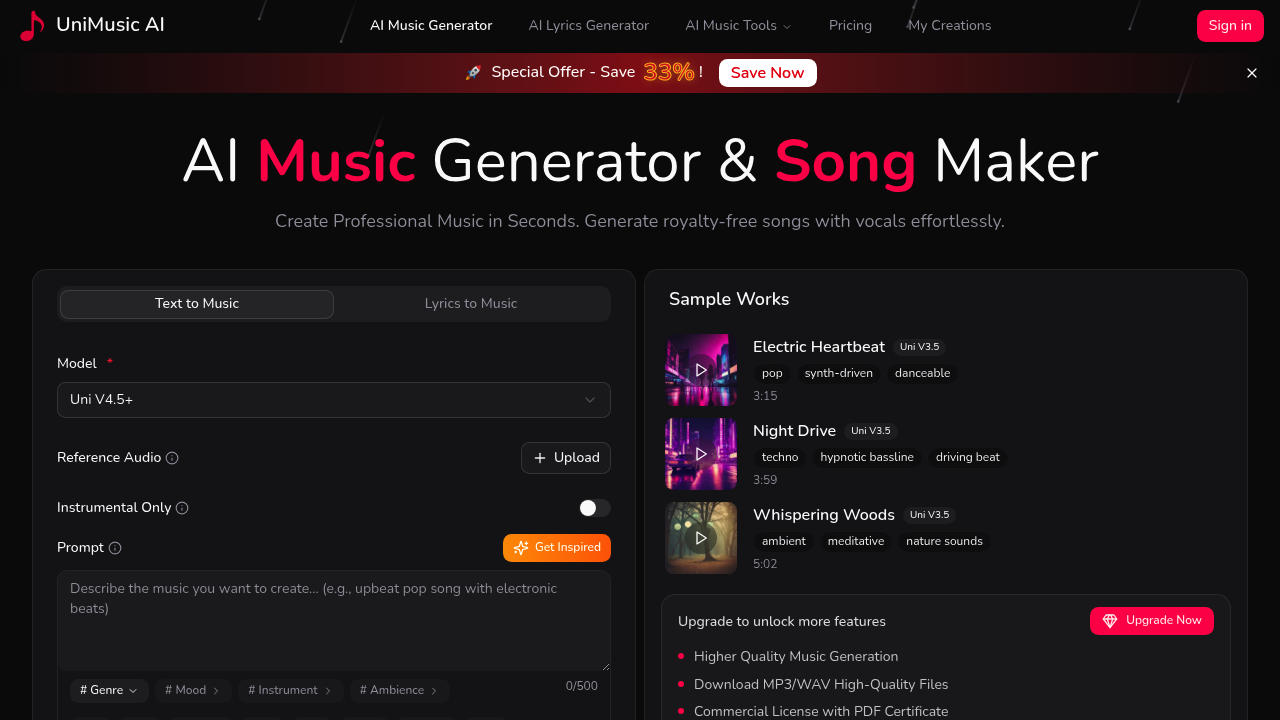
UniMusic AI screenshot

Musicians and content creators can generate complete, production-ready songs from text descriptions in seconds without touching an instrument or learning music theory. This system transforms written prompts or lyrics into full tracks with vocals, instrumentation, proper song structure including intros, verses, choruses, and outros.

Two generation modes handle different creative starting points. Text to Music accepts descriptions like "upbeat pop song about summer romance with guitar and synths" and builds the entire composition including AI-generated lyrics. Lyrics to Music takes user-written lyrics and wraps them in matching instrumentation and vocal melodies. An AI Lyrics Generator helps users who need lyrical content but don't want to write it themselves. All generations run on multiple AI models, with Uni V4.5+ and Uni V3.5 available depending on subscription tier.

Genre coverage spans twelve categories from Pop and Rock through Hip Hop, R&B, Jazz, Blues, Country, Folk, Classical, EDM, Reggae, and Metal. Users can customize mood and specific instruments within those genres. Reference audio uploads guide the AI toward particular sonic directions. Instrumental only mode strips vocals for background music applications. Prompts accept up to 500 characters of description.

Generated tracks export as MP3 or WAV files. The service includes a Stem Splitter that separates songs into individual instrument and vocal tracks for remixing or editing. A Vocal Remover isolates instrumentals from existing audio. Every song gets a shareable web player with cover art and synchronized lyrics that scroll during playback.

Copyright ownership transfers completely to users. Generated music comes with commercial licensing and PDF certificates proving rights. Creators can monetize tracks on YouTube, TikTok, and Spotify without copyright strikes or royalty obligations to UniMusic.

The free plan provides 35 credits generating four songs with seven days of storage. Text and lyrics to music generation both work. Latest model access includes the newest AI versions. Commercial licensing applies even to free tier songs. The shareable player page works for free users. WAV downloads, Stem Splitter, and Vocal Remover stay locked behind paid tiers.

Starter plan costs $8 monthly on annual billing with 750 credits producing 150 songs per month. Storage extends to 30 days. MP3 downloads become available along with the Lyrics Generator. Yearly subscribers save 20% compared to monthly billing.

Professional tier runs $20 monthly on annual plans with 3,000 credits generating 750 songs monthly. Storage becomes unlimited. WAV downloads, Stem Splitter, and Vocal Remover all activate. The VIP Rate drops credit costs to 10 credits for two songs instead of the standard rate, a 33% savings. This rate locks permanently and applies to all future premium models the service releases. Yearly subscribers save 33% compared to monthly payments.

All paid plans include a 14-day money-back guarantee. Credits reset at the start of each subscription period rather than rolling over.

The seven-day storage window on free accounts means songs disappear unless downloaded quickly. Free users can't extract stems or remove vocals for remixing. The 35-credit limit restricts free experimentation to four tracks total. The 500-character prompt limit constrains detailed musical instructions across all tiers.

YouTubers needing background music, podcasters wanting intro themes, TikTok creators requiring original audio, and Spotify artists testing song concepts all fit the target audience. Anyone needing royalty-free music without production skills can generate usable tracks. The copyright ownership particularly benefits creators building content libraries or monetizing across platforms.

UniMusic AI alternatives

See all →

Frequently asked

7 questions
Does UniMusic AI have a free plan?
UniMusic AI offers a free plan with 35 credits that generate four complete songs. Free users get text and lyrics to music generation, access to the latest AI models including Uni V4.5+, and commercial licensing with full copyright ownership of generated tracks. The plan includes a shareable web player with cover art and synchronized lyrics, but songs only stay stored for seven days before deletion. Free accounts can't download WAV files, use the Stem Splitter to separate instrument tracks, or access the Vocal Remover tool.
How much does UniMusic AI cost per month?
Paid plans start at $8 monthly on annual billing for the Starter tier, which provides 750 credits generating 150 songs per month with 30-day storage and MP3 downloads. The Professional plan costs $20 monthly on yearly billing, delivering 3,000 credits for 750 songs per month with unlimited storage, WAV downloads, Stem Splitter, and Vocal Remover. Professional subscribers get a VIP Rate of 10 credits for two songs instead of the standard rate, locked permanently even for future premium models. Yearly subscribers save 20% on Starter and 33% on Professional compared to monthly billing, and all paid plans include a 14-day money-back guarantee.
Can I use UniMusic AI songs on YouTube and Spotify without copyright issues?
Users own full copyright to all music generated through UniMusic AI with zero royalty obligations to the platform. Every song comes with a commercial license and PDF certificate proving ownership rights, allowing monetization on YouTube, TikTok, and Spotify without copyright strikes. This copyright ownership applies even to songs created on the free plan, making the platform suitable for content creators building monetizable libraries. The licensing covers both the composition and the AI-generated vocals, eliminating clearance requirements for commercial use.
What's the difference between text to music and lyrics to music in UniMusic AI?
Text to Music generation accepts descriptive prompts like "upbeat pop song about summer romance with guitar and synths" and creates the entire composition including AI-generated lyrics, instrumentation, vocals, and song structure. Lyrics to Music takes user-written lyrics and wraps them in matching instrumentation and vocal melodies that fit the provided words. Both modes support genre selection across twelve categories, mood customization, specific instrument choices, and reference audio uploads to guide the AI's sonic direction. An AI Lyrics Generator helps users who want the text-to-music workflow but need assistance writing lyrical content.
How many songs can I make with UniMusic AI credits?
The free plan's 35 credits generate four songs total before running out. Starter plan subscribers get 750 credits monthly producing 150 songs, while Professional subscribers receive 3,000 credits generating 750 songs per month at standard rates. Professional users benefit from a VIP Rate of 10 credits for two songs instead of the typical cost, effectively increasing their monthly output. Credits reset at the start of each subscription period rather than rolling over, so unused credits from one month don't carry forward to the next billing cycle.
What are the limitations of UniMusic AI's free plan?
Free accounts face a seven-day storage window that automatically deletes songs unless downloaded within a week of generation. The 35-credit limit restricts experimentation to just four total tracks before requiring a paid upgrade. WAV file downloads stay locked behind paid tiers, forcing free users to work with MP3 format only. The Stem Splitter for separating individual instrument and vocal tracks and the Vocal Remover for isolating instrumentals both require paid subscriptions, preventing free users from remixing or editing generated audio beyond the original output.
Can UniMusic AI create instrumental music without vocals?
UniMusic AI includes an instrumental only mode that generates music without vocal tracks, suitable for background music in videos, podcasts, or other content requiring pure instrumentation. Users can specify genres, moods, and particular instruments across twelve musical categories from Pop and Classical to EDM and Metal. The Vocal Remover tool available on Professional plans can also strip vocals from any generated song to create instrumental versions after the fact. Reference audio uploads help guide the AI toward specific sonic characteristics even when generating instrumental tracks.

Traffic

Estimated monthly website visits · last 5 months

12.1K visits/mo
Monthly visits
12.1K
↑ 1,492.3% MoM
Category rank
#71
AI Music Generator
12.1K 9.1K 6.1K 3.1K 49 Jan 2026: 3.3K visits Jan 2026 Feb 2026: 49 visits Feb 2026 Mar 2026: 271 visits Mar 2026 Apr 2026: 762 visits Apr 2026 Aug 2026: 12.1K visits Aug 2026

Reviews (0)

Write review

No reviews yet. Be the first to share your experience.