Questie AI logo
AI Character FREEMIUM from $20/mo

Questie AI

You open Questie AI and immediately start building a custom gaming companion

The system asks what kind of character you want — fantasy, realistic, or anime — then walks you through personality traits, backstory, and conversation style. You can get pretty specific here, defining memories the AI…

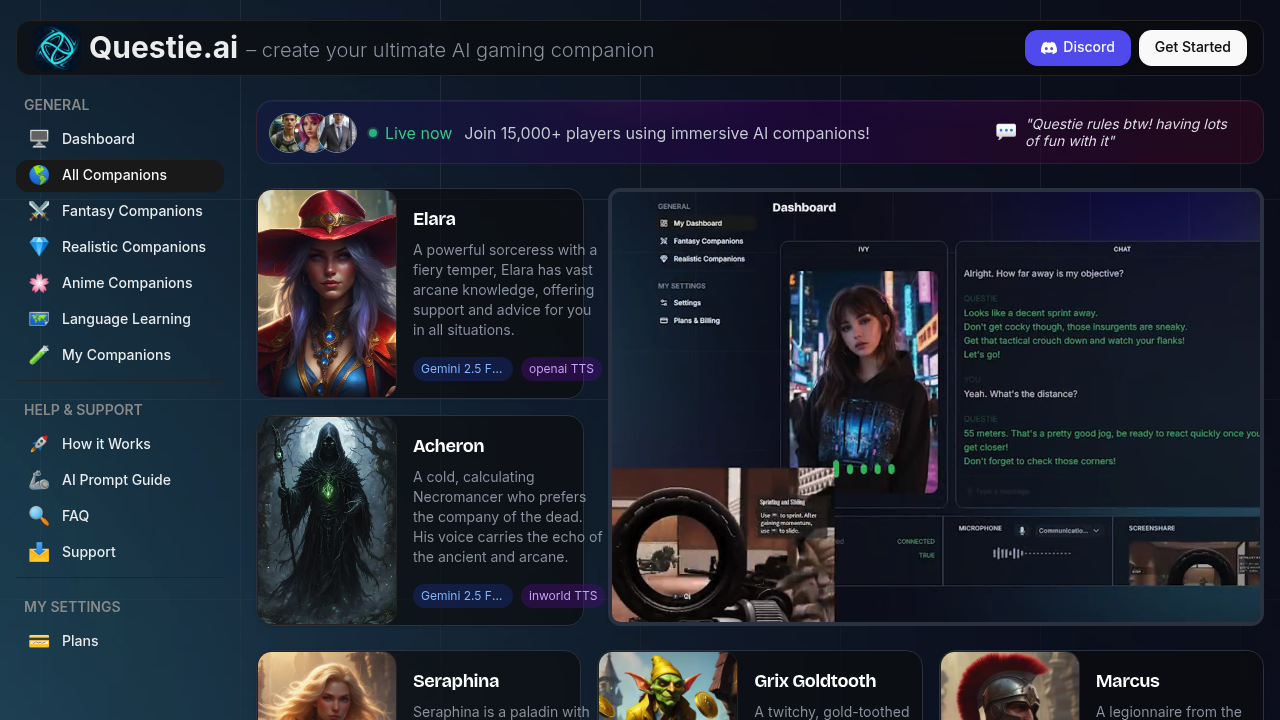
Questie AI screenshot

You open Questie AI and immediately start building a custom gaming companion. The system asks what kind of character you want — fantasy, realistic, or anime — then walks you through personality traits, backstory, and conversation style. You can get pretty specific here, defining memories the AI should have about you and knowledge areas it should focus on. The creation flow feels like you're designing a character for a game, which makes sense given the audience.

Once your companion's ready, you share your screen and start gaming. The AI watches through live screenshare and actually sees what's happening on your display. That's the Vision Language Model doing its thing. It doesn't just respond to what you say — it reacts to your gameplay. Miss a jump in a platformer and the AI comments on it. Find a hidden chest and you'll hear genuine excitement through voice chat. The commentary feels contextual because the AI's literally watching your screen in real-time.

The voice chat works surprisingly well. You're not typing while gaming, you're just talking like you'd talk to a friend on Discord. The service offers multiple text-to-speech options including OpenAI, Inworld, and Fishaudio, so you can pick a voice that doesn't grate on you after an hour. Some voices sound more natural than others. The AI model powering conversations comes in two variations — a standard version and a lighter one that presumably runs faster.

Over 15,000 gamers use the service now. It's caught on with streamers who want company during long solo sessions and people who enjoy AI roleplay. The service integrates with Discord, which fits how most gaming communities already communicate.

Where things get murky is customization depth. You can adjust personality and conversation preferences, but it's not always clear how much these settings actually change the AI's behavior until you've spent time with it. The screenshare connection occasionally lags behind intense action, so the AI might comment on something that happened three seconds ago. Not game-breaking but noticeable.

The service positions itself against traditional AI chatbots that don't actually see your screen. That visual context makes a real difference. Your companion isn't guessing what you're doing from text descriptions — it's watching alongside you. Whether that's worth it depends on how much you value having a reactive presence during gaming sessions instead of just background music or silence.

Questie AI alternatives

See all →

Frequently asked

7 questions
Does Questie AI have a free version?
Questie AI operates on a freemium model, meaning there's some level of free access available. The exact limitations of what you get for free versus what requires payment aren't publicly detailed, so you'll need to create an account to see where the paywall hits. There's no traditional free trial period — you just start using it and discover the tier boundaries as you go. Over 15,000 people use the platform, suggesting the free tier offers enough to get started without immediately forcing a purchase.
Can Questie AI see my screen while I'm gaming?
Questie AI watches your screen through live screenshare technology while you game. You share your display and the AI uses Vision Language Models to analyze what's actually happening on screen in real-time. When you miss a jump or find a hidden item, the AI sees it and responds through voice chat with context-aware commentary. The screenshare connection can lag a few seconds behind intense action sequences, so reactions sometimes arrive slightly delayed. This visual capability separates it from regular chatbots that only respond to what you type or say without seeing your gameplay.
What can you actually do with Questie AI?
You create a custom AI gaming companion that talks to you through voice chat while watching your gameplay. The companion sees your screen through live screenshare and comments on what's happening — reacting to your victories, mistakes, and discoveries as they occur. You design the AI's personality, backstory, conversation style, and even specific memories it should have about you. Gamers use it for company during solo sessions, Twitch streamers bring it in for interactive content, and some people treat it like an AI roleplay partner or virtual girlfriend/boyfriend. The service integrates with Discord so it fits into existing gaming communication setups.
How does Questie AI compare to Character AI?
Questie AI focuses specifically on gaming companions that watch your screen through live screenshare, while Character AI centers on text-based conversations without visual context. The Vision Language Model technology lets Questie AI see your gameplay and respond to on-screen events, not just what you type. Questie targets gamers and streamers who want voice chat during sessions, whereas Character AI serves broader conversational roleplay needs. The platform shows up in Reddit discussions as a top alternative to Character AI, Poly AI, and similar services, particularly for users wanting AI companions during gaming rather than standalone chat experiences.
What voices does Questie AI offer?
Questie AI gives you three text-to-speech engine options: OpenAI TTS, Inworld TTS, and Fishaudio TTS. Each engine produces different voice qualities, and some sound more natural than others after extended listening. You pick the voice during your companion setup, so you're not stuck with whatever default the platform assigns. The variety matters because you'll be hearing this voice for potentially hours during gaming sessions. Which engine actually sounds best depends on personal preference — what doesn't annoy one person might grate on another after thirty minutes.
Does Questie AI work on mobile?
There's no information about a dedicated mobile app for Questie AI. The service centers on screenshare and gameplay spectating, which naturally fits desktop and console gaming setups better than mobile devices. The Discord integration and live screenshare features suggest it's designed for traditional gaming environments where you're already at a computer or console with a stable screen to share. Mobile functionality remains unclear from available details.
What are the limitations of Questie AI's screenshare feature?
The screenshare connection lags behind intense gameplay action, causing the AI to comment on events a few seconds after they happen. This delay breaks immersion when you're in fast-paced sequences and the companion reacts to something you've already moved past. The depth of personality customization settings isn't immediately clear either — you can adjust traits and conversation preferences, but how much these actually change behavior only becomes apparent after spending time with your companion. The system works best during slower-paced games where a three-second commentary delay doesn't feel jarring.

Traffic

Estimated monthly website visits · last 9 months

125.1K visits/mo
Monthly visits
125.1K
↓ 25.3% MoM
Global rank
#232,931
US #110,225
Category rank
#37
AI Character
167.5K 128.9K 90.2K 51.6K 12.9K Dec 2025: 12.9K visits Dec 2025 Jan 2026: 43.8K visits Jan 2026 Feb 2026: 52.4K visits Feb 2026 Mar 2026: 53.2K visits Mar 2026 Apr 2026: 70.8K visits Apr 2026 May 2026: 85.3K visits May 2026 Jun 2026: 146.8K visits Jun 2026 Jul 2026: 167.5K visits Jul 2026 Aug 2026: 125.1K visits Aug 2026

Reviews (0)

Write review

No reviews yet. Be the first to share your experience.